Igor Munkin
Publisher
Igor Munkin publishes handoff.design. Its guides are written and edited by the site's desk; every browser-support claim on them names the source it came from and when it was checked.
Editorial standards
- No paid placements. We do not accept payment for a placement, a ranking or a favourable review. Where a link earns a commission, the page carrying it says so.
- No untested claims. We do not say we have tried something we have not. Prices and plan details supplied by a provider are labelled as indicative rather than presented as our own findings.
- No page for the sake of a keyword. A destination gets a page when there is something specific to say about it. That is why the site is small.
- Corrections are made in public. A factual fix is applied to the page and the update date changes with it.
155 pages by Igor Munkin
-
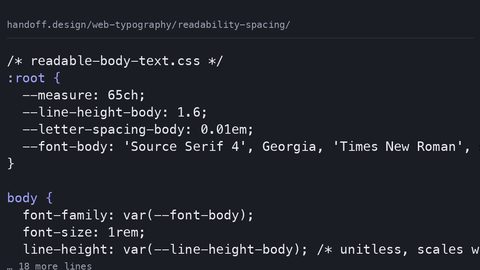 Readability in CSS: line-height, letter-spacing, and the Measure That Makes Text Comfortable
Set line-height, letter-spacing, and measure in CSS for readable text that meets WCAG text-spacing requirements—and state the typeface loading cost.
Readability in CSS: line-height, letter-spacing, and the Measure That Makes Text Comfortable
Set line-height, letter-spacing, and measure in CSS for readable text that meets WCAG text-spacing requirements—and state the typeface loading cost.
-
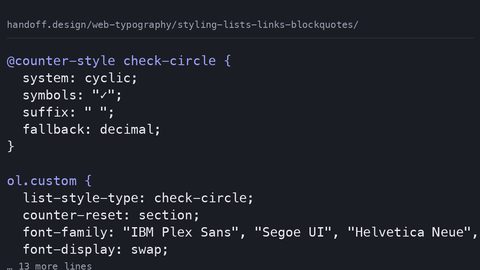 Styling Lists, Links, and Blockquotes in CSS: Markers, Underlines, and Quotation Marks
Style lists with ::marker, blockquotes with the quotes property, and links with text-decoration-thickness—modern CSS for semantic HTML elements with fallbacks.
Styling Lists, Links, and Blockquotes in CSS: Markers, Underlines, and Quotation Marks
Style lists with ::marker, blockquotes with the quotes property, and links with text-decoration-thickness—modern CSS for semantic HTML elements with fallbacks.
-
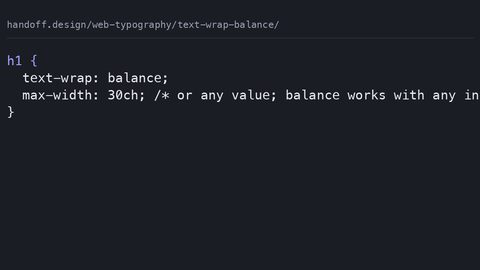 CSS text-wrap balance and pretty for native text layout without JavaScript
Use CSS text-wrap: balance for multi-line headlines and text-wrap: pretty for body copy widow prevention, replacing JavaScript text-balancing polyfills with a single declaration.
CSS text-wrap balance and pretty for native text layout without JavaScript
Use CSS text-wrap: balance for multi-line headlines and text-wrap: pretty for body copy widow prevention, replacing JavaScript text-balancing polyfills with a single declaration.
-
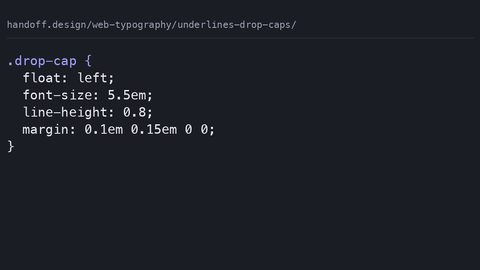 CSS underlines and drop caps with text-decoration and initial-letter styling
Create cross-browser drop caps with the CSS initial-letter property and style precise underlines using text-decoration-thickness and text-underline-offset.
CSS underlines and drop caps with text-decoration and initial-letter styling
Create cross-browser drop caps with the CSS initial-letter property and style precise underlines using text-decoration-thickness and text-underline-offset.
-
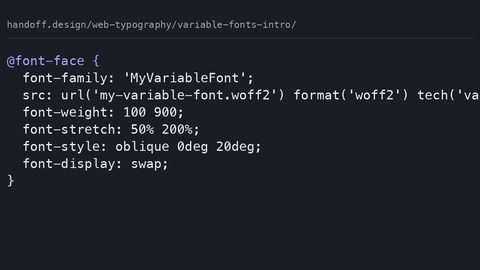 Variable fonts CSS introduction with font-variation-settings and axes control
Serve one variable font file instead of multiple static files using CSS font-variation-settings and the mapped axis properties for weight, width, and slant.
Variable fonts CSS introduction with font-variation-settings and axes control
Serve one variable font file instead of multiple static files using CSS font-variation-settings and the mapped axis properties for weight, width, and slant.
-
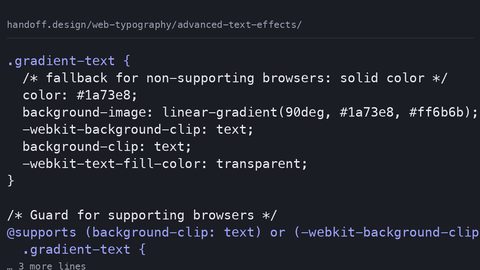 CSS Advanced Text Effects Without JavaScript: Clipping, Masking, and Paint-Order
Create gradient text, text strokes, and layered shadows with CSS background-clip, mask-image, and paint-order—with fallbacks that work when the effect doesn't.
CSS Advanced Text Effects Without JavaScript: Clipping, Masking, and Paint-Order
Create gradient text, text strokes, and layered shadows with CSS background-clip, mask-image, and paint-order—with fallbacks that work when the effect doesn't.
-
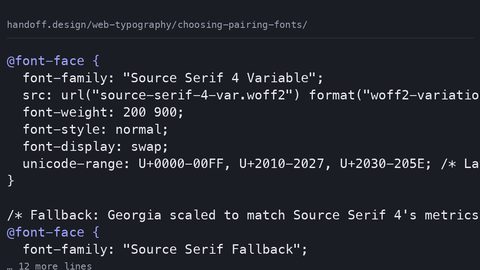 How to Choose and Pair Web Fonts: Loading Cost, Fallback Stacks, and the Cascade
Choose and pair web fonts systematically: match x-height, budget loading cost in bytes, and use size-adjust fallback stacks to prevent layout shift.
How to Choose and Pair Web Fonts: Loading Cost, Fallback Stacks, and the Cascade
Choose and pair web fonts systematically: match x-height, budget loading cost in bytes, and use size-adjust fallback stacks to prevent layout shift.
-
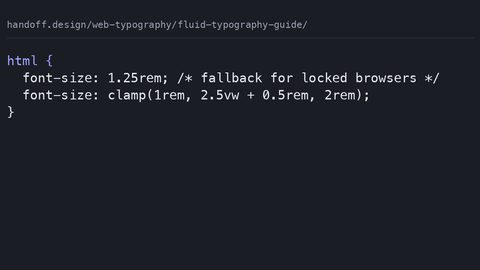 Fluid Typography with CSS clamp(): Viewport Units, WCAG Zoom, and Fallback Stacks
Implement fluid typography with CSS clamp() that respects WCAG zoom requirements, includes rem fallbacks, and states the loading cost of every typeface.
Fluid Typography with CSS clamp(): Viewport Units, WCAG Zoom, and Fallback Stacks
Implement fluid typography with CSS clamp() that respects WCAG zoom requirements, includes rem fallbacks, and states the loading cost of every typeface.
-
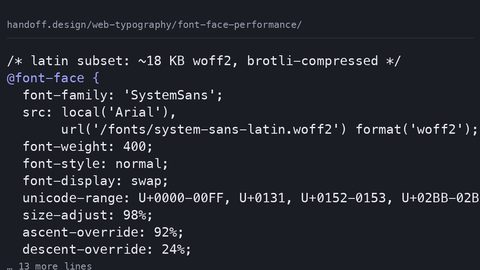 @font-face Performance: Self-Hosting, Subsetting, and the font-display Descriptor
Configure @font-face for performance: self-host woff2 subsets, use font-display swap with size-adjust fallbacks, and measure the byte cost of every typeface decision.
@font-face Performance: Self-Hosting, Subsetting, and the font-display Descriptor
Configure @font-face for performance: self-host woff2 subsets, use font-display swap with size-adjust fallbacks, and measure the byte cost of every typeface decision.
-
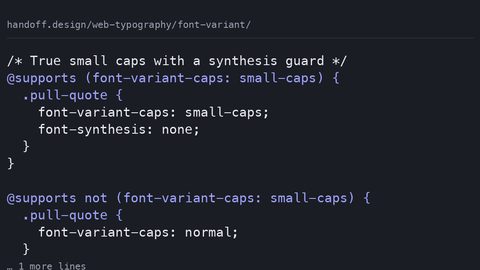 The font-variant CSS Property: Small Caps, Numerals, and Ligature Control
Control small caps, tabular numerals, and ligatures with the font-variant CSS property—and know the fallback when the font lacks the OpenType feature.
The font-variant CSS Property: Small Caps, Numerals, and Ligature Control
Control small caps, tabular numerals, and ligatures with the font-variant CSS property—and know the fallback when the font lacks the OpenType feature.
-
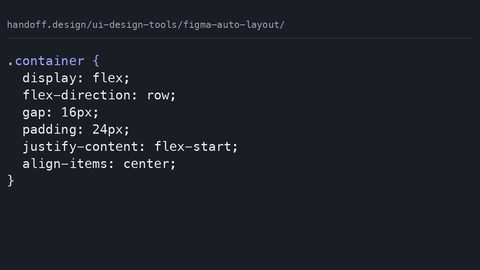 Figma Auto Layout Guide for Developers Who Write the CSS It Generates
Audit the CSS that Figma auto layout actually generates: where it produces clean flexbox, where it falls back to absolute positioning, and what a developer must rewrite.
Figma Auto Layout Guide for Developers Who Write the CSS It Generates
Audit the CSS that Figma auto layout actually generates: where it produces clean flexbox, where it falls back to absolute positioning, and what a developer must rewrite.
-
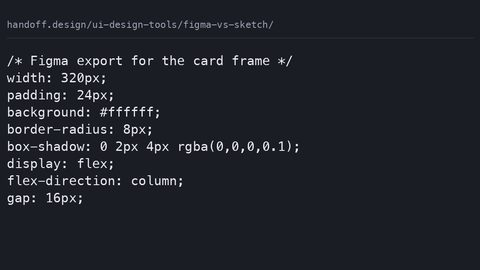 Figma vs Sketch Developer Handoff Comparison for 2025
Compare Figma and Sketch solely on developer handoff output: which tool's CSS snippets, design tokens, and asset exports require fewer manual corrections.
Figma vs Sketch Developer Handoff Comparison for 2025
Compare Figma and Sketch solely on developer handoff output: which tool's CSS snippets, design tokens, and asset exports require fewer manual corrections.
-
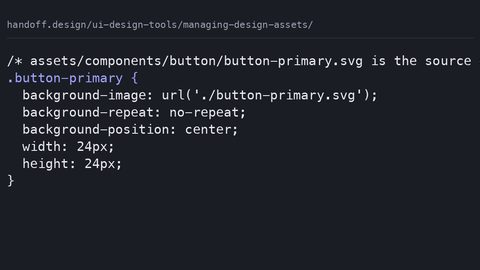 Managing Design Assets So Developers Receive Build-Ready Files
Establish the asset handoff contract: naming conventions, export formats, and folder structures that let developers drop design files directly into a CSS codebase.
Managing Design Assets So Developers Receive Build-Ready Files
Establish the asset handoff contract: naming conventions, export formats, and folder structures that let developers drop design files directly into a CSS codebase.
-
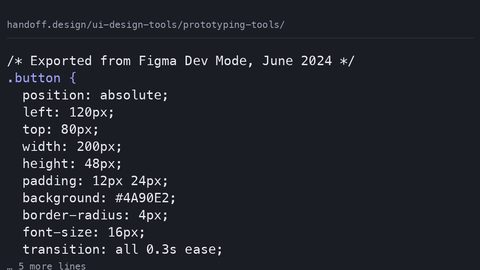 Prototyping Tools That Export CSS Developers Can Actually Use
Evaluate prototyping tools by the CSS they export: which tools produce animation and interaction code that survives the transition to production without a rewrite.
Prototyping Tools That Export CSS Developers Can Actually Use
Evaluate prototyping tools by the CSS they export: which tools produce animation and interaction code that survives the transition to production without a rewrite.
-
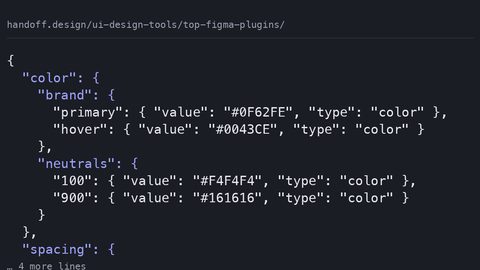 Top Figma Plugins for Developer Handoff Productivity in 2025
Rank Figma plugins by developer handoff output quality: which produce CSS snippets, design tokens, and assets that require no manual cleanup before production.
Top Figma Plugins for Developer Handoff Productivity in 2025
Rank Figma plugins by developer handoff output quality: which produce CSS snippets, design tokens, and assets that require no manual cleanup before production.
-
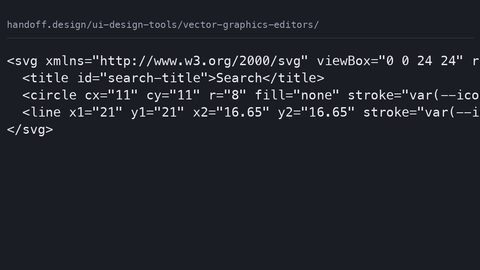 Vector Graphics Editors for UI Design That Export Web-Ready SVG
Compare vector graphics editors by the SVG they emit: which produce clean markup with correct viewBox attributes that CSS can style without manual cleanup.
Vector Graphics Editors for UI Design That Export Web-Ready SVG
Compare vector graphics editors by the SVG they emit: which produce clean markup with correct viewBox attributes that CSS can style without manual cleanup.
-
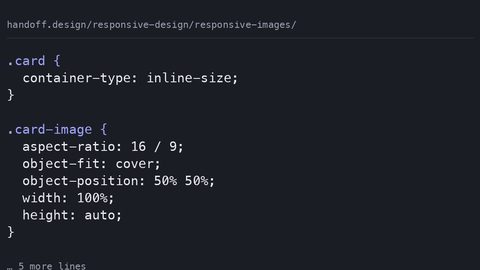 Responsive Images with object-fit, aspect-ratio, and the Picture Element
Combine srcset, sizes, object-fit, and aspect-ratio to serve responsive images that prevent cumulative layout shift and support art direction.
Responsive Images with object-fit, aspect-ratio, and the Picture Element
Combine srcset, sizes, object-fit, and aspect-ratio to serve responsive images that prevent cumulative layout shift and support art direction.
-
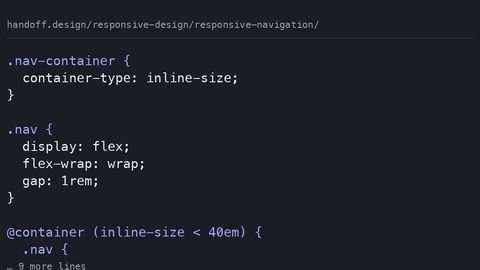 Responsive Navigation Menus with Container Queries and CSS-Only Patterns
Build responsive navigation that collapses based on its own container width using container queries, CSS-only toggle patterns, and accessible state management.
Responsive Navigation Menus with Container Queries and CSS-Only Patterns
Build responsive navigation that collapses based on its own container width using container queries, CSS-only toggle patterns, and accessible state management.
-
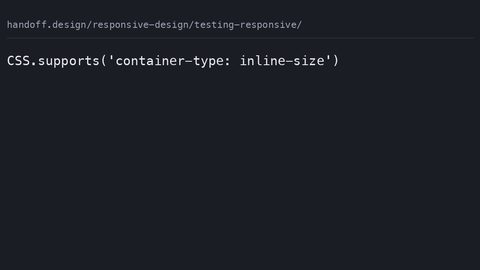 Testing Responsive Designs Across Container Widths and Viewport Conditions
Test responsive CSS designs that use container queries, viewport units, and user preference queries using browser DevTools and automated checks.
Testing Responsive Designs Across Container Widths and Viewport Conditions
Test responsive CSS designs that use container queries, viewport units, and user preference queries using browser DevTools and automated checks.
-
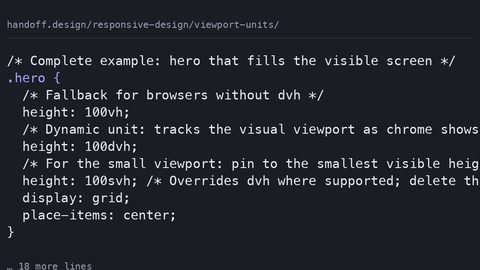 Viewport Units vw, vh, dvh, svh, lvh and When Each One Applies
Understand dvh, svh, and lvh viewport units, how they handle mobile browser chrome, and when to use container query units instead.
Viewport Units vw, vh, dvh, svh, lvh and When Each One Applies
Understand dvh, svh, and lvh viewport units, how they handle mobile browser chrome, and when to use container query units instead.
-
 Building Component Libraries in Design Tools That Export Usable CSS
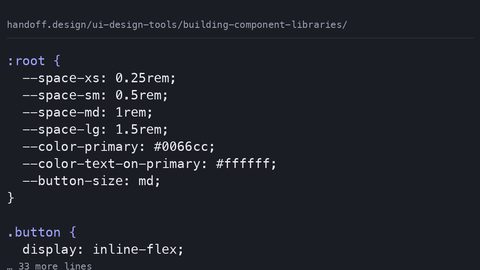
Structure design tool component libraries so variants map to CSS states and design tokens export as custom properties, not absolute-positioned frames.
Building Component Libraries in Design Tools That Export Usable CSS
Structure design tool component libraries so variants map to CSS states and design tokens export as custom properties, not absolute-positioned frames.
-
 Collaboration Tools for Design Teams from the Developer Handoff Perspective
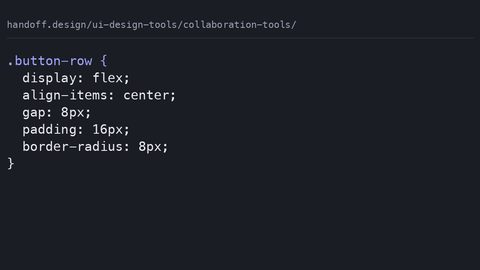
Evaluate design collaboration tools by what they export for developers: usable CSS snippets, design tokens, and component state documentation.
Collaboration Tools for Design Teams from the Developer Handoff Perspective
Evaluate design collaboration tools by what they export for developers: usable CSS snippets, design tokens, and component state documentation.
-
 Design System Documentation Tools That Export What Developers Need
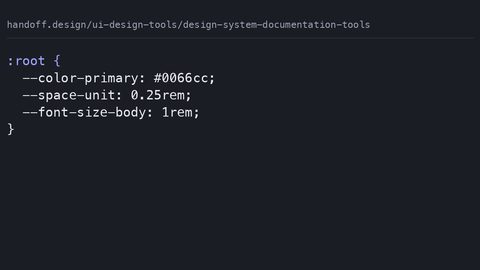
Compare design system documentation tools by what they actually export: CSS custom properties, JSON tokens, and code snippets a developer can use without manual translation.
Design System Documentation Tools That Export What Developers Need
Compare design system documentation tools by what they actually export: CSS custom properties, JSON tokens, and code snippets a developer can use without manual translation.
-
 Figma Accessibility Plugins That Catch What Code Linters Miss
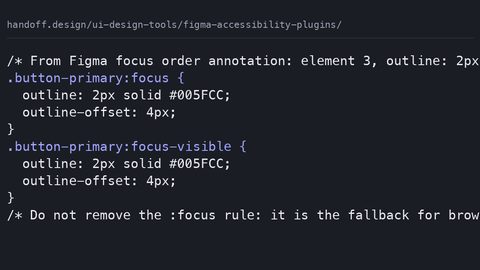
Evaluate Figma accessibility plugins by what they catch before code exists: contrast violations, missing focus orders, and heading structure errors that CSS alone cannot fix.
Figma Accessibility Plugins That Catch What Code Linters Miss
Evaluate Figma accessibility plugins by what they catch before code exists: contrast violations, missing focus orders, and heading structure errors that CSS alone cannot fix.
-
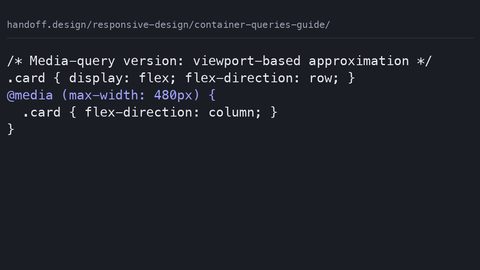 A Practical Guide to Container Queries With Production Fallbacks
Use container queries in production with a media-query fallback pattern, side-by-side code showing when each approach is the right call for the component.
A Practical Guide to Container Queries With Production Fallbacks
Use container queries in production with a media-query fallback pattern, side-by-side code showing when each approach is the right call for the component.
-
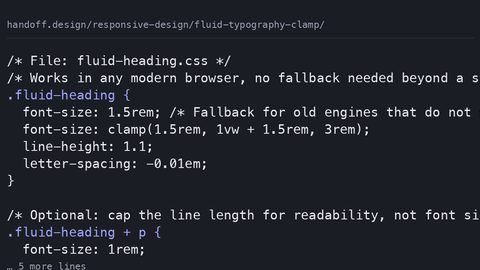 Fluid Typography With clamp() Without Breaking the WCAG Zoom Rule
Implement fluid typography with clamp() that respects WCAG 2.2 zoom requirements by using rem as the preferred value, not viewport units alone.
Fluid Typography With clamp() Without Breaking the WCAG Zoom Rule
Implement fluid typography with clamp() that respects WCAG 2.2 zoom requirements by using rem as the preferred value, not viewport units alone.
-
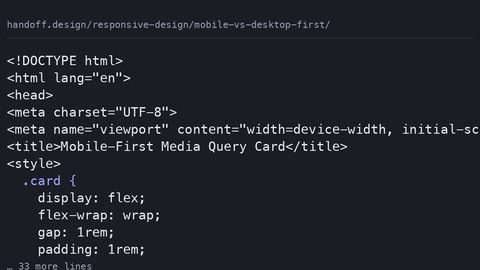 Mobile-First vs Desktop-First Strategy After Container Queries
Container queries do not eliminate the mobile-first vs desktop-first decision; they relocate it from page-level breakpoints to component-level defaults and overrides.
Mobile-First vs Desktop-First Strategy After Container Queries
Container queries do not eliminate the mobile-first vs desktop-first decision; they relocate it from page-level breakpoints to component-level defaults and overrides.
-
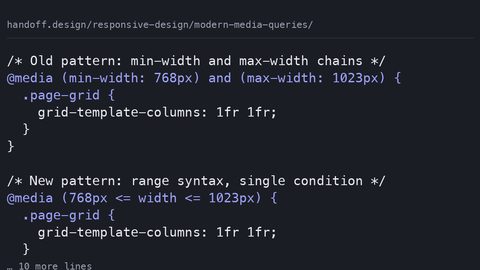 Modern Media Queries That Still Earn Their Place After Container Queries
Media queries now earn their place for user preferences, device characteristics, and page-level layout; container queries own component responsiveness.
Modern Media Queries That Still Earn Their Place After Container Queries
Media queries now earn their place for user preferences, device characteristics, and page-level layout; container queries own component responsiveness.
-
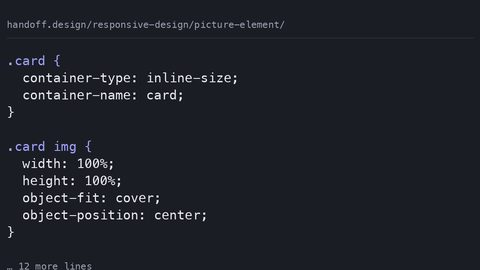 The picture Element for Art Direction With Container Query Fallbacks
Use the picture element when the image itself must change at different sizes; use CSS object-fit and container queries when a single image adapts to its container.
The picture Element for Art Direction With Container Query Fallbacks
Use the picture element when the image itself must change at different sizes; use CSS object-fit and container queries when a single image adapts to its container.
-
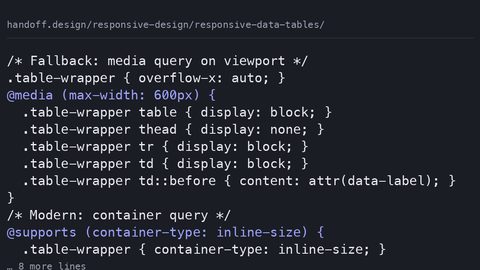 Responsive Data Tables Without Breaking the Semantic Contract
Preserve semantic table markup and accessibility while making data tables responsive using container queries and overflow techniques, not div hacks.
Responsive Data Tables Without Breaking the Semantic Contract
Preserve semantic table markup and accessibility while making data tables responsive using container queries and overflow techniques, not div hacks.
-
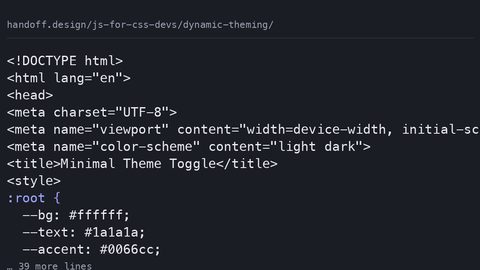 Dynamic Theming with CSS Custom Properties and a JavaScript Theme Toggle
Build a theme toggle that reads prefers-color-scheme on first visit, persists user overrides in localStorage, and sets a data-theme attribute before first paint to prevent flicker.
Dynamic Theming with CSS Custom Properties and a JavaScript Theme Toggle
Build a theme toggle that reads prefers-color-scheme on first visit, persists user overrides in localStorage, and sets a data-theme attribute before first paint to prevent flicker.
-
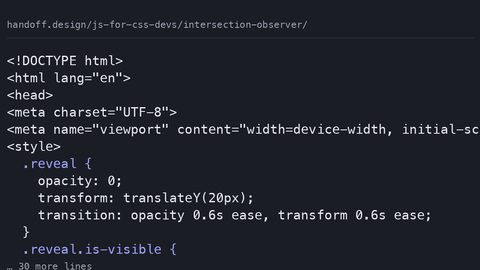 IntersectionObserver for CSS Triggered Animations and Lazy Loading
Use IntersectionObserver to trigger CSS animations and lazy loading when elements enter the viewport, and know when the CSS-only view() timeline replaces the JavaScript approach entirely.
IntersectionObserver for CSS Triggered Animations and Lazy Loading
Use IntersectionObserver to trigger CSS animations and lazy loading when elements enter the viewport, and know when the CSS-only view() timeline replaces the JavaScript approach entirely.
-
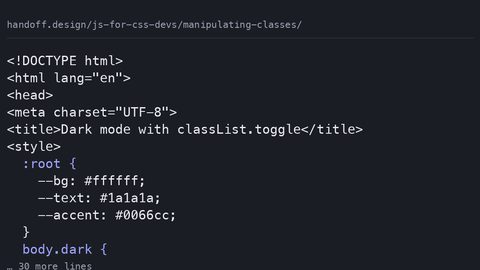 Manipulating CSS Classes with JavaScript classList and data-* Attributes
Use the classList API to add, remove, toggle, and replace CSS classes, and know when a data-* attribute or custom property is the better choice for component state that JavaScript needs to read.
Manipulating CSS Classes with JavaScript classList and data-* Attributes
Use the classList API to add, remove, toggle, and replace CSS classes, and know when a data-* attribute or custom property is the better choice for component state that JavaScript needs to read.
-
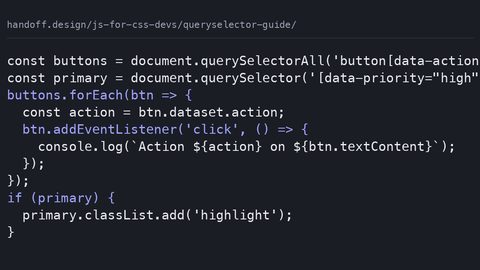 Using document.querySelector and CSS Selectors to Find DOM Elements
Use document.querySelector and querySelectorAll with full CSS selector syntax to find DOM elements, and understand when right-to-left selector matching makes a complex query cost more than a targeted one.
Using document.querySelector and CSS Selectors to Find DOM Elements
Use document.querySelector and querySelectorAll with full CSS selector syntax to find DOM elements, and understand when right-to-left selector matching makes a complex query cost more than a targeted one.
-
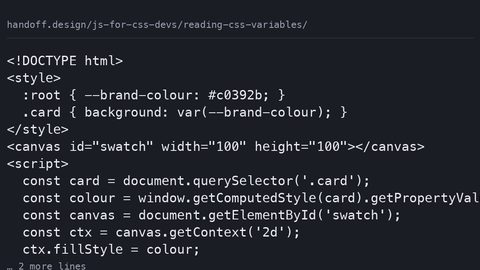 Reading and Writing CSS Custom Property Values with JavaScript
Read CSS custom property computed values with getComputedStyle and getPropertyValue, write them with setProperty, and register types with @property so JavaScript receives parsed values instead of strings.
Reading and Writing CSS Custom Property Values with JavaScript
Read CSS custom property computed values with getComputedStyle and getPropertyValue, write them with setProperty, and register types with @property so JavaScript receives parsed values instead of strings.
-
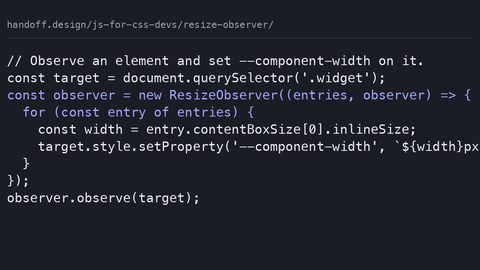 ResizeObserver for Element Size Changes and Container Query Fallbacks
Use ResizeObserver to detect element size changes and drive CSS breakpoints via custom properties, and know when native container queries eliminate the JavaScript dependency and the main-thread cost.
ResizeObserver for Element Size Changes and Container Query Fallbacks
Use ResizeObserver to detect element size changes and drive CSS breakpoints via custom properties, and know when native container queries eliminate the JavaScript dependency and the main-thread cost.
-
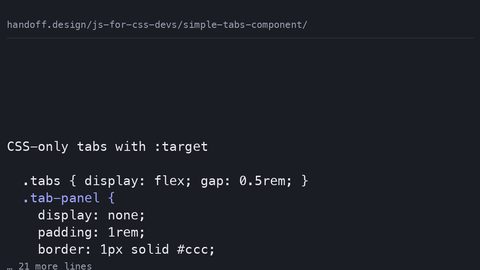 A Simple Tabs Component With the Minimum JavaScript CSS Needs
Build a tabs component where JavaScript only toggles data-state attributes and ARIA, leaving the visual logic to CSS cascade, scroll-driven animations, and container queries.
A Simple Tabs Component With the Minimum JavaScript CSS Needs
Build a tabs component where JavaScript only toggles data-state attributes and ARIA, leaving the visual logic to CSS cascade, scroll-driven animations, and container queries.
-
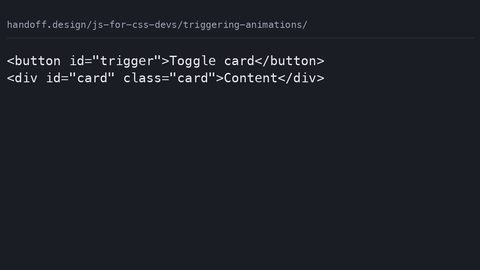 Triggering CSS Animations With the Minimum JavaScript Required
Trigger CSS animations from JavaScript only when CSS cannot detect the state itself: class toggles, scroll-driven timelines, and WAAPI calls that read custom properties.
Triggering CSS Animations With the Minimum JavaScript Required
Trigger CSS animations from JavaScript only when CSS cannot detect the state itself: class toggles, scroll-driven timelines, and WAAPI calls that read custom properties.
-
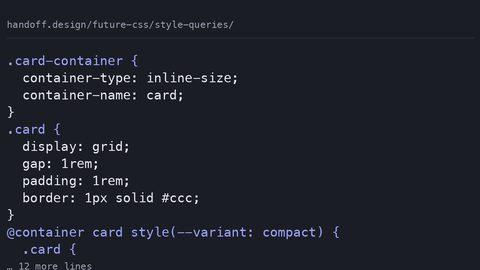 CSS Style Queries: Component Variant Logic with Custom Properties
Style queries let a container's custom property value drive component variants, replacing BEM modifier classes with a single source of truth on the container.
CSS Style Queries: Component Variant Logic with Custom Properties
Style queries let a container's custom property value drive component variants, replacing BEM modifier classes with a single source of truth on the container.
-
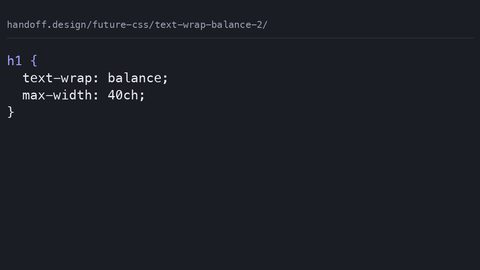 CSS text-wrap: balance and pretty for Native Typographic Control
text-wrap: balance evens out multi-line headlines while text-wrap: pretty prevents widows in body text, replacing JavaScript polyfills with native browser typographic control.
CSS text-wrap: balance and pretty for Native Typographic Control
text-wrap: balance evens out multi-line headlines while text-wrap: pretty prevents widows in body text, replacing JavaScript polyfills with native browser typographic control.
-
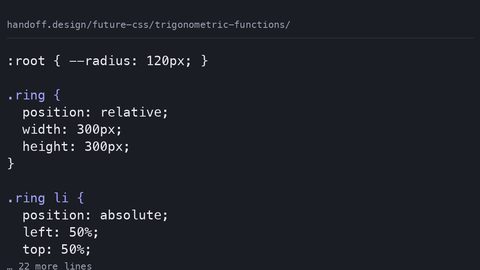 CSS Trigonometric Functions sin(), cos(), tan() for Angle-Based Layouts
CSS sin(), cos(), and tan() compute angles directly in stylesheets, enabling circular layouts and orbital animations without JavaScript trigonometry.
CSS Trigonometric Functions sin(), cos(), tan() for Angle-Based Layouts
CSS sin(), cos(), and tan() compute angles directly in stylesheets, enabling circular layouts and orbital animations without JavaScript trigonometry.
-
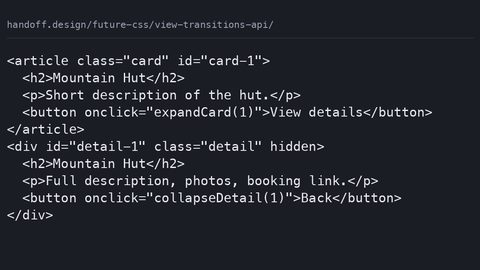 View Transitions API: Declarative Morphing Between DOM States
The View Transitions API morphs between DOM states using CSS ::view-transition pseudo-elements, but requires JavaScript to trigger—it is not purely declarative.
View Transitions API: Declarative Morphing Between DOM States
The View Transitions API morphs between DOM states using CSS ::view-transition pseudo-elements, but requires JavaScript to trigger—it is not purely declarative.
-
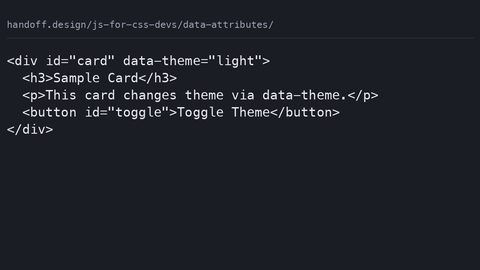 Using HTML data-* Attributes for CSS Content and State Switching
Use HTML data-* attributes as the single source of truth for component state, styled with CSS attribute selectors and read by JavaScript via dataset, replacing class-toggling patterns.
Using HTML data-* Attributes for CSS Content and State Switching
Use HTML data-* attributes as the single source of truth for component state, styled with CSS attribute selectors and read by JavaScript via dataset, replacing class-toggling patterns.
-
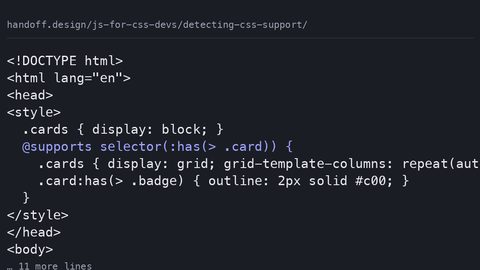 Detecting CSS Feature Support with @supports and JavaScript Fallbacks
Use @supports in CSS as the primary feature-detection mechanism, with CSS.supports() in JavaScript only for the gaps that the at-rule cannot cover, per the CSS Conditional Rules specification.
Detecting CSS Feature Support with @supports and JavaScript Fallbacks
Use @supports in CSS as the primary feature-detection mechanism, with CSS.supports() in JavaScript only for the gaps that the at-rule cannot cover, per the CSS Conditional Rules specification.
-
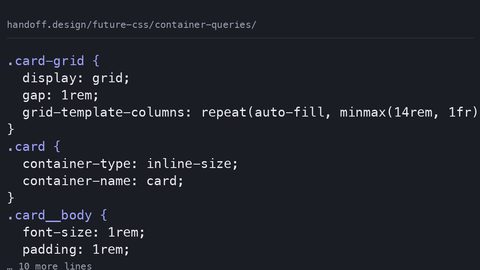 Container Queries in Production What Shipped and the Fallback
-
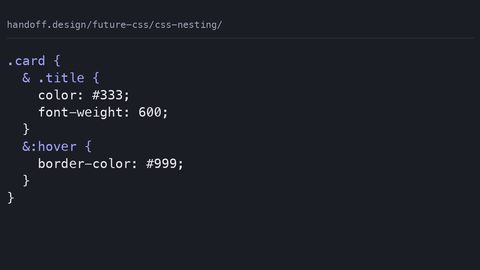 CSS Nesting in Production What Shipped and the Preprocessor Fallback
-
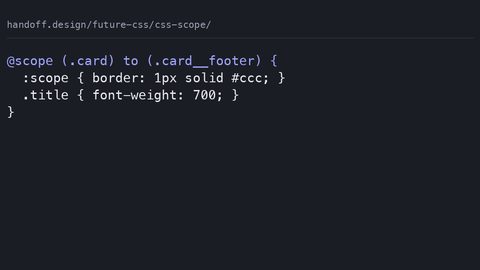 CSS @scope in Production What Shipped and the BEM Fallback
-
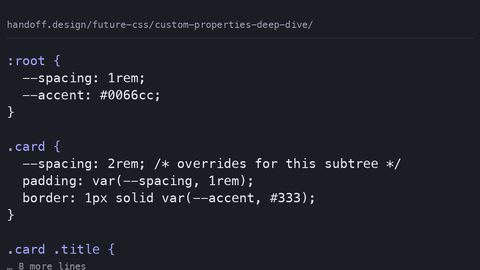 CSS Custom Properties Deep Dive: Runtime Theming and Cascade Control
CSS custom properties inherit and cascade at runtime, enabling dynamic theming that preprocessor variables cannot match. Learn how @property adds type constraints and animation.
CSS Custom Properties Deep Dive: Runtime Theming and Cascade Control
CSS custom properties inherit and cascade at runtime, enabling dynamic theming that preprocessor variables cannot match. Learn how @property adds type constraints and animation.
-
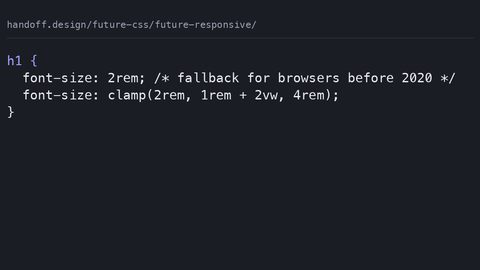 Responsive Design with min(), max(), and clamp() Without Media Queries
CSS min(), max(), and clamp() let elements define their own size constraints, replacing media query breakpoints with fluid, self-adjusting layouts.
Responsive Design with min(), max(), and clamp() Without Media Queries
CSS min(), max(), and clamp() let elements define their own size constraints, replacing media query breakpoints with fluid, self-adjusting layouts.
-
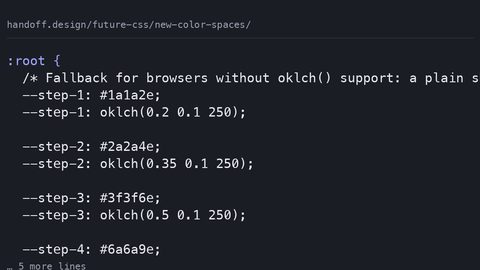 New CSS Color Spaces: oklch(), oklab(), and Wide Gamut Support
oklch() and oklab() offer perceptually uniform color spaces where equal numeric steps look equal, replacing hsl() for systematic color work with wide gamut support.
New CSS Color Spaces: oklch(), oklab(), and Wide Gamut Support
oklch() and oklab() offer perceptually uniform color spaces where equal numeric steps look equal, replacing hsl() for systematic color work with wide gamut support.
-
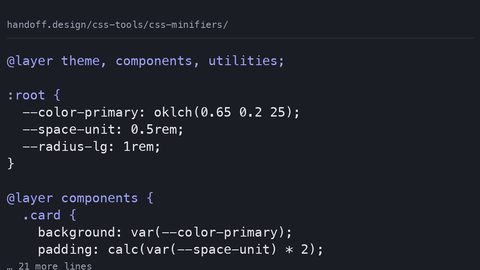 CSS Minifier Output Compared: Byte Savings, Identifier Shortening and Risks
Lightning CSS and CSSNano output compared: byte savings before and after gzip, identifier shortening risks for custom properties, and why compression reduces the gain.
CSS Minifier Output Compared: Byte Savings, Identifier Shortening and Risks
Lightning CSS and CSSNano output compared: byte savings before and after gzip, identifier shortening risks for custom properties, and why compression reduces the gain.
-
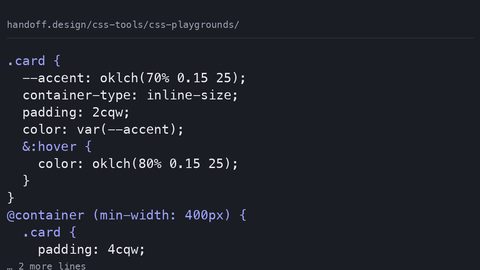 CSS Playground Output: What Browser-Based Editors Emit and What They Hide
What CodePen, JSFiddle, and Playcode actually emit when you export CSS: autoprefixer bloat, hidden feature-support gaps, and the production-ready equivalent with fallbacks.
CSS Playground Output: What Browser-Based Editors Emit and What They Hide
What CodePen, JSFiddle, and Playcode actually emit when you export CSS: autoprefixer bloat, hidden feature-support gaps, and the production-ready equivalent with fallbacks.
-
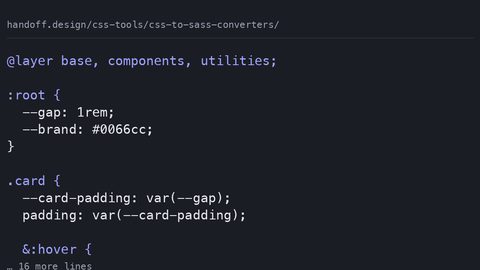 CSS to Sass Converter Output: What Gets Lost in Automated Conversion
What CSS-to-Sass converters emit and what they lose: custom properties become frozen build-time constants, native nesting breaks, and cascade layers are stripped.
CSS to Sass Converter Output: What Gets Lost in Automated Conversion
What CSS-to-Sass converters emit and what they lose: custom properties become frozen build-time constants, native nesting breaks, and cascade layers are stripped.
-
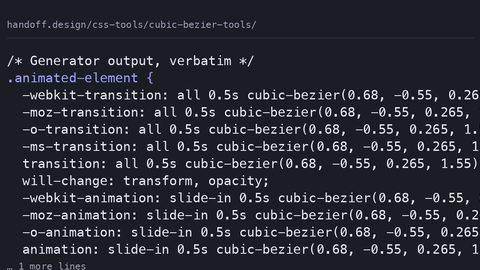 Cubic Bezier Easing Tools and the CSS They Emit
What cubic-bezier generator tools emit versus what you should ship: auditing the verbose output, stale prefixes, and unnecessary paint costs in generated easing CSS.
Cubic Bezier Easing Tools and the CSS They Emit
What cubic-bezier generator tools emit versus what you should ship: auditing the verbose output, stale prefixes, and unnecessary paint costs in generated easing CSS.
-
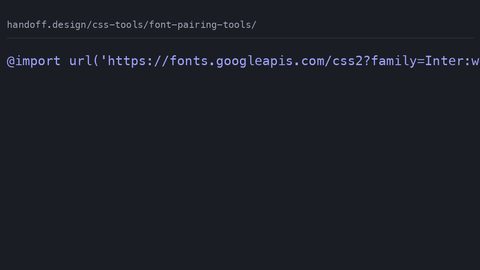 Font Pairing Tools and the CSS Font-Face They Generate
What font pairing tools generate for @font-face and Google Fonts imports, and the hand-written production CSS with font-display, preload, and fallback stacks that prevents FOIT and CLS.
Font Pairing Tools and the CSS Font-Face They Generate
What font pairing tools generate for @font-face and Google Fonts imports, and the hand-written production CSS with font-display, preload, and fallback stacks that prevents FOIT and CLS.
-
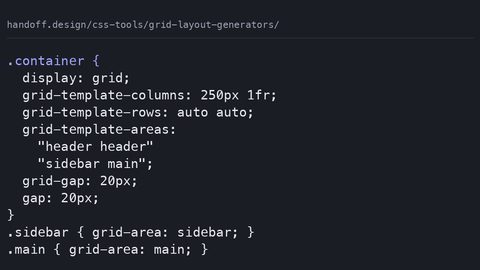 CSS Grid Layout Generators and the Code They Actually Emit
-
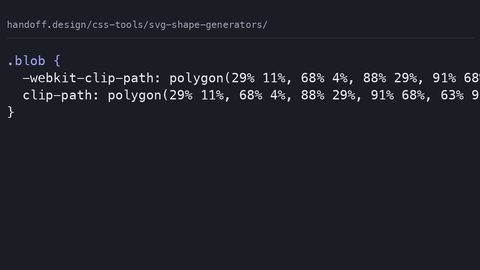 SVG Shape and Blob Generators and the CSS They Produce
-
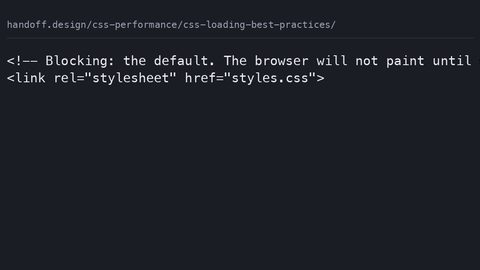 Best Practices for Loading CSS Files Without Blocking First Paint or Causing FOUC
CSS loading strategies range from blocking to fully deferred; the media attribute and preload+onload patterns eliminate render-blocking while preventing FOUC, with LCP improvement measurable in Lighthouse.
Best Practices for Loading CSS Files Without Blocking First Paint or Causing FOUC
CSS loading strategies range from blocking to fully deferred; the media attribute and preload+onload patterns eliminate render-blocking while preventing FOUC, with LCP improvement measurable in Lighthouse.
-
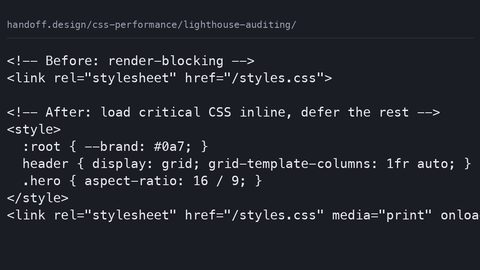 Performance Auditing CSS with Lighthouse to Find and Fix Render-Blocking and Layout Shift
Lighthouse isolates CSS performance problems through specific audits: render-blocking resources, unused CSS bytes, and layout shifts; each maps to a measurable LCP, CLS, or TBT improvement.
Performance Auditing CSS with Lighthouse to Find and Fix Render-Blocking and Layout Shift
Lighthouse isolates CSS performance problems through specific audits: render-blocking resources, unused CSS bytes, and layout shifts; each maps to a measurable LCP, CLS, or TBT improvement.
-
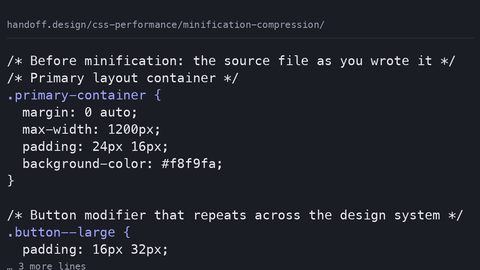 CSS Minification and Compression Explained: What Each Removes and What That Saves in Bytes
CSS minification removes whitespace and comments from source files; compression with gzip or brotli reduces transfer bytes over the wire; both are measurable in DevTools as reduced download size.
CSS Minification and Compression Explained: What Each Removes and What That Saves in Bytes
CSS minification removes whitespace and comments from source files; compression with gzip or brotli reduces transfer bytes over the wire; both are measurable in DevTools as reduced download size.
-
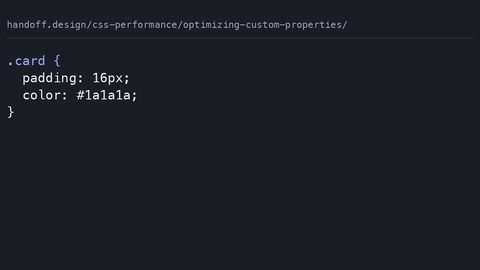 Optimizing CSS Custom Properties for Runtime Performance Without Losing Theming Flexibility
CSS custom properties enable runtime theming but trigger style recalculation on all descendants when changed; the cost is measurable in DevTools and proportional to the inheritance chain length.
Optimizing CSS Custom Properties for Runtime Performance Without Losing Theming Flexibility
CSS custom properties enable runtime theming but trigger style recalculation on all descendants when changed; the cost is measurable in DevTools and proportional to the inheritance chain length.
-
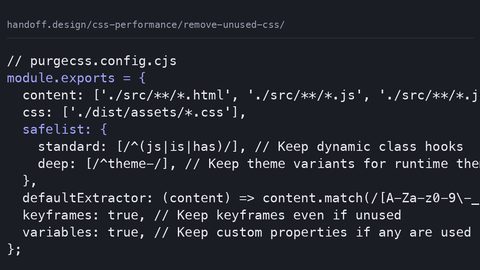 How to Find and Remove Unused CSS to Improve LCP and Reduce Bytes
Measure and remove unused CSS with the Coverage panel and PurgeCSS to reduce render-blocking bytes and improve LCP, without breaking conditionally-applied styles.
How to Find and Remove Unused CSS to Improve LCP and Reduce Bytes
Measure and remove unused CSS with the Coverage panel and PurgeCSS to reduce render-blocking bytes and improve LCP, without breaking conditionally-applied styles.
-
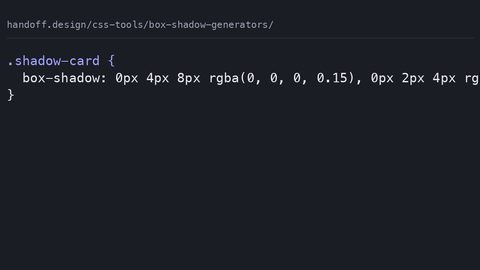 What CSS Box-Shadow Generators Emit and the Hand-Written Alternative
What CSS box-shadow generators actually emit, why verbose rgba() and absolute units hurt, and the hand-written equivalent using custom properties and layered shadows.
What CSS Box-Shadow Generators Emit and the Hand-Written Alternative
What CSS box-shadow generators actually emit, why verbose rgba() and absolute units hurt, and the hand-written equivalent using custom properties and layered shadows.
-
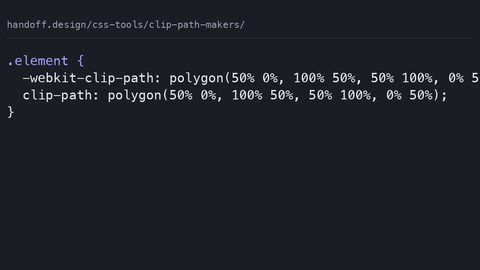 CSS Clip-Path Maker Output: Stale Prefixes, Absolute Units and Fixes
What CSS clip-path makers emit: stale WebKit prefixes and absolute units that break on resize, with hand-written percentage-based replacements and accessible fallbacks.
CSS Clip-Path Maker Output: Stale Prefixes, Absolute Units and Fixes
What CSS clip-path makers emit: stale WebKit prefixes and absolute units that break on resize, with hand-written percentage-based replacements and accessible fallbacks.
-
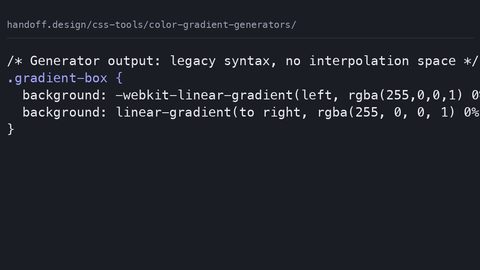 CSS Gradient Generator Output: Legacy Syntax, Missing Colour Spaces, Fixes
What CSS gradient generators emit: legacy WebKit syntax and hsl() stops, with modern oklch interpolation replacements and paint-cost warnings for animated gradients.
CSS Gradient Generator Output: Legacy Syntax, Missing Colour Spaces, Fixes
What CSS gradient generators emit: legacy WebKit syntax and hsl() stops, with modern oklch interpolation replacements and paint-cost warnings for animated gradients.
-
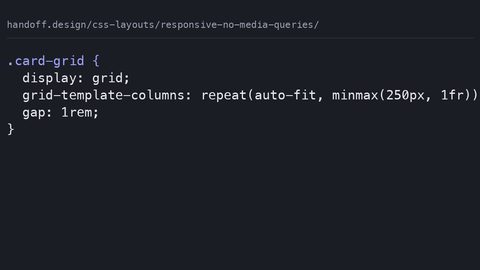 Responsive Layouts Without Media Queries Using CSS Grid auto-fit and minmax
CSS Grid auto-fit with minmax and flexbox wrapping create responsive layouts that adapt to container size without @media queries. Breakpoints follow content, not device widths.
Responsive Layouts Without Media Queries Using CSS Grid auto-fit and minmax
CSS Grid auto-fit with minmax and flexbox wrapping create responsive layouts that adapt to container size without @media queries. Breakpoints follow content, not device widths.
-
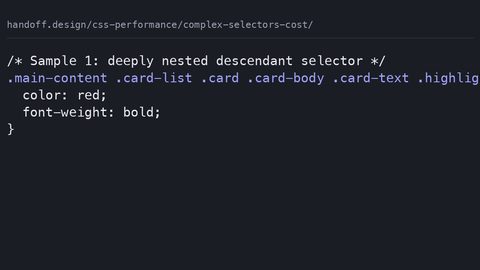 The Performance Cost of Complex CSS Selectors and When Selector Matching Matters
Complex CSS selector matching is rarely the bottleneck in page performance, but specific patterns can increase style recalculation cost. Measure with DevTools, not selector-counting rules.
The Performance Cost of Complex CSS Selectors and When Selector Matching Matters
Complex CSS selector matching is rarely the bottleneck in page performance, but specific patterns can increase style recalculation cost. Measure with DevTools, not selector-counting rules.
-
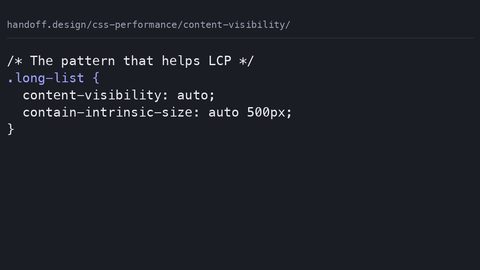 How content-visibility Skips Rendering Work to Improve LCP and INP
content-visibility defers layout and paint for off-screen content, improving LCP and INP, but requires contain-intrinsic-size to prevent layout shift and breaks find-in-page and accessibility tree exposure.
How content-visibility Skips Rendering Work to Improve LCP and INP
content-visibility defers layout and paint for off-screen content, improving LCP and INP, but requires contain-intrinsic-size to prevent layout shift and breaks find-in-page and accessibility tree exposure.
-
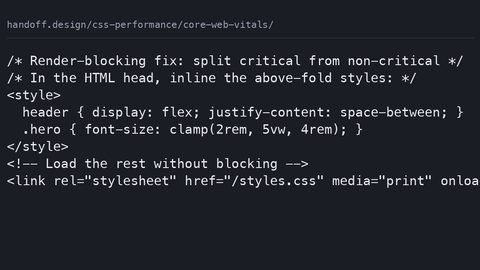 How CSS Directly Impacts Largest Contentful Paint, Layout Shift, and Interaction Delay
CSS directly affects all three Core Web Vitals: render-blocking stylesheets delay LCP, un-sized content causes CLS, and main-thread animations block INP; each has a measurable fix.
How CSS Directly Impacts Largest Contentful Paint, Layout Shift, and Interaction Delay
CSS directly affects all three Core Web Vitals: render-blocking stylesheets delay LCP, un-sized content causes CLS, and main-thread animations block INP; each has a measurable fix.
-
 Extracting and Inlining Critical CSS to Reduce Largest Contentful Paint by Seconds
Critical CSS inlining eliminates render-blocking requests for above-the-fold content, directly reducing LCP; the improvement is measurable with Lighthouse and proportional to the bytes deferred.
Extracting and Inlining Critical CSS to Reduce Largest Contentful Paint by Seconds
Critical CSS inlining eliminates render-blocking requests for above-the-fold content, directly reducing LCP; the improvement is measurable with Lighthouse and proportional to the bytes deferred.
-
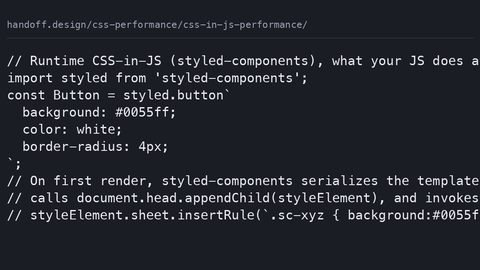 What CSS-in-JS Libraries Actually Emit and What That Costs in Render-Blocking Bytes
Runtime CSS-in-JS libraries inject styles via JavaScript, adding main-thread bytes and delaying LCP; zero-runtime alternatives extract static CSS at build time, eliminating the JavaScript dependency.
What CSS-in-JS Libraries Actually Emit and What That Costs in Render-Blocking Bytes
Runtime CSS-in-JS libraries inject styles via JavaScript, adding main-thread bytes and delaying LCP; zero-runtime alternatives extract static CSS at build time, eliminating the JavaScript dependency.
-
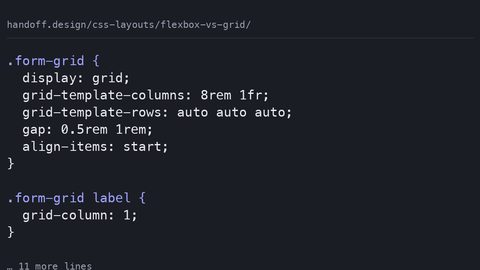 Flexbox vs CSS Grid: The One-Axis vs Two-Axis Decision That Replaces Guessing
Replaces the 'grid for page, flexbox for component' rule with the actual decision criterion: one-axis distribution versus two-axis row-and-column alignment.
Flexbox vs CSS Grid: The One-Axis vs Two-Axis Decision That Replaces Guessing
Replaces the 'grid for page, flexbox for component' rule with the actual decision criterion: one-axis distribution versus two-axis row-and-column alignment.
-
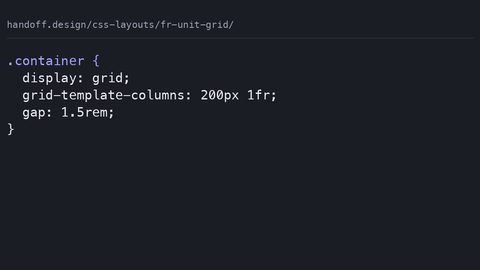 How the CSS Grid fr Unit Distributes Space and Replaces Percentage Hacks
The CSS Grid fr unit distributes remaining space after fixed tracks and gaps are accounted for, not a percentage of total width. Learn how available space is calculated and when content minimums override fr sizing.
How the CSS Grid fr Unit Distributes Space and Replaces Percentage Hacks
The CSS Grid fr unit distributes remaining space after fixed tracks and gaps are accounted for, not a percentage of total width. Learn how available space is calculated and when content minimums override fr sizing.
-
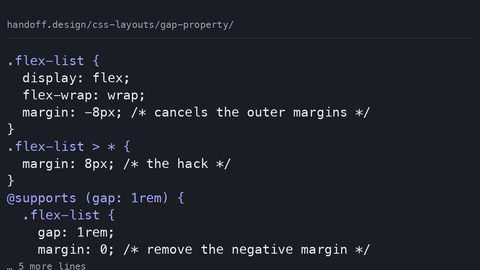 The CSS gap Property in Flexbox and Grid Replaces Margin Hacks for Spacing
The CSS gap property provides spacing between flexbox and grid items without margin hacks or negative container margins. Use it with a fallback for older browsers.
The CSS gap Property in Flexbox and Grid Replaces Margin Hacks for Spacing
The CSS gap property provides spacing between flexbox and grid items without margin hacks or negative container margins. Use it with a fallback for older browsers.
-
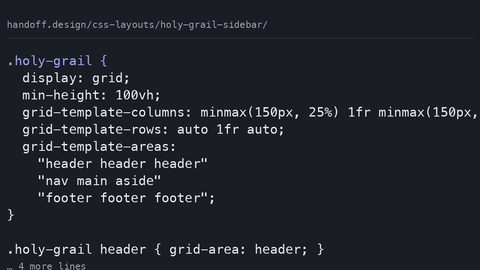 Holy Grail and Sidebar Layouts with CSS Grid Replace Float and Clearfix Hacks
CSS Grid replaces float-based holy grail layouts with grid-template-areas, automatic equal-height columns, and source-order independence. Build a sidebar layout that works without hacks.
Holy Grail and Sidebar Layouts with CSS Grid Replace Float and Clearfix Hacks
CSS Grid replaces float-based holy grail layouts with grid-template-areas, automatic equal-height columns, and source-order independence. Build a sidebar layout that works without hacks.
-
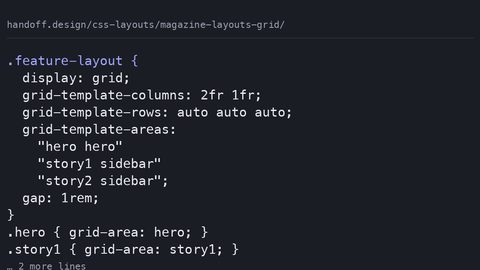 Building Magazine-Style Editorial Layouts with CSS Grid and Named Areas
CSS Grid enables magazine-style editorial layouts with grid-template-areas, spanning items, and dense packing. Visual placement separates from source order without restructuring HTML.
Building Magazine-Style Editorial Layouts with CSS Grid and Named Areas
CSS Grid enables magazine-style editorial layouts with grid-template-areas, spanning items, and dense packing. Visual placement separates from source order without restructuring HTML.
-
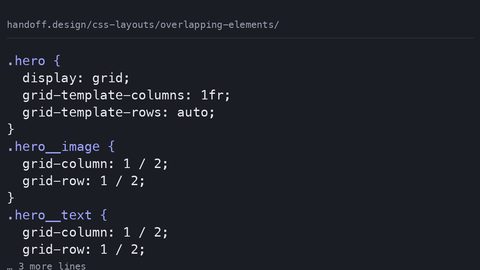 Overlapping Elements with CSS Grid and z-index Replace Absolute Positioning Hacks
CSS Grid places multiple items in the same cell for overlapping layouts without position: absolute. Control stacking with z-index and manage stacking contexts with isolation.
Overlapping Elements with CSS Grid and z-index Replace Absolute Positioning Hacks
CSS Grid places multiple items in the same cell for overlapping layouts without position: absolute. Control stacking with z-index and manage stacking contexts with isolation.
-
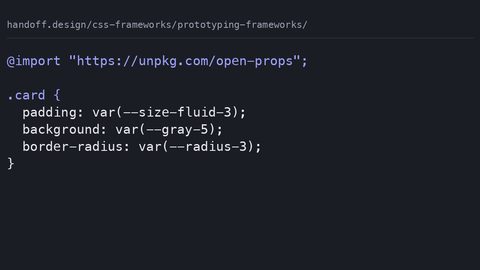 CSS Frameworks for Prototyping That Do Not Become Technical Debt
Evaluates CSS frameworks for prototyping by what they emit, what they cost in bytes, and whether the prototype styles can be discarded without a rewrite.
CSS Frameworks for Prototyping That Do Not Become Technical Debt
Evaluates CSS frameworks for prototyping by what they emit, what they cost in bytes, and whether the prototype styles can be discarded without a rewrite.
-
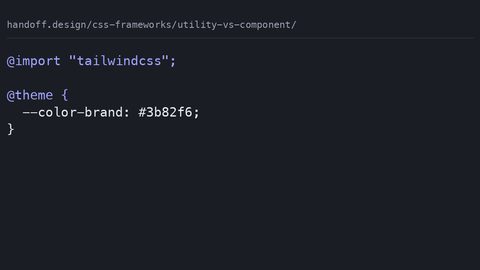 Utility-First Versus Component-Based CSS Frameworks by Output and Cost
Compares utility-first and component-based CSS frameworks by their actual shipped output after compression, specificity overhead, and the cost of overriding them.
Utility-First Versus Component-Based CSS Frameworks by Output and Cost
Compares utility-first and component-based CSS frameworks by their actual shipped output after compression, specificity overhead, and the cost of overriding them.
-
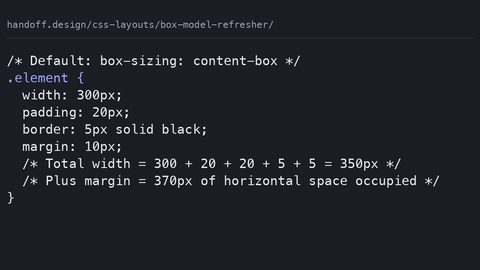 The CSS Box Model Refresher That Names the Hacks It Replaces
Explains the CSS box model's actual dimension calculation rules, margin collapse, and why box-sizing: border-box replaced the 2014 width-calculation hacks.
The CSS Box Model Refresher That Names the Hacks It Replaces
Explains the CSS box model's actual dimension calculation rules, margin collapse, and why box-sizing: border-box replaced the 2014 width-calculation hacks.
-
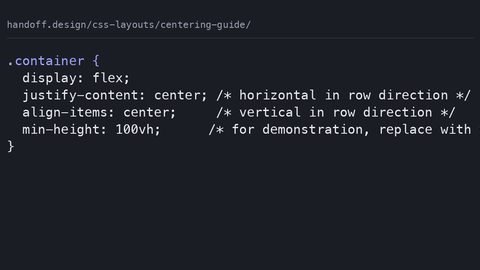 CSS Centering in 2026: The Two Declarations That Replaced Twelve Hacks
Shows the two-declaration CSS centering techniques that replaced the twelve hacks developers needed in 2014, using flexbox, grid, and place-items.
CSS Centering in 2026: The Two Declarations That Replaced Twelve Hacks
Shows the two-declaration CSS centering techniques that replaced the twelve hacks developers needed in 2014, using flexbox, grid, and place-items.
-
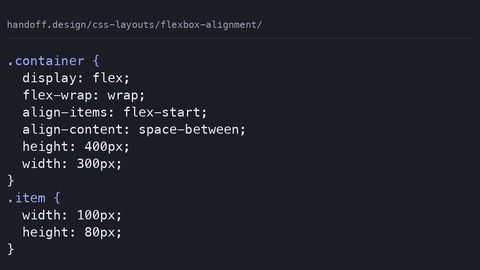 Flexbox Alignment: justify-content and align-items in the Fewest Declarations
Explains flexbox alignment properties justify-content and align-items with complete code samples, naming the 2014 hacks each value replaces.
Flexbox Alignment: justify-content and align-items in the Fewest Declarations
Explains flexbox alignment properties justify-content and align-items with complete code samples, naming the 2014 hacks each value replaces.
-
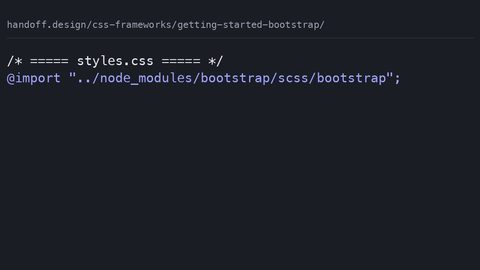 Getting Started with Bootstrap 5: What It Ships and What It Costs
What Bootstrap 5 ships in bytes after compression, the build step it requires, and which customisation paths its architecture closes off.
Getting Started with Bootstrap 5: What It Ships and What It Costs
What Bootstrap 5 ships in bytes after compression, the build step it requires, and which customisation paths its architecture closes off.
-
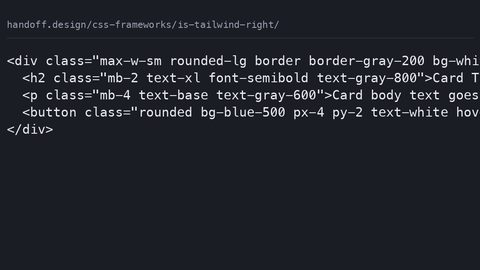 Is Tailwind CSS Right for Your Project? The Cost in Bytes and Control
What Tailwind CSS costs in shipped bytes after purging, the design problems it makes harder, and who should not use it.
Is Tailwind CSS Right for Your Project? The Cost in Bytes and Control
What Tailwind CSS costs in shipped bytes after purging, the design problems it makes harder, and who should not use it.
-
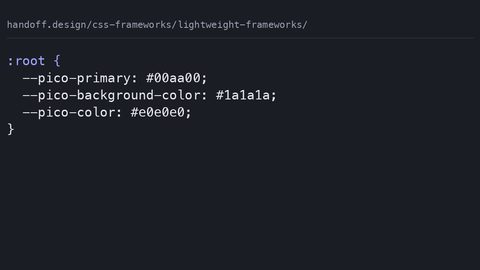 Lightweight CSS Frameworks Compared: Bytes, Features, and the Trade-Offs
A comparison of lightweight CSS frameworks by shipped bytes, missing features, and when the omission is the point.
Lightweight CSS Frameworks Compared: Bytes, Features, and the Trade-Offs
A comparison of lightweight CSS frameworks by shipped bytes, missing features, and when the omission is the point.
-
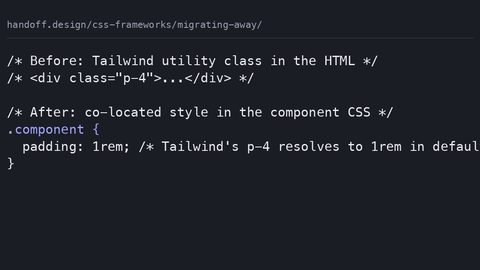 Migrating Away from a CSS Framework: Strategy, Cost, and the Escape Hatch
A step-by-step strategy for migrating away from a CSS framework: audit dead code, extract to native declarations, and use @layer to replace without a rewrite.
Migrating Away from a CSS Framework: Strategy, Cost, and the Escape Hatch
A step-by-step strategy for migrating away from a CSS framework: audit dead code, extract to native declarations, and use @layer to replace without a rewrite.
-
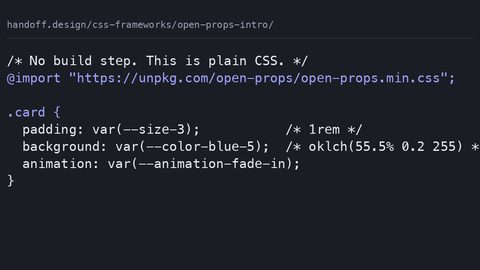 An Introduction to Open Props: Design Tokens as Custom Properties, No Build Step
What Open Props ships as design tokens via custom properties, how it differs from utility-class frameworks, and who should skip it.
An Introduction to Open Props: Design Tokens as Custom Properties, No Build Step
What Open Props ships as design tokens via custom properties, how it differs from utility-class frameworks, and who should skip it.
-
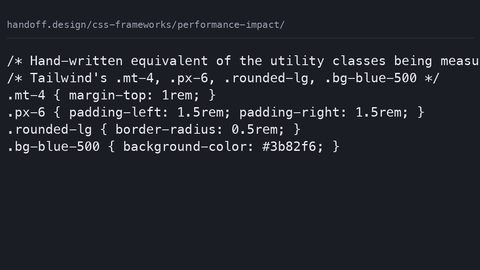 What CSS Frameworks Actually Cost in Bytes, Build Steps and Control
Quantifies what CSS frameworks actually cost in shipped bytes after compression, build-step overhead, and the runtime performance of the selectors they generate.
What CSS Frameworks Actually Cost in Bytes, Build Steps and Control
Quantifies what CSS frameworks actually cost in shipped bytes after compression, build-step overhead, and the runtime performance of the selectors they generate.
-
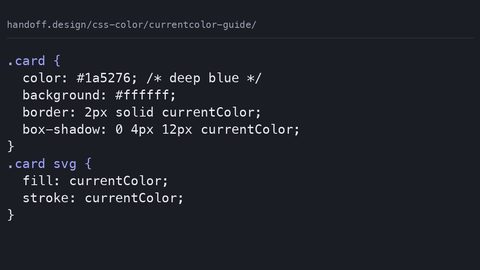 Using CSS currentColor for Theming Before and After Custom Properties
The CSS currentColor keyword inherits the computed color value and applies it to borders, shadows, and SVG fills without declaring custom properties.
Using CSS currentColor for Theming Before and After Custom Properties
The CSS currentColor keyword inherits the computed color value and applies it to borders, shadows, and SVG fills without declaring custom properties.
-
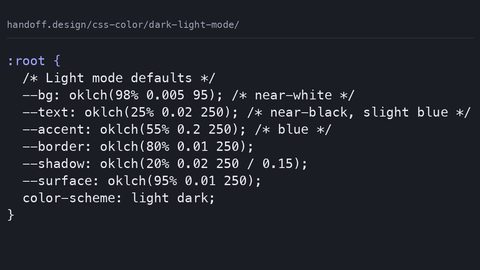 Building a Dark and Light Mode Theme With CSS Custom Properties Only
Build a dark and light mode theme with CSS custom properties, the light-dark() function, and the color-scheme meta tag to prevent a flash of the wrong theme.
Building a Dark and Light Mode Theme With CSS Custom Properties Only
Build a dark and light mode theme with CSS custom properties, the light-dark() function, and the color-scheme meta tag to prevent a flash of the wrong theme.
-
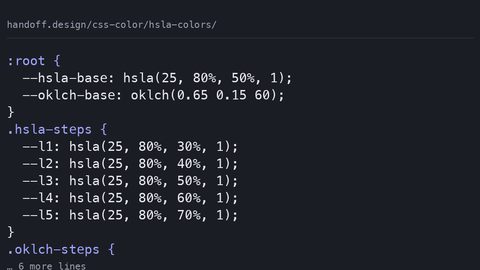 Practical Uses for HSLA Colors in CSS and Why OKLCH Replaces Them
HSLA colors are perceptually uneven because they map to sRGB; OKLCH provides uniform lightness and wider gamut with a simple two-value fallback pattern.
Practical Uses for HSLA Colors in CSS and Why OKLCH Replaces Them
HSLA colors are perceptually uneven because they map to sRGB; OKLCH provides uniform lightness and wider gamut with a simple two-value fallback pattern.
-
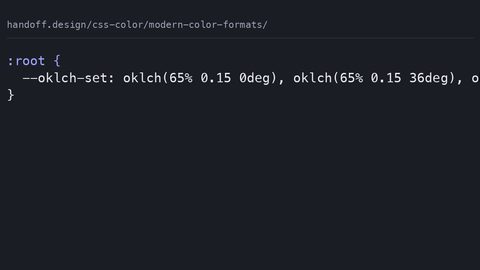 Modern CSS Color Formats LCH and OKLCH Explained With Code Samples
OKLCH is a perceptually uniform CSS color space where equal numerical steps look equal to the eye, with gamut mapping that LCH does not guarantee.
Modern CSS Color Formats LCH and OKLCH Explained With Code Samples
OKLCH is a perceptually uniform CSS color space where equal numerical steps look equal to the eye, with gamut mapping that LCH does not guarantee.
-
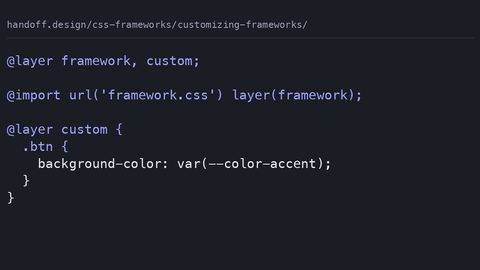 Customizing CSS Frameworks: What You Can Change and What You Cannot
How to customise CSS frameworks at the correct override point: design tokens, cascade layers, and the specificity traps that break when the framework updates.
Customizing CSS Frameworks: What You Can Change and What You Cannot
How to customise CSS frameworks at the correct override point: design tokens, cascade layers, and the specificity traps that break when the framework updates.
-
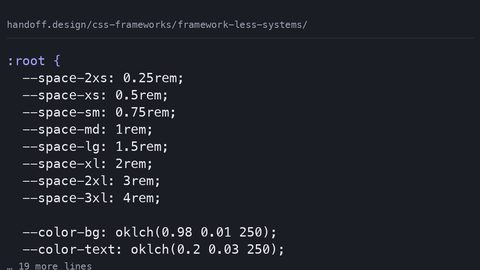 Framework-Less CSS Systems: What Modern CSS Features Replace Framework Utilities
How modern CSS features—custom properties, @scope, @layer, Container Queries, and CSS Nesting—replace the utilities developers reach for frameworks to provide.
Framework-Less CSS Systems: What Modern CSS Features Replace Framework Utilities
How modern CSS features—custom properties, @scope, @layer, Container Queries, and CSS Nesting—replace the utilities developers reach for frameworks to provide.
-
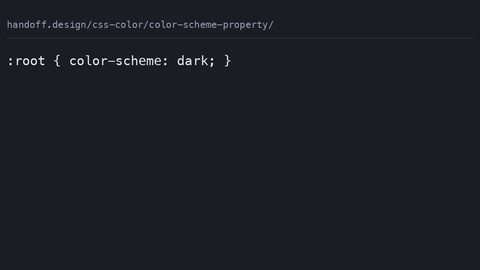 The CSS color-scheme Property Controls Light and Dark Mode Rendering
The CSS color-scheme property tells the browser to render its own chrome, form controls, and scrollbars in light or dark mode, separate from your authored styles.
The CSS color-scheme Property Controls Light and Dark Mode Rendering
The CSS color-scheme property tells the browser to render its own chrome, form controls, and scrollbars in light or dark mode, separate from your authored styles.
-
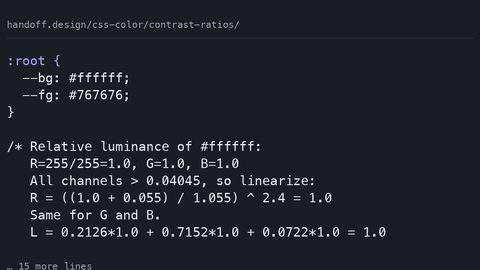 Calculating WCAG Color Contrast Ratios in CSS With Live Code Examples
Calculate WCAG 2.2 contrast ratios from CSS colour values using the relative luminance formula, with exact AA and AAA thresholds for text and non-text content.
Calculating WCAG Color Contrast Ratios in CSS With Live Code Examples
Calculate WCAG 2.2 contrast ratios from CSS colour values using the relative luminance formula, with exact AA and AAA thresholds for text and non-text content.
-
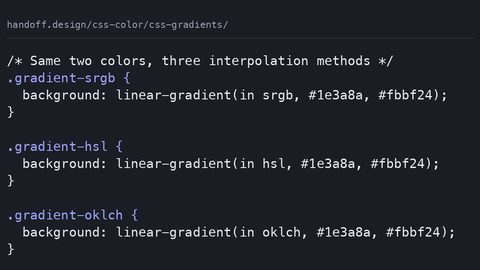 CSS Gradients in 2026: New Color Spaces and Interpolation Methods
CSS gradients now support color interpolation in oklch, hsl, and sRGB, producing visibly different results from the same color stops with a medium paint cost.
CSS Gradients in 2026: New Color Spaces and Interpolation Methods
CSS gradients now support color interpolation in oklch, hsl, and sRGB, producing visibly different results from the same color stops with a medium paint cost.
-
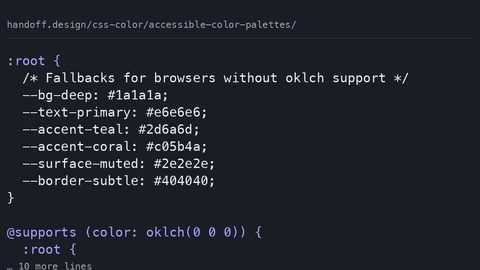 Building Accessible Color Palettes with oklch and WCAG Contrast Ratios
Build WCAG-compliant color palettes in oklch with real contrast ratios for every swatch, hsl fallbacks for older browsers, and light-dark mode parity.
Building Accessible Color Palettes with oklch and WCAG Contrast Ratios
Build WCAG-compliant color palettes in oklch with real contrast ratios for every swatch, hsl fallbacks for older browsers, and light-dark mode parity.
-
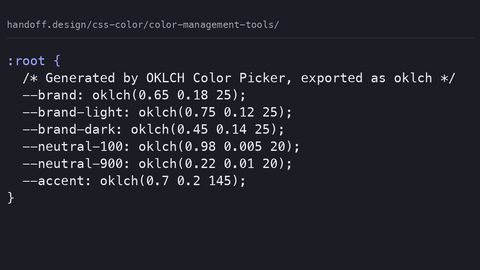 CSS Color Management Tools That Output Modern Syntax Like oklch and color-mix
Evaluate color management tools by whether they output modern CSS like oklch and color-mix, with complete palette samples and real contrast ratios.
CSS Color Management Tools That Output Modern Syntax Like oklch and color-mix
Evaluate color management tools by whether they output modern CSS like oklch and color-mix, with complete palette samples and real contrast ratios.
-
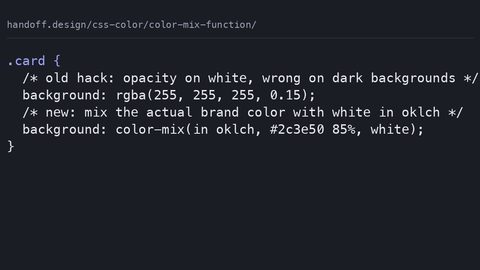 How the CSS color-mix() Function Works With Real Code Examples
Use CSS color-mix() to blend colors dynamically in any color space, with a complete fallback pattern for browsers that do not support the function.
How the CSS color-mix() Function Works With Real Code Examples
Use CSS color-mix() to blend colors dynamically in any color space, with a complete fallback pattern for browsers that do not support the function.
-
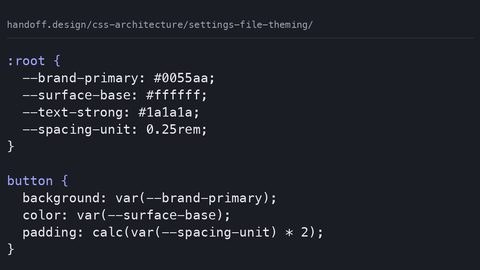 Theming with a Settings File Using Custom Properties Instead of Sass Variables
Build a runtime theme system with CSS custom properties instead of Sass variables, with complete samples showing why build-time values freeze and cascade tokens don't.
Theming with a Settings File Using Custom Properties Instead of Sass Variables
Build a runtime theme system with CSS custom properties instead of Sass variables, with complete samples showing why build-time values freeze and cascade tokens don't.
-
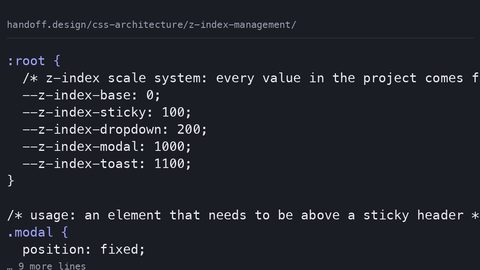 Managing z-index in Large Projects with Stacking Context Layers
Organise z-index values in large projects with a custom property scale system and explicit stacking context isolation to prevent the 9999 arms race.
Managing z-index in Large Projects with Stacking Context Layers
Organise z-index values in large projects with a custom property scale system and explicit stacking context isolation to prevent the 9999 arms race.
-
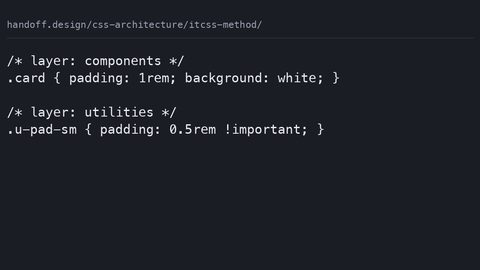 ITCSS: The Inverted Triangle CSS Method for Predictable Specificity Order
ITCSS layers stylesheets from generic to specific so specificity is predictable. See a conflict resolved by layering versus selector hacks, and how @layer maps on.
ITCSS: The Inverted Triangle CSS Method for Predictable Specificity Order
ITCSS layers stylesheets from generic to specific so specificity is predictable. See a conflict resolved by layering versus selector hacks, and how @layer maps on.
-
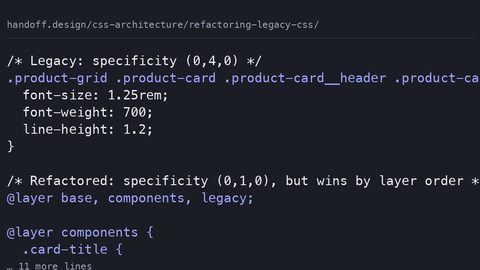 Refactoring Legacy CSS Without Breaking a Site That Still Ships
Refactor legacy CSS incrementally on a live site using cascade layers, coverage audits, and component-scoped custom properties without a full rewrite.
Refactoring Legacy CSS Without Breaking a Site That Still Ships
Refactor legacy CSS incrementally on a live site using cascade layers, coverage audits, and component-scoped custom properties without a full rewrite.
-
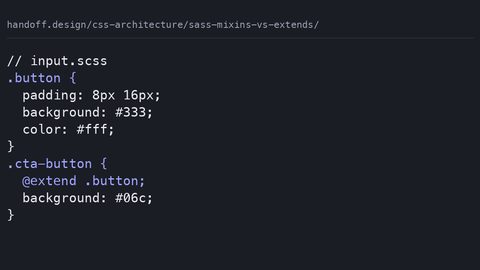 Sass Mixins vs Extends and What Each One Actually Compiles To
Compare Sass mixins and extends by examining the actual compiled CSS output, source order risks, and why gzip makes code duplication less of a concern.
Sass Mixins vs Extends and What Each One Actually Compiles To
Compare Sass mixins and extends by examining the actual compiled CSS output, source order risks, and why gzip makes code duplication less of a concern.
-
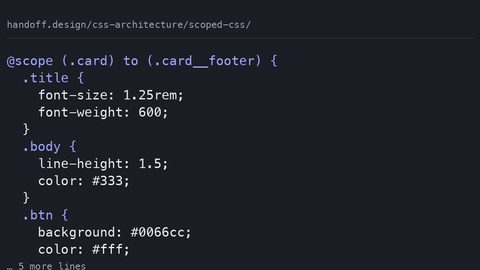 Scoped CSS in 2026 with @scope, CSS Modules, and Shadow DOM Compared
Compare @scope, CSS Modules, and Shadow DOM for scoping component styles, with complete code samples showing what each method protects against and costs.
Scoped CSS in 2026 with @scope, CSS Modules, and Shadow DOM Compared
Compare @scope, CSS Modules, and Shadow DOM for scoping component styles, with complete code samples showing what each method protects against and costs.
-
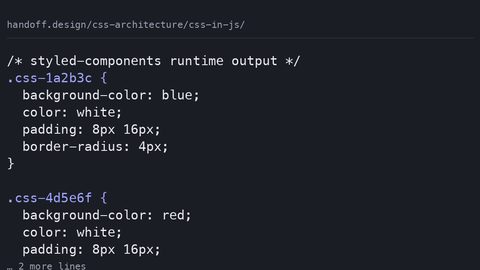 CSS-in-JS: What the Libraries Emit and What That Costs in the Browser
CSS-in-JS libraries inject styles at runtime or extract them at build time. See the actual CSS each approach emits and understand the performance cost.
CSS-in-JS: What the Libraries Emit and What That Costs in the Browser
CSS-in-JS libraries inject styles at runtime or extract them at build time. See the actual CSS each approach emits and understand the performance cost.
-
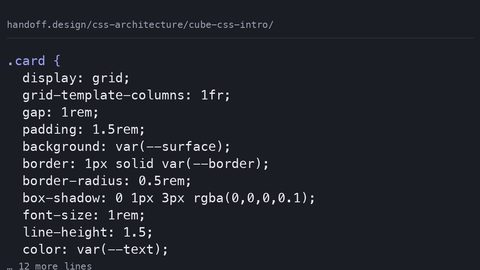 CUBE CSS: Separating Layout from Visual Treatment So the Cascade Works
CUBE CSS separates layout composition from visual treatment so the cascade helps rather than hinders. See a component written both ways and understand the trade-off.
CUBE CSS: Separating Layout from Visual Treatment So the Cascade Works
CUBE CSS separates layout composition from visual treatment so the cascade helps rather than hinders. See a component written both ways and understand the trade-off.
-
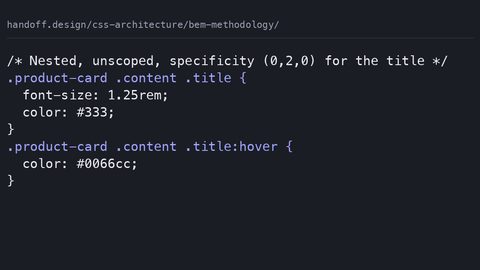 BEM Methodology: Naming Conventions That Prevent CSS Specificity Wars
BEM uses block, element, and modifier naming to keep CSS specificity flat and predictable. See it compared to unscoped nesting, and learn what @scope replaces.
BEM Methodology: Naming Conventions That Prevent CSS Specificity Wars
BEM uses block, element, and modifier naming to keep CSS specificity flat and predictable. See it compared to unscoped nesting, and learn what @scope replaces.
-
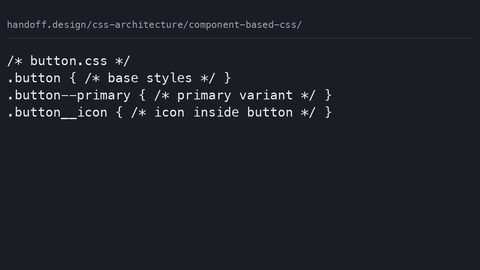 Component-Based CSS: Organising Styles When the DOM Is Split into Pieces
Organise CSS by component using @scope, CSS Modules, or BEM. See the same button styled three ways and learn what each approach protects against.
Component-Based CSS: Organising Styles When the DOM Is Split into Pieces
Organise CSS by component using @scope, CSS Modules, or BEM. See the same button styled three ways and learn what each approach protects against.
-
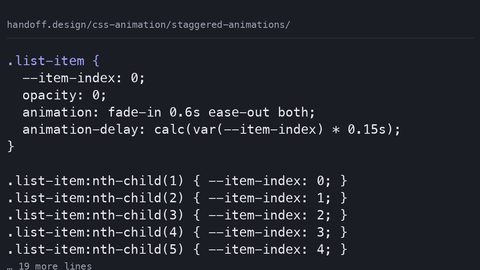 Staggered Animations with animation-delay and Custom Properties for Cascading Sequences
CSS has no stagger() function. Create staggered animations with animation-delay, custom properties and nth-child to cascade start times across a list of elements.
Staggered Animations with animation-delay and Custom Properties for Cascading Sequences
CSS has no stagger() function. Create staggered animations with animation-delay, custom properties and nth-child to cascade start times across a list of elements.
-
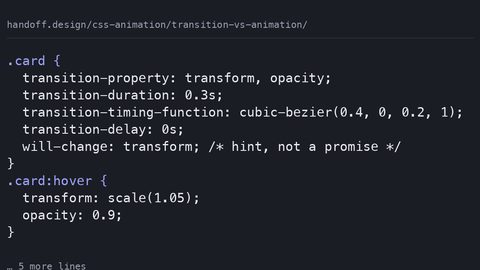 CSS Transition vs Animation: When to Use Which and Why It Matters
CSS transitions respond to property state changes; CSS animations run independently. Learn the performance cost of each and when to choose one over the other.
CSS Transition vs Animation: When to Use Which and Why It Matters
CSS transitions respond to property state changes; CSS animations run independently. Learn the performance cost of each and when to choose one over the other.
-
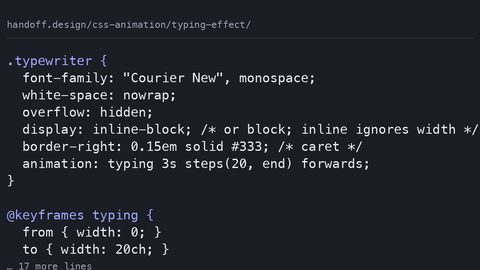 CSS Typing Effect with Steps: A Typewriter Animation Without JavaScript
Build a CSS-only typewriter effect with animation-timing-function: steps(). Understand the layout cost, the monospace requirement, and the reduced-motion fallback.
CSS Typing Effect with Steps: A Typewriter Animation Without JavaScript
Build a CSS-only typewriter effect with animation-timing-function: steps(). Understand the layout cost, the monospace requirement, and the reduced-motion fallback.
-
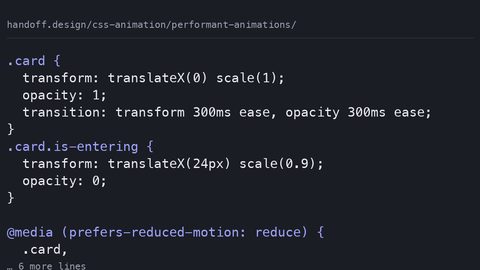 The Guide to Performant CSS Animations: Compositor-Only Properties and When Paint Is Inevitable
Only transform and opacity animate on the compositor thread. Learn which CSS properties trigger layout or paint, how to measure the cost, and how to write animations that stay at 60fps.
The Guide to Performant CSS Animations: Compositor-Only Properties and When Paint Is Inevitable
Only transform and opacity animate on the compositor thread. Learn which CSS properties trigger layout or paint, how to measure the cost, and how to write animations that stay at 60fps.
-
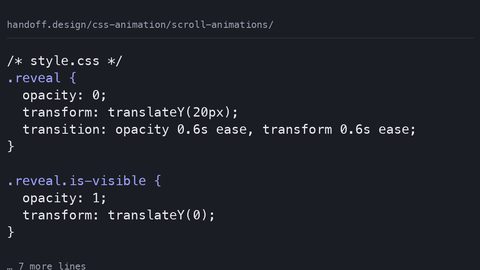 On-Scroll Animations with IntersectionObserver and Scroll-Driven Animation Timelines
Build on-scroll animations with IntersectionObserver or the declarative scroll() and view() timeline functions. Learn which approach runs off the main thread with runnable samples.
On-Scroll Animations with IntersectionObserver and Scroll-Driven Animation Timelines
Build on-scroll animations with IntersectionObserver or the declarative scroll() and view() timeline functions. Learn which approach runs off the main thread with runnable samples.
-
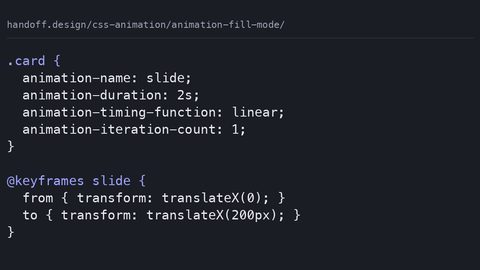 CSS animation-fill-mode: Controlling What Happens Before and After an Animation Runs
animation-fill-mode controls whether an element retains styles from the keyframes before the animation starts and after it ends. Learn forwards, backwards and both with runnable samples.
CSS animation-fill-mode: Controlling What Happens Before and After an Animation Runs
animation-fill-mode controls whether an element retains styles from the keyframes before the animation starts and after it ends. Learn forwards, backwards and both with runnable samples.
-
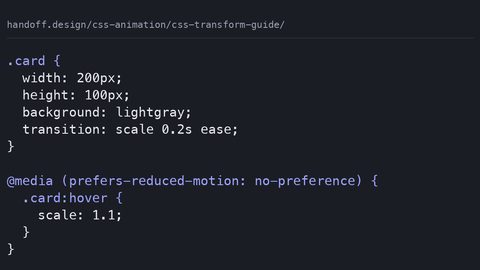 CSS transform Guide: Scale, Rotate and Skew With Compositor-Safe Performance
CSS transform functions scale, rotate and skew animate on the compositor thread without triggering layout or paint. Learn each function with complete, runnable code samples.
CSS transform Guide: Scale, Rotate and Skew With Compositor-Safe Performance
CSS transform functions scale, rotate and skew animate on the compositor thread without triggering layout or paint. Learn each function with complete, runnable code samples.
-
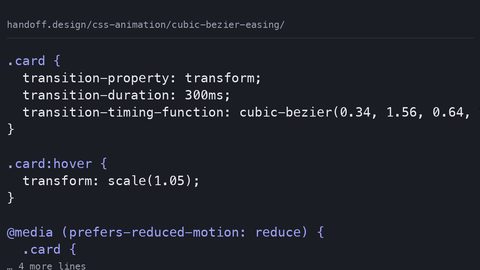 Understanding cubic-bezier for Custom Easing Curves in CSS Animations and Transitions
cubic-bezier defines custom easing curves with four control points for CSS transitions and animations. Learn to design curves that feel natural using complete code samples.
Understanding cubic-bezier for Custom Easing Curves in CSS Animations and Transitions
cubic-bezier defines custom easing curves with four control points for CSS transitions and animations. Learn to design curves that feel natural using complete code samples.
-
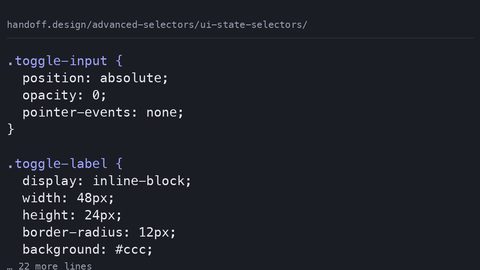 CSS UI State Selectors for Styling Form Elements Without JavaScript
UI state selectors like :checked, :disabled, and :user-invalid style form controls based on their interactive state without JavaScript.
CSS UI State Selectors for Styling Form Elements Without JavaScript
UI state selectors like :checked, :disabled, and :user-invalid style form controls based on their interactive state without JavaScript.
-
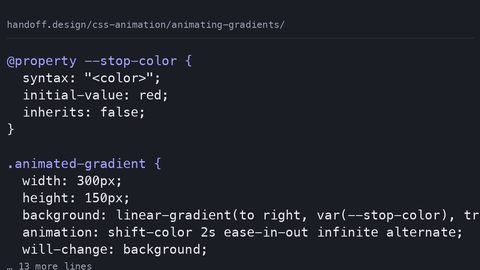 Animating CSS Gradients with @property and Compositor-Safe Techniques
CSS gradients cannot be transitioned directly—the browser snaps between values. Learn how @property enables smooth gradient animation by typing custom properties for interpolation.
Animating CSS Gradients with @property and Compositor-Safe Techniques
CSS gradients cannot be transitioned directly—the browser snaps between values. Learn how @property enables smooth gradient animation by typing custom properties for interpolation.
-
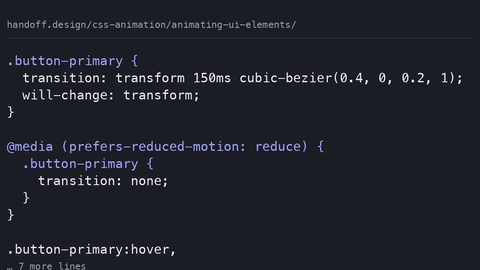 Animating UI Elements: Buttons, Toggles and Form Controls That Feel Responsive
Animate UI elements at 60fps by restricting motion to transform and opacity. Learn compositor-safe techniques for buttons, toggles and form controls with reduced-motion fallbacks.
Animating UI Elements: Buttons, Toggles and Form Controls That Feel Responsive
Animate UI elements at 60fps by restricting motion to transform and opacity. Learn compositor-safe techniques for buttons, toggles and form controls with reduced-motion fallbacks.
-
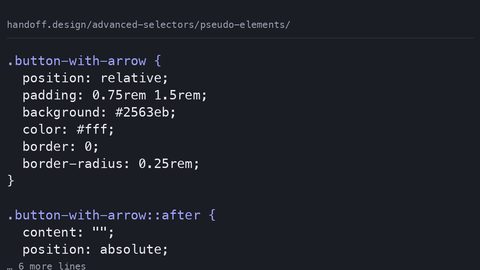 CSS ::before and ::after Pseudo-Elements for Generated Content and Decoration
::before and ::after insert generated content before or after an element's actual content, enabling decoration without extra HTML elements.
CSS ::before and ::after Pseudo-Elements for Generated Content and Decoration
::before and ::after insert generated content before or after an element's actual content, enabling decoration without extra HTML elements.
-
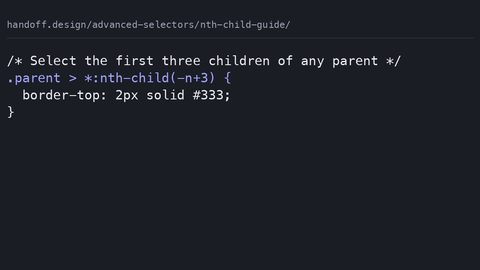 CSS :nth-child and :nth-of-type Selectors for Pattern-Based Styling
:nth-child selects by position among all siblings; :nth-of-type selects by position among siblings of the same element type, using the An+B formula.
CSS :nth-child and :nth-of-type Selectors for Pattern-Based Styling
:nth-child selects by position among all siblings; :nth-of-type selects by position among siblings of the same element type, using the An+B formula.
-
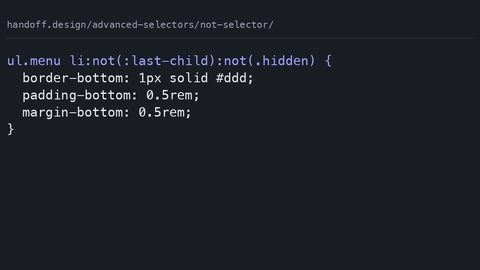 Excluding Elements from CSS Rules Using the :not() Pseudo-Class
The :not() pseudo-class excludes elements matching its argument from a rule, letting you write inclusive selectors without separate override declarations.
Excluding Elements from CSS Rules Using the :not() Pseudo-Class
The :not() pseudo-class excludes elements matching its argument from a rule, letting you write inclusive selectors without separate override declarations.
-
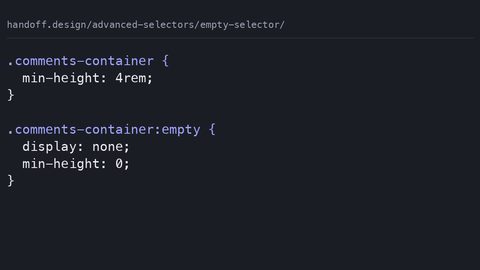 Using the CSS :empty Selector to Style Elements Without Content
The :empty pseudo-class matches elements with no children, including text nodes, letting you hide or style empty containers without JavaScript.
Using the CSS :empty Selector to Style Elements Without Content
The :empty pseudo-class matches elements with no children, including text nodes, letting you hide or style empty containers without JavaScript.
-
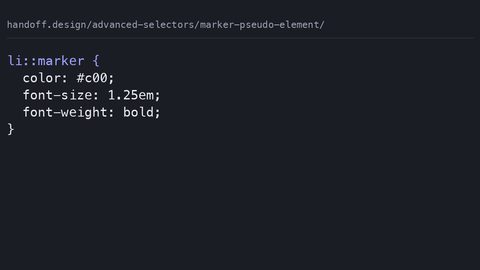 Custom List Markers with the CSS ::marker Pseudo-Element
The ::marker pseudo-element targets the bullet or number box of a list item, allowing independent styling of markers without extra markup.
Custom List Markers with the CSS ::marker Pseudo-Element
The ::marker pseudo-element targets the bullet or number box of a list item, allowing independent styling of markers without extra markup.
-
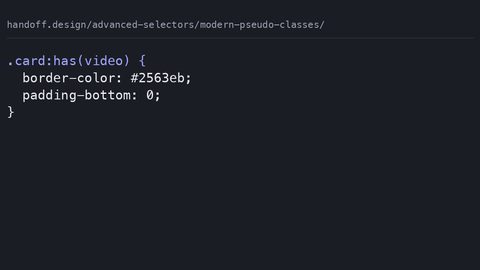 CSS :has(), :is(), and :where() Pseudo-Classes Guide for Modern Selectors
:has() selects an element based on its descendants, :is() matches any selector in a list, and :where() does the same with zero specificity.
CSS :has(), :is(), and :where() Pseudo-Classes Guide for Modern Selectors
:has() selects an element based on its descendants, :is() matches any selector in a list, and :where() does the same with zero specificity.
-
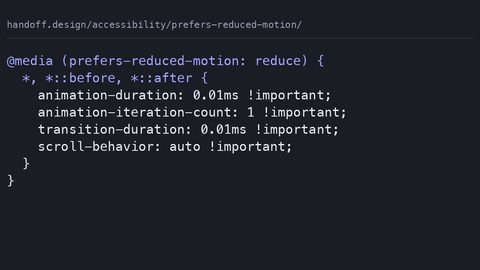 Using the prefers-reduced-motion Media Query for Accessible Animation
Write CSS that respects the prefers-reduced-motion media query, with WCAG 2.3.3 guidance on essential versus non-essential animation.
Using the prefers-reduced-motion Media Query for Accessible Animation
Write CSS that respects the prefers-reduced-motion media query, with WCAG 2.3.3 guidance on essential versus non-essential animation.
-
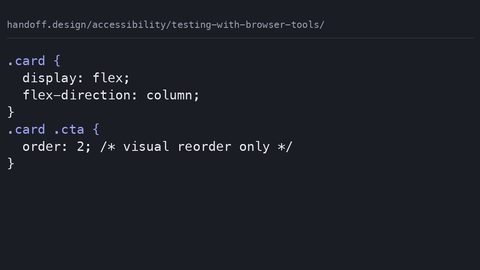 Testing CSS Accessibility with Browser Developer Tools
Use Chrome DevTools and Firefox Accessibility Inspector to test how CSS affects the accessibility tree, contrast, and focus order.
Testing CSS Accessibility with Browser Developer Tools
Use Chrome DevTools and Firefox Accessibility Inspector to test how CSS affects the accessibility tree, contrast, and focus order.
-
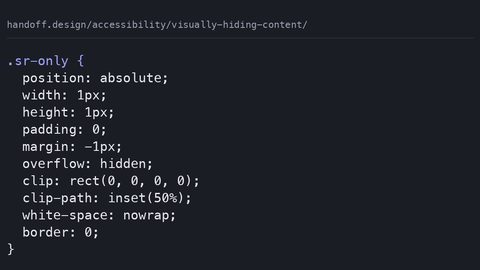 Visually Hiding Content That Screen Readers Still Announce
The CSS clip-rect pattern for hiding content visually while keeping it in the accessibility tree, and why display: none is the wrong tool.
Visually Hiding Content That Screen Readers Still Announce
The CSS clip-rect pattern for hiding content visually while keeping it in the accessibility tree, and why display: none is the wrong tool.
-
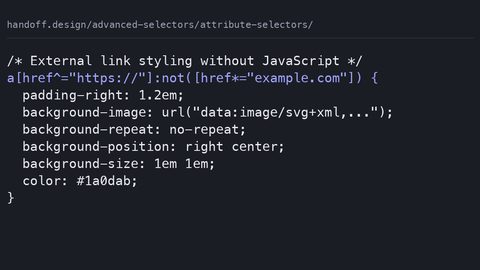 CSS Attribute Selectors Guide for Substring and Value Matching
Use CSS attribute selectors for substring and value matching, with specificity values and the case-insensitive flag that shipped across engines.
CSS Attribute Selectors Guide for Substring and Value Matching
Use CSS attribute selectors for substring and value matching, with specificity values and the case-insensitive flag that shipped across engines.
-
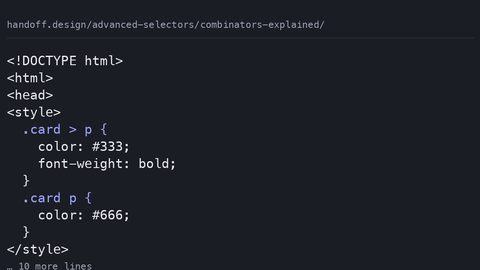 CSS Combinators Explained with Child Adjacent and Sibling Selectors
How the child, adjacent sibling, general sibling, and descendant combinators match element relationships, with zero specificity contribution.
CSS Combinators Explained with Child Adjacent and Sibling Selectors
How the child, adjacent sibling, general sibling, and descendant combinators match element relationships, with zero specificity contribution.
-
 Combining CSS Selectors for Powerful Specific Element Targeting
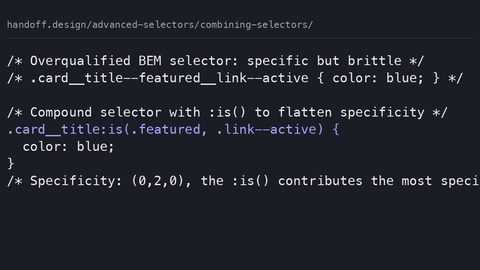
Combine CSS selectors into compound rules with :is(), :has(), and :not() while controlling specificity and avoiding forgiving-list surprises.
Combining CSS Selectors for Powerful Specific Element Targeting
Combine CSS selectors into compound rules with :is(), :has(), and :not() while controlling specificity and avoiding forgiving-list surprises.
-
 Ensuring High Color Contrast in CSS for WCAG 2.2 AA and AAA Compliance
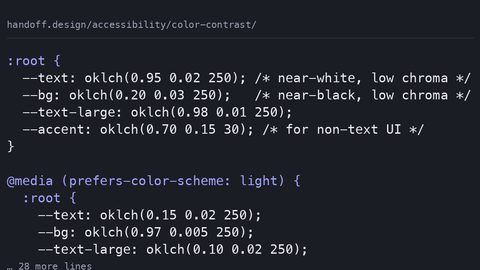
How to meet WCAG 2.2 color contrast requirements with modern CSS, using oklch(), prefers-color-scheme, and color-mix() to maintain AA and AAA ratios.
Ensuring High Color Contrast in CSS for WCAG 2.2 AA and AAA Compliance
How to meet WCAG 2.2 color contrast requirements with modern CSS, using oklch(), prefers-color-scheme, and color-mix() to maintain AA and AAA ratios.
-
 The Role of CSS in Semantic HTML and the Accessibility Object Model
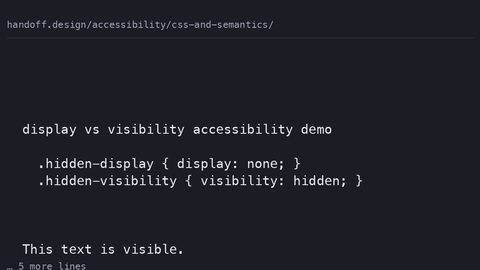
How CSS properties like display, visibility, content, and order affect the accessibility tree and what assistive technology exposes to users.
The Role of CSS in Semantic HTML and the Accessibility Object Model
How CSS properties like display, visibility, content, and order affect the accessibility tree and what assistive technology exposes to users.
-
 How CSS Display Properties Change the Accessibility Tree
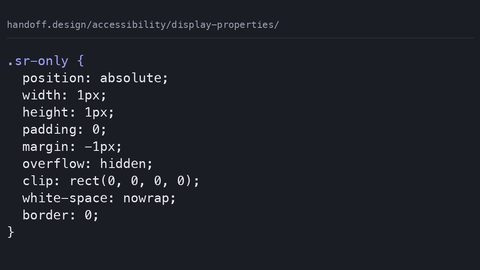
How display: none, visibility: hidden, and CSS-generated content each affect the accessibility tree, with the WCAG success criteria that govern them.
How CSS Display Properties Change the Accessibility Tree
How display: none, visibility: hidden, and CSS-generated content each affect the accessibility tree, with the WCAG success criteria that govern them.
-
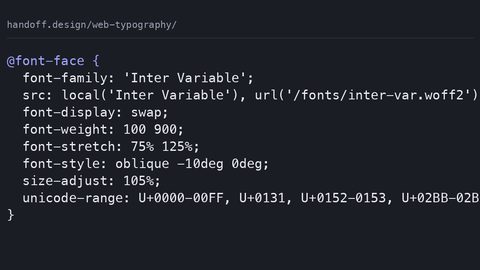 Web Typography: Variable Fonts, Performance, and the Spacing That Makes Text Readable
The typography hub for handoff.design: variable fonts, pairing, the loading cost of a typeface, and the spacing that decides whether a paragraph is read.
Web Typography: Variable Fonts, Performance, and the Spacing That Makes Text Readable
The typography hub for handoff.design: variable fonts, pairing, the loading cost of a typeface, and the spacing that decides whether a paragraph is read.
-
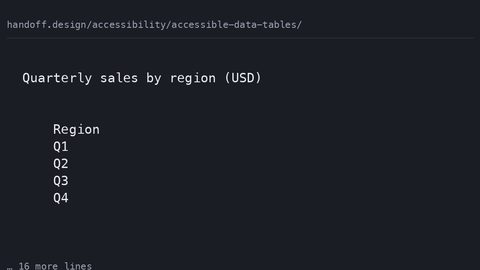 Making Accessible Data Tables with Semantic HTML and Responsive CSS
How to build data tables that are semantically correct for screen readers and visually usable on narrow viewports, with complete CSS and HTML samples.
Making Accessible Data Tables with Semantic HTML and Responsive CSS
How to build data tables that are semantically correct for screen readers and visually usable on narrow viewports, with complete CSS and HTML samples.
-
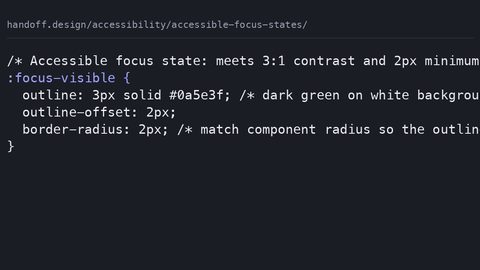 Designing Accessible Focus States That Meet WCAG 2.4.7 Visible Focus
How to design focus states that meet WCAG 2.4.7, with complete CSS samples showing :focus-visible, contrast requirements, and the outline: none anti-pattern.
Designing Accessible Focus States That Meet WCAG 2.4.7 Visible Focus
How to design focus states that meet WCAG 2.4.7, with complete CSS samples showing :focus-visible, contrast requirements, and the outline: none anti-pattern.
-
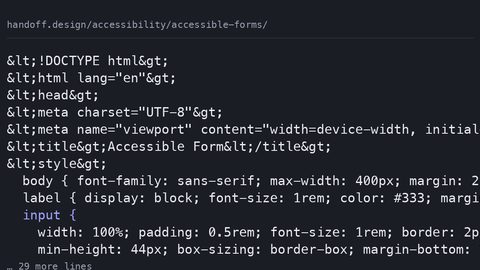 A Guide to Accessible Form Styling with CSS Labels, Errors, and Focus
How to style forms with visible labels, accessible error recovery, and focus indicators that meet WCAG 2.2, with complete code samples.
A Guide to Accessible Form Styling with CSS Labels, Errors, and Focus
How to style forms with visible labels, accessible error recovery, and focus indicators that meet WCAG 2.2, with complete code samples.
-
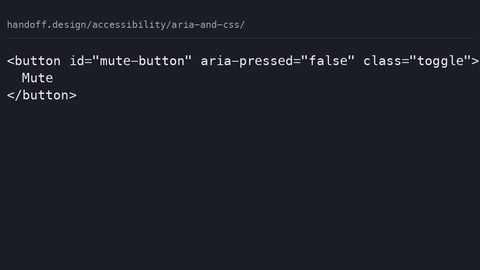 Using ARIA Attributes with CSS Selectors for Stateful Accessible Styling
How to use CSS attribute selectors to style component states based on ARIA attributes like aria-expanded and aria-current, with complete code samples.
Using ARIA Attributes with CSS Selectors for Stateful Accessible Styling
How to use CSS attribute selectors to style component states based on ARIA attributes like aria-expanded and aria-current, with complete code samples.
-
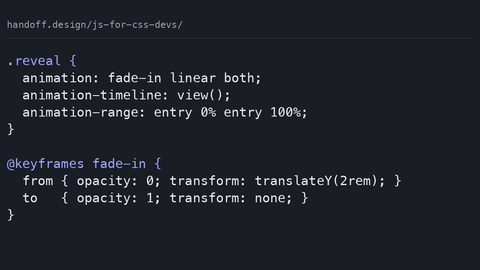 JavaScript for CSS Developers: The Smallest JS a Stylesheet Needs
The smallest JavaScript a stylesheet needs today, and the modern CSS features—scroll-driven animations, View Transitions, custom properties—that have made JS unnecessary.
JavaScript for CSS Developers: The Smallest JS a Stylesheet Needs
The smallest JavaScript a stylesheet needs today, and the modern CSS features—scroll-driven animations, View Transitions, custom properties—that have made JS unnecessary.
-
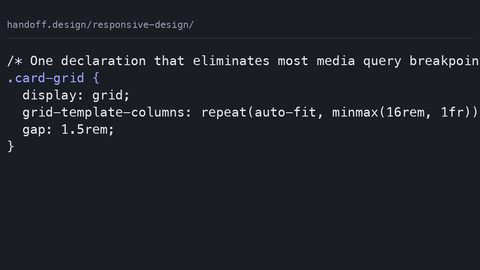 Responsive Design After Container Queries and clamp()
Responsive design after container queries and clamp(): fluid type, the media queries that still earn their place, and component-level constraints replacing page-level breakpoints.
Responsive Design After Container Queries and clamp()
Responsive design after container queries and clamp(): fluid type, the media queries that still earn their place, and component-level constraints replacing page-level breakpoints.
-
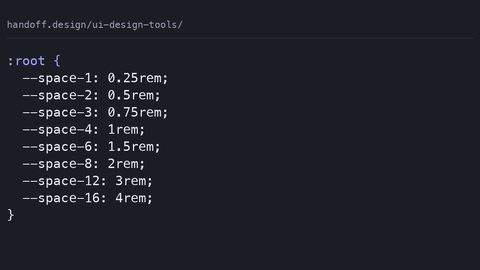 Design Tools for Developers Who Receive the Handoff and Build the Output
Evaluate design tools from the developer's side: what the design file must contain before it can be built, and which exports produce usable CSS.
Design Tools for Developers Who Receive the Handoff and Build the Output
Evaluate design tools from the developer's side: what the design file must contain before it can be built, and which exports produce usable CSS.
-
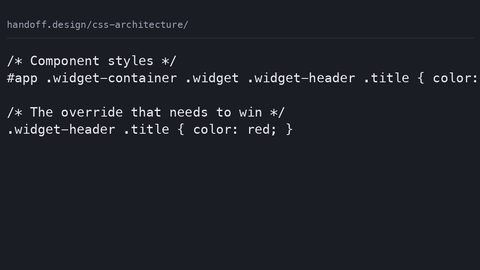 CSS Architecture: How to Organise Stylesheets So the Next Change Is Safe
BEM, ITCSS, CUBE CSS, and native @layer: how CSS architecture methodologies protect against specificity wars, dead code, and the fear of renaming a class.
CSS Architecture: How to Organise Stylesheets So the Next Change Is Safe
BEM, ITCSS, CUBE CSS, and native @layer: how CSS architecture methodologies protect against specificity wars, dead code, and the fear of renaming a class.
-
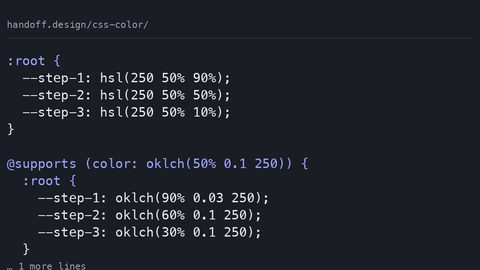 Modern CSS Color Spaces, Functions, and Accessible Palette Systems
Build accessible, perceptually uniform colour palettes with modern CSS color spaces like oklch, functions like color-mix, and wide-gamut fallback strategies.
Modern CSS Color Spaces, Functions, and Accessible Palette Systems
Build accessible, perceptually uniform colour palettes with modern CSS color spaces like oklch, functions like color-mix, and wide-gamut fallback strategies.
-
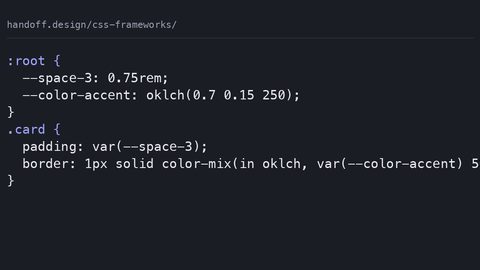 CSS Frameworks Compared: What Each One Costs in Bytes and Control
A cost-first comparison of Tailwind, Bootstrap, Open Props, and framework-less CSS: what each ships, what it costs in bytes after compression, and who should not use it.
CSS Frameworks Compared: What Each One Costs in Bytes and Control
A cost-first comparison of Tailwind, Bootstrap, Open Props, and framework-less CSS: what each ships, what it costs in bytes after compression, and who should not use it.
-
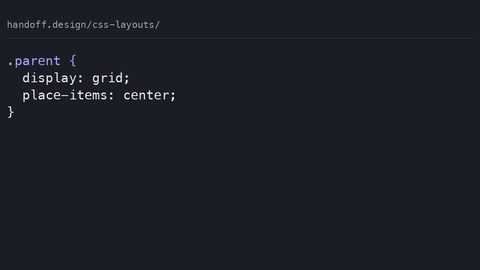 CSS Layouts in the Fewest Declarations That Actually Work Across Engines
The CSS layout hub covering flexbox, grid, and the patterns that replace framework layouts in the fewest declarations that work across engines.
CSS Layouts in the Fewest Declarations That Actually Work Across Engines
The CSS layout hub covering flexbox, grid, and the patterns that replace framework layouts in the fewest declarations that work across engines.
-
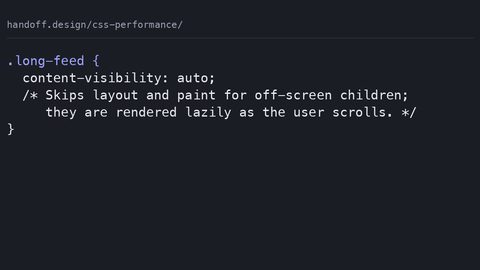 CSS Performance and Core Web Vitals What Declarations Cost in Layout Paint Composite
CSS performance affects Core Web Vitals through layout, paint, and composite costs. Learn which declarations trigger each stage and how to measure their impact on LCP, CLS, and INP.
CSS Performance and Core Web Vitals What Declarations Cost in Layout Paint Composite
CSS performance affects Core Web Vitals through layout, paint, and composite costs. Learn which declarations trigger each stage and how to measure their impact on LCP, CLS, and INP.
-
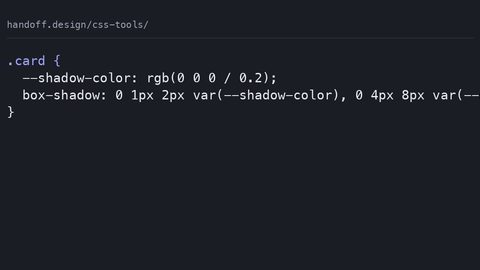 CSS Generators, Playgrounds and Converters: What They Output and Why
CSS generators, playgrounds, and converters judged on what they actually emit: stale prefixes, bloated syntax, and missing fallbacks, with hand-written equivalents shown.
CSS Generators, Playgrounds and Converters: What They Output and Why
CSS generators, playgrounds, and converters judged on what they actually emit: stale prefixes, bloated syntax, and missing fallbacks, with hand-written equivalents shown.
-
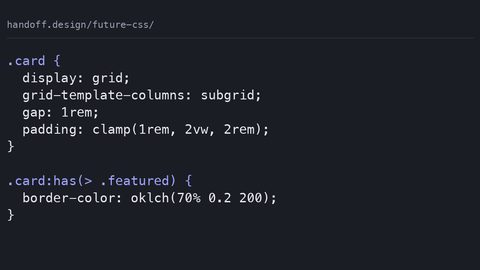 Modern CSS Features That Have Shipped and What Is Safe to Use
Which modern CSS features have shipped across all engines and are safe without a fallback: the Baseline widely available status for container queries, nesting, @scope, oklch, and view transitions.
Modern CSS Features That Have Shipped and What Is Safe to Use
Which modern CSS features have shipped across all engines and are safe without a fallback: the Baseline widely available status for container queries, nesting, @scope, oklch, and view transitions.
-
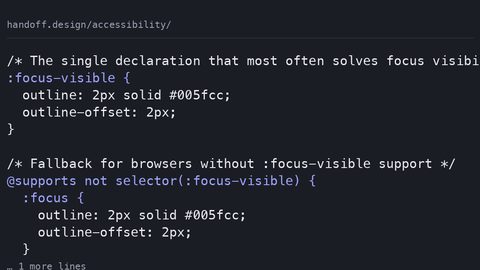 CSS Accessibility Techniques for Focus, Contrast, and Screen Readers
The CSS half of accessibility: focus states a keyboard user can see, contrast that survives dark mode, and the display properties that quietly remove an element from the accessibility tree.
CSS Accessibility Techniques for Focus, Contrast, and Screen Readers
The CSS half of accessibility: focus states a keyboard user can see, contrast that survives dark mode, and the display properties that quietly remove an element from the accessibility tree.
-
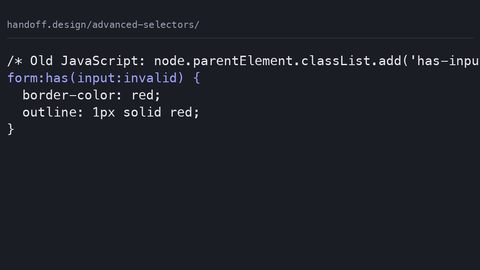 CSS Advanced Selectors Guide for Modern Browser Targeting
The CSS selectors that shipped across all engines since 2021: :has(), :is(), :where(), and how they replace JavaScript DOM traversal patterns.
CSS Advanced Selectors Guide for Modern Browser Targeting
The CSS selectors that shipped across all engines since 2021: :has(), :is(), :where(), and how they replace JavaScript DOM traversal patterns.
-
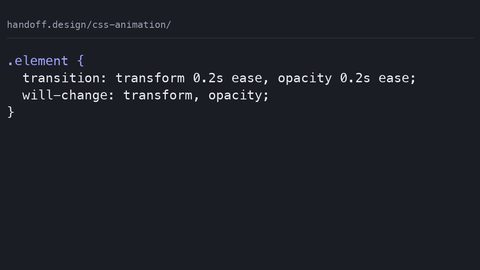 CSS Animation Hub: Transitions, Keyframes, and Compositor-Safe Properties
CSS animation spans transitions, keyframes, and scroll-driven timelines—but only transform and opacity animate without triggering layout or paint.
CSS Animation Hub: Transitions, Keyframes, and Compositor-Safe Properties
CSS animation spans transitions, keyframes, and scroll-driven timelines—but only transform and opacity animate without triggering layout or paint.
-
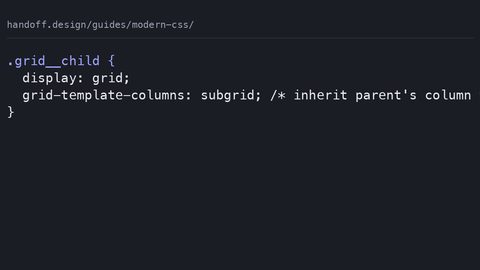 What CSS Can Do in 2026 That It Could Not in 2020
A survey of the most transformative CSS features that have shipped since 2020, from subgrid to container queries, with the one declaration that best shows each change.
What CSS Can Do in 2026 That It Could Not in 2020
A survey of the most transformative CSS features that have shipped since 2020, from subgrid to container queries, with the one declaration that best shows each change.