CSS Tools, Generators, Playgrounds and Converters Judged on Output Quality
CSS generators, playgrounds, and converters judged on what they actually emit: stale prefixes, bloated syntax, and missing fallbacks, with hand-written equivalents shown.
A CSS generator is a machine that emits declarations. A CSS playground shows you what those declarations do. A CSS converter rewrites one form of CSS into another. This guide sorts the CSS tools generators output quality question: what each kind of tool actually emits, what is wrong with that emission, and why a hand-written replacement fixes it. The working front-end developer who writes CSS daily, the design-system author who defends choices, the performance-conscious developer who counts paint cost, and the technical writer who needs sourced statements: all four get routed to the sub-page that answers their specific question. It does not answer those questions itself. It owns the evaluation criteria, and the articles beneath it start at the specific tool without re-explaining those criteria.
The Four Failures That Tank Output Quality
Every generator, playground, and converter shares one trait: it emits a CSS declaration block. The quality of that block is the only thing that separates a useful tool from a trap. The single most common failure is stale vendor prefixes. A box-shadow generator from 2019 still emits "-webkit-box-shadow" for Safari 9, which has not existed in any meaningful install base since 2016. The second most common failure is bloated gradient syntax. A linear-gradient generator that targets "compatibility" will output a stack of legacy forms: the original two-stop syntax, the repeating form, and then the modern space-separated color stop list, all in one declaration. The third is absolute units. A tool that defaults to px for border-radius, margin, or padding bakes in a fixed size that breaks responsive design the moment the container shrinks. The fourth is missing fallbacks. A tool that emits oklch() without a preceding rgb() or hex fallback leaves the entire declaration unread in any engine that shipped before 2023. Each of these has a hand-written equivalent that fixes it. The box-shadow example is the one that most often solves a tool-output problem.

_Morten_Rand-Hendriksen_(34592698373).jpg)
Here is the declaration that replaces a generator's verbose output. A typical generator emits a multi-line shadow with blur spread, an inset, and a color, sometimes with a vendor-prefixed duplicate. The hand-written version is shorter, uses a custom property for the color so it can update at runtime, and needs no prefix at all since box-shadow has been Baseline widely available since 2020. This is the single declaration that most often solves a tool-output problem:
.card {
  --shadow-color: rgb(0 0 0 / 0.2);
  box-shadow: 0 1px 2px var(--shadow-color), 0 4px 8px var(--shadow-color);
}
The gradient is the one that most often causes it. A generator that targets "maximum compatibility" will emit this:
.gradient {
  background: -webkit-gradient(linear, left top, right top, from(#fff), to(#000));
  background: -o-linear-gradient(left, #fff, #000);
  background: linear-gradient(90deg, #fff, #000);
}
The first two lines are dead weight. Every engine that supports the modern linear-gradient syntax also supports the two-stop form, so the legacy lines are never read, but they still cost bytes over the wire. The hand-written equivalent is a single line:
.gradient {
  background: linear-gradient(90deg in oklab, var(--start, #fff), var(--end, #000));
}
That single line uses the oklch() color space for perceptually uniform interpolation, which is the default for gradients in CSS Color 4 and shipped in all major engines by 2024. But notice the fallback problem: if you target an engine that does not support the "in oklab" syntax, the entire declaration fails. The correct hand-written version puts a plain linear-gradient first and the enhanced version second, letting @supports decide:
.gradient {
  background: linear-gradient(90deg, #fff, #000);
  @supports (background: linear-gradient(in oklab, red, blue)) {
    background: linear-gradient(90deg in oklab, #fff, #000);
  }
}
That pattern, a safe baseline followed by an @supports upgrade, is the single most important habit a CSS tool user can learn. It applies to oklch(), color-mix(), text-wrap: balance, and every other modern feature that is not yet Baseline widely available. The tools that emit this pattern are rare. The tools that do not are the ones you should stop using.
Three Axes of Cost
The CSS generator tool review question is not "does it work" but "what does it emit and what does that emission cost". Cost has three axes. The first is file size after compression. A generator that emits three duplicate gradient declarations costs bytes even after gzip or brotli compression. The duplicates are not identical strings; they differ by prefix and syntax, so the compression algorithm cannot collapse them. The second is runtime performance. box-shadow and filter are frequently underestimated sources of paint work. A generator that emits a 20-pixel blur shadow on a full-width element forces the compositor to repaint that region on every scroll. The hand-written version with a smaller blur and a custom property for the color does the same job at a fraction of the paint cost. The third is maintainability. A generator that emits absolute units locks your design to a fixed viewport. The hand-written version uses clamp() or a custom property that the design system can override at runtime.
The Four-Point Test
The review criteria are these: does the tool emit vendor prefixes that are no longer needed, does it emit absolute units where relative units or clamp() would work, does it emit a fallback for features that are not Baseline widely available, and does it use the modern syntax when the legacy syntax is dead. A tool that passes all four is worth using. A tool that fails one is a trap that you will pay for in bytes, in paint, or in a broken layout. The sub-page on the box-shadow generator tool review answers the specific question of which generator emits the shortest, most maintainable output, and which one is overrated because its "advanced" features are stale prefixes.
The box-shadow generator output question is the one where the tool's failure is most visible. A typical generator emits a multi-line shadow with a blur, a spread, an inset, and a color, and it prefixes the whole thing with "-webkit-box-shadow" for Safari 9. That prefix is not dead weight. It is actively harmful: it duplicates the shadow. The browser reads the prefixed line first, applies it, then reads the unprefixed line and applies that too, producing a double shadow on any engine that still honors the prefix. There are none left in meaningful numbers. The hand-written version uses a custom property for the color, so the shadow can respond to theme changes at runtime, and it needs no prefix at all. The single declaration that solves this is the one shown earlier. The sub-page on the box-shadow generator output goes deeper into the specific generators, which one emits the shortest output, and which one emits a 20-line monstrosity that you should never use.
The CSS playground comparison question is about what the tool hides. A playground shows you the visual result of a declaration in a single browser, usually the one you are using right now. It does not show you what happens in the other engines. That is exactly where the interop bugs live. The playground does not show you the cascade. It does not show you how custom properties inherit. It does not show you whether the declaration triggers a layout, a paint, or a composite operation. It does not show you the file size after compression. It does not show you whether the fallback works. A playground is a tool for seeing, not for shipping. The sub-page on the CSS playground comparison compares the three main playgrounds on the axes that matter to a working developer: whether it shows the Baseline status of the feature, whether it lets you test @supports, and whether it lets you see the parsed cascade rather than the visual result.
The CSS minifier byte saving question is where most developers get the wrong answer. A minifier that strips whitespace and comments saves bytes in the source file, but the number that matters is the size after compression. That is what goes over the wire. gzip and brotli exploit repetition, so repeated utility classes compress well despite verbose source. A minifier that renames nothing, because CSS class names cannot be safely renamed, and that merely strips whitespace, saves maybe 20 percent on the wire. A minifier that also removes dead code, meaning rules that no selector references, saves far more. Lightning CSS is the tool that does this best. It is a Rust-based parser, transformer, and minifier that targets modern browser syntax without transpiling to older forms. It removes the vendor prefixes that are no longer needed. That is the cheapest byte saving of all: those prefixes are long strings that gzip cannot collapse. The sub-page on the CSS minifier byte saving compares the three main minifiers on the wire size after gzip and brotli, not on the source size, and it names the one that is overrated because it only strips whitespace and nothing else.
How to Read the Table
Every sub-page carries a specification table for the feature it covers. The table has five columns: property, Baseline status, shipped in Chrome, shipped in Edge, shipped in Firefox, and shipped in Safari. The order that matters is not the printed order. The Baseline status is the first thing to read. It tells you whether you can use the feature without a fallback. Widely available means every major engine has shipped it and it has been in the field long enough that the risk is negligible. Newly available means it has shipped but the field is still catching up. Limited availability means it is behind a flag or in a single engine. The second thing to read is the Safari date. Safari is the engine that lags most often. The third is the Chrome date. Chrome is the engine that ships first most often. Firefox and Edge are rarely the laggards. The dates are evidence, not advertising. The Interop dashboard tracks the actual pass rate per feature per engine, and it is the source of truth when a feature shows "shipped" but still fails in a real browser.
Write the Safe Version First
The single most useful habit for anyone who uses CSS tools is the @supports fallback pattern. Write the safe version first, then the enhanced version inside an @supports block. The safe version uses only features that are Baseline widely available. The enhanced version uses the modern feature. @supports tests the property and value pair, not the feature in general, so you can test exactly the thing you are about to use. @supports has been Baseline widely available since 2020, so it is safe to use everywhere. The pattern costs a few extra bytes in the source, but it costs nothing on the wire after compression. The two declarations share a common prefix that gzip and brotli compress into a single reference. This is the pattern that every tool should emit and almost none do. The tools that do emit it are rare enough that you should bookmark them. The tools that do not are not broken, but they are incomplete.
Custom Properties Need a Fallback Too
The pattern also applies to CSS custom properties. A generator that emits a var() reference without defining the custom property is a trap. The declaration silently fails to apply. A generator that emits a hard-coded value instead of a var() reference is a missed opportunity. You cannot theme the result at runtime. The hand-written version defines the custom property in a :root rule or in the component's own scope, then uses var() with a fallback in the declaration. The fallback is required. A custom property that is not defined, or that is set to an invalid value, causes the entire declaration to be treated as unset. The var() fallback syntax is the difference between a working theme and a silently broken one.
Nesting and Variables
The CSS converter question is about Sass SCSS conversion and its reverse. A converter that takes SCSS and emits plain CSS is a transpiler, and its output is only as good as its parser. The most common failure is the handling of nested rules. CSS nesting is now Baseline widely available since 2024, and it uses the & selector and relaxed parsing rules that differ from Sass. A converter that was written before CSS nesting shipped will emit flat selectors that are longer and harder to read. A converter that was written after will emit nested CSS that uses the modern syntax. The second most common failure is the handling of Sass variables. Sass variables are compile-time, so a converter that emits them as literal values is correct. A converter that tries to preserve them as CSS custom properties is wrong. The two have different semantics. Custom properties cascade, inherit, and update at runtime. Sass variables do not. The distinguishing feature is whether the value can change after the page loads. The sub-page on the Sass SCSS conversion question compares the two main converters on the axes that matter: whether they preserve nesting, whether they preserve mixins, and whether they correctly distinguish Sass variables from custom properties.
The gradient interpolation question is the one where the tool's default is almost always wrong. A generator that targets "compatibility" emits a gradient in the sRGB color space, which is the legacy default. The problem: sRGB interpolation produces a muddy middle when the two colors are far apart in hue, such as from red to blue. The modern default is oklch() interpolation. It is perceptually uniform, so the middle is a clean purple instead of a muddy brown. CSS Color 4 specifies oklch as the default for gradients, and it shipped in all major engines by 2024. A tool that still emits the sRGB default is a tool that is two years behind the spec. The hand-written version specifies the interpolation color space explicitly: linear-gradient(in oklch, red, blue). This is the single declaration that most often causes a tool-output problem. The tool emits the legacy sRGB form and the hand-written equivalent fixes it. The sub-page on the gradient interpolation question shows the before and after for a specific color pair, and it names the tool that still defaults to sRGB.
The Dead List
The vendor prefixes question is the one where the tool's output is most often stale. The prefixes that mattered in 2015 are dead now. -webkit- for box-shadow, border-radius, and linear-gradient is dead. Every engine that supports those features supports the unprefixed version. The -webkit- prefix survives only for a handful of features that are still experimental, such as some Safari-specific scrollbar styling. The -o- prefix for linear-gradient is dead. The -ms- prefix for flexbox is dead. A tool that emits any of these is a tool that was written before 2016 and has not been updated. The hand-written equivalent strips them all. The exception is -webkit- for backdrop-filter and for some CSS mask features, where the prefix is still required in Safari. The rule of thumb: if the feature is Baseline widely available, strip the prefix. If it is not, check the Interop dashboard to see which engine is the laggard and add the prefix only for that engine. Lightning CSS automates this correctly. It targets modern browser syntax and strips the prefixes that are no longer needed. A tool that does not use Lightning CSS is a tool that you should check carefully.
The absolute units question is the one where the tool's output breaks responsive design. A generator that defaults to px for border-radius, margin, padding, or font-size bakes in a fixed size. The hand-written equivalent uses rem for font-size, so it scales with the user's root font size. Or it uses clamp() for fluid ranges, so it scales with the viewport. Or it uses a custom property so the design system can override it at runtime. The absolute unit is not wrong in every context. A 1px border is a 1px border. A 2px box-shadow inset is a 2px inset. But a 24px margin or a 16px border-radius is a decision that should be made by the design system, not by a generator's default. A tool that emits px for every value produces a fixed design. A tool that emits rem or clamp() produces a responsive design. The sub-page on the absolute units question shows the conversion table for the most common values, and it names the tools that still default to px.
The missing fallbacks question is the one where the tool's output fails silently. A tool that emits oklch() without a preceding fallback leaves the declaration unread in any engine that shipped before 2023. A tool that emits color-mix() without a fallback leaves the declaration unread in any engine that shipped before 2024. A tool that emits text-wrap: balance without a fallback leaves the declaration unread in any engine that shipped before 2024. The hand-written equivalent always puts the safe version first. The safe version uses a feature that is Baseline widely available. The enhanced version uses the modern feature. The @supports pattern is the tool that makes this explicit. The failure mode is silent. The browser does not error. It ignores the declaration and uses the previous value or the initial value. The result is a card with no shadow, a gradient that is not applied, or a headline with a widow. The sub-page on the missing fallbacks question lists the five most common silent failures and the exact fallback declaration that fixes each one.
The DevTools question is the one where the tool is not a generator but a verifier. The browser DevTools are the most trustworthy CSS tool you have. They show you the computed value, the cascade, and the inheritance chain. A computed value that is not what you expected is the first sign of a fallback that is not working or a custom property that is not updating. The DevTools also show you the parsed value, which is the form after the browser has applied its own preprocessing. The parsed value is the ground truth. It is what the rendering engine actually uses. A generator that emits a value that looks correct in the source but is different in the parsed value has a bug. The DevTools catch that bug. The sub-page on the DevTools question shows the three panes that matter: the computed pane, the styles pane, and the cascade pane. It explains how to read them in the order that matters.
One Toy, One Editor, One Test Suite
The CSS playground comparison question has a concrete answer. The playground that is not worth it is the one that only shows a visual result in a single browser. The playground that is worth it is the one that shows the parsed cascade, the computed value, and the Baseline status of the feature you are testing. The three main playgrounds differ on exactly those axes. One of them is a visual toy that hides the cascade. One of them is a code editor that shows the computed value. One of them is a testing suite that shows the interop status across engines. The last one is the only one that a working developer should use for anything that is going to ship. The other two are fine for a quick visual check, but they are not fine for verifying that a declaration works in all engines. The sub-page on the CSS playground comparison names the one that is overrated and the one that outperforms it, and it explains why the better choice is the one that the Interop dashboard tracks.
The CSS minifier byte saving question has real numbers, and they are not the numbers the minifier's marketing page shows. A minifier that strips whitespace and comments saves about 20 percent on the source file. After gzip or brotli compression, the saving drops to about 10 percent. The compression algorithm already removes most of the redundancy. A minifier that removes dead code, meaning rules that no selector references, saves 30 to 50 percent on the wire, depending on how much dead code is in the file. The dead code saving is the one that matters. It is the one that most minifiers do not do. It requires a full parse of the HTML to know which selectors are used. Lightning CSS does this. It is a Rust-based parser, transformer, and minifier that can parse the HTML alongside the CSS. The other two minifiers do not. They are single-file tools. The sub-page on the CSS minifier byte saving shows a real file, a real build, and the wire size after gzip and after brotli for all three minifiers. It names the one that is overrated because it only strips whitespace and nothing else.
The CSS tools generators output quality verdict is that the tools are getting better, but the gap between tool output and hand-written CSS is still wide. The tools that fail are the ones that were written before the modern features shipped and have not been updated. The tools that succeed are the ones that use Lightning CSS under the hood. Lightning CSS targets modern browser syntax without transpiling to older forms. The tools that succeed also emit the @supports fallback pattern. The tools that fail emit stale prefixes, bloated gradients, absolute units, and missing fallbacks. The hand-written equivalent fixes all four. The fix is not hard. It is a habit. Write the safe version first, the enhanced version second, and test the enhanced version in the browser that you are least confident about. That habit is the entire difference between a tool that saves you time and a tool that costs you a broken layout in production.
Output and Fallbacks
What is the most common failure in CSS generator output? Stale vendor prefixes that duplicate the declaration and cost bytes over the wire. The second is missing fallbacks for features that are not Baseline widely available. What is the single most useful habit for using CSS tools? The @supports fallback pattern: write the safe version first, the enhanced version second, and test in the laggard engine. Which minifier saves the most bytes? Lightning CSS. It removes dead code and strips stale prefixes, not just whitespace. Does the playground show the cascade? Most playgrounds do not. Only one of the three main ones shows the parsed cascade and the computed value. What is the difference between a Sass variable and a CSS custom property? Sass variables are compile-time and cannot change after the page loads. Custom properties cascade, inherit, and update at runtime. Why does oklch() matter for gradients? It is perceptually uniform. The interpolation between two colors is clean, whereas the legacy sRGB interpolation produces a muddy middle. What is the first thing to read in a specification table? The Baseline status. It tells you whether you can use the feature without a fallback.
No tool, not the best playground, not the best minifier, not the best converter, will ever replace the judgment of a developer who knows what the cascade does and what a declaration costs. The tools are crutches, not replacements. They are useful when they emit output that you would have written anyway. They are harmful when they emit output that you would not have written, because you do not know why it is wrong. This guide exists to give you that knowledge. The sub-pages beneath it give you the specific tools and the specific failures. Start with the section on the fallback pattern. That is the one habit that fixes the most output. After that, go to the sub-page on the box-shadow generator output. That is the one where the tool's failure is most visible and the fix is shortest. Then come back here and use the specification table to decide which feature you can use without a fallback and which one you cannot.
More in this guide
Grid layout generatorsSVG shape generatorsCSS Box-Shadow Generator Output Quality and the Hand-Written Equivalent.
More in Tools
-
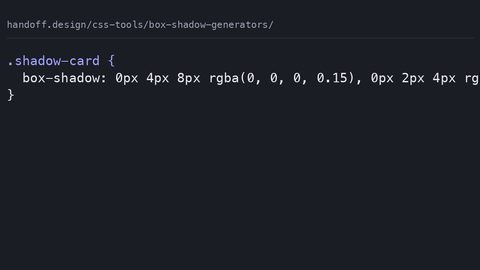 Box shadow generators
What CSS box-shadow generators actually emit, why verbose rgba() and absolute units hurt, and the hand-written equivalent using custom properties and layered shadows.
Box shadow generators
What CSS box-shadow generators actually emit, why verbose rgba() and absolute units hurt, and the hand-written equivalent using custom properties and layered shadows.
-
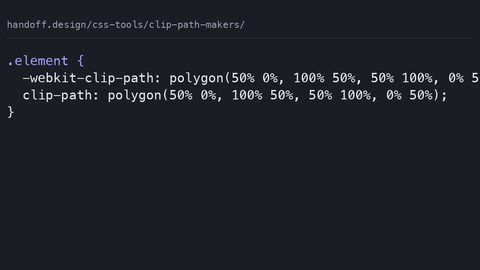 Clip path makers
What CSS clip-path makers emit: stale WebKit prefixes and absolute units that break on resize, with hand-written percentage-based replacements and accessible fallbacks.
Clip path makers
What CSS clip-path makers emit: stale WebKit prefixes and absolute units that break on resize, with hand-written percentage-based replacements and accessible fallbacks.
-
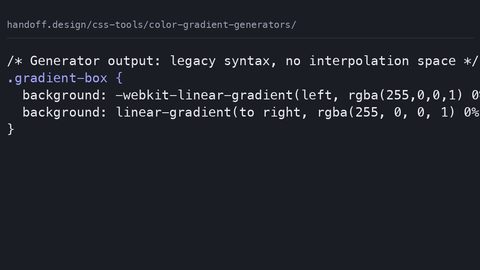 Color gradient generators
What CSS gradient generators emit: legacy WebKit syntax and hsl() stops, with modern oklch interpolation replacements and paint-cost warnings for animated gradients.
Color gradient generators
What CSS gradient generators emit: legacy WebKit syntax and hsl() stops, with modern oklch interpolation replacements and paint-cost warnings for animated gradients.
-
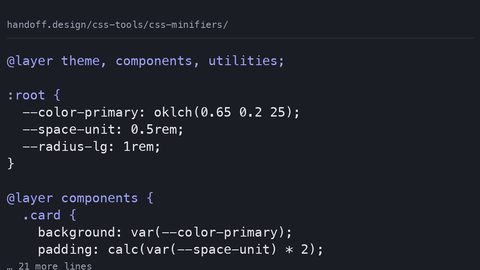 CSS minifiers
Lightning CSS and CSSNano output compared: byte savings before and after gzip, identifier shortening risks for custom properties, and why compression reduces the gain.
CSS minifiers
Lightning CSS and CSSNano output compared: byte savings before and after gzip, identifier shortening risks for custom properties, and why compression reduces the gain.
-
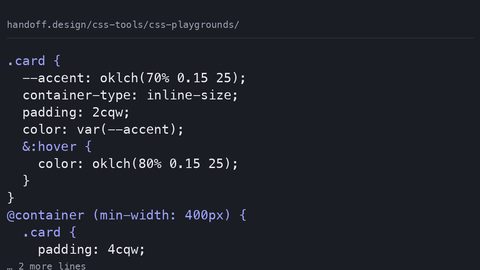 CSS playgrounds
What CodePen, JSFiddle, and Playcode actually emit when you export CSS: autoprefixer bloat, hidden feature-support gaps, and the production-ready equivalent with fallbacks.
CSS playgrounds
What CodePen, JSFiddle, and Playcode actually emit when you export CSS: autoprefixer bloat, hidden feature-support gaps, and the production-ready equivalent with fallbacks.
-
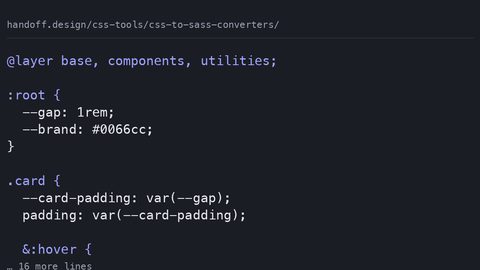 CSS to Sass converters
What CSS-to-Sass converters emit and what they lose: custom properties become frozen build-time constants, native nesting breaks, and cascade layers are stripped.
CSS to Sass converters
What CSS-to-Sass converters emit and what they lose: custom properties become frozen build-time constants, native nesting breaks, and cascade layers are stripped.
-
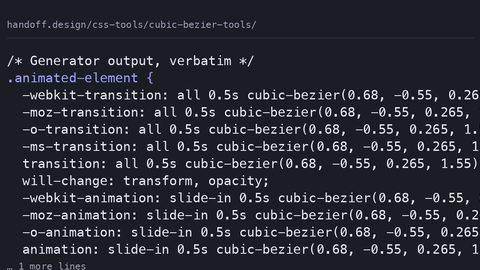 Cubic bezier tools
What cubic-bezier generator tools emit versus what you should ship: auditing the verbose output, stale prefixes, and unnecessary paint costs in generated easing CSS.
Cubic bezier tools
What cubic-bezier generator tools emit versus what you should ship: auditing the verbose output, stale prefixes, and unnecessary paint costs in generated easing CSS.
-
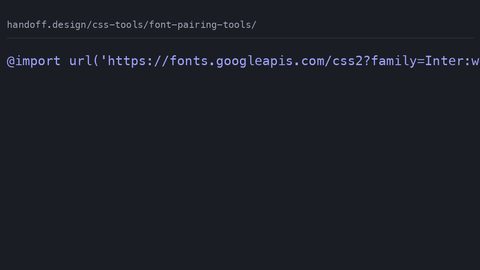 Font pairing tools
What font pairing tools generate for @font-face and Google Fonts imports, and the hand-written production CSS with font-display, preload, and fallback stacks that prevents FOIT and CLS.
Font pairing tools
What font pairing tools generate for @font-face and Google Fonts imports, and the hand-written production CSS with font-display, preload, and fallback stacks that prevents FOIT and CLS.
-
 Grid layout generators
-
 SVG shape generators
Read next
-
Grid layout generators
-
SVG shape generators
-
CSS to Sass converters
What CSS-to-Sass converters emit and what they lose: custom properties become frozen build-time constants, native nesting breaks, and cascade layers are stripped.
-
Cubic bezier tools
What cubic-bezier generator tools emit versus what you should ship: auditing the verbose output, stale prefixes, and unnecessary paint costs in generated easing CSS.
-
CSS playgrounds
What CodePen, JSFiddle, and Playcode actually emit when you export CSS: autoprefixer bloat, hidden feature-support gaps, and the production-ready equivalent with fallbacks.
-
Font pairing tools
What font pairing tools generate for @font-face and Google Fonts imports, and the hand-written production CSS with font-display, preload, and fallback stacks that prevents FOIT and CLS.