An Introduction to CUBE CSS: Composition, Utility, Block, Exception
CUBE CSS separates layout composition from visual treatment so the cascade helps rather than hinders. See a component written both ways and understand the trade-off.
If you write CSS for a living, you have felt the cascade turn on you. Not the cascade as the specification defines it, origin, layer, specificity, source order, but the cascade as it behaves after two years of adding features to a component that was never allowed to decompose. One selector carries layout, spacing, colour, and type. Change the padding and you break the grid. Change the colour and you trigger a specificity war three files away. The CUBE CSS methodology exists because that tangle is not a discipline problem; it is a structural one. CUBE stands for Composition, Utility, Block, Exception. Authored by Andy Bell, it separates layout arrangement from visual treatment so the cascade has fewer fights to win. This article shows you the same card twice: once written the way most codebases write it, once written as CUBE. It names exactly what that separation protects against as a project scales.
The Monolithic Card and the Specificity Trap
The most common card in production looks like this. One class, maybe two, and every concern jammed into the same selector:
.card {
  display: grid;
  grid-template-columns: 1fr;
  gap: 1rem;
  padding: 1.5rem;
  background: var(--surface);
  border: 1px solid var(--border);
  border-radius: 0.5rem;
  box-shadow: 0 1px 3px rgba(0,0,0,0.1);
  font-size: 1rem;
  line-height: 1.5;
  color: var(--text);
}

.card h3 {
  font-size: 1.25rem;
  margin: 0;
}

.card--featured {
  background: var(--accent-soft);
  border-color: var(--accent);
  box-shadow: 0 4px 12px rgba(0,0,0,0.15);
}
That works until the day the card needs to sit in a sidebar where the gap should be 0.75rem, or in a grid where the padding must collapse to zero. Now you add .card–compact, .card–flush, and the specificity arms race begins. The cascade is not confused. It is doing exactly what the selectors ask. The problem is that the layout machinery, the grid, the gap, the padding, is welded to the visual treatment, the colour, the border, the shadow. When one changes, the other must change with it. There is no way to express that relationship except by writing more selectors that are more specific than the last ones.
The CUBE Card: Composition, Utility, Block, Exception
CUBE decomposes that same card into layers that map onto native CSS features. The Composition layer is a layout primitive, no aesthetics. The Utility layer is atomic CSS, one property per class. The Block layer is the component’s own visual identity. The Exception layer is where a modifier breaks the rule.
CSS For Each Layer
/* Composition: layout only, no visual treatment */
.layout-stack {
  display: grid;
  gap: 1rem;
}

/* Utility: atomic, single responsibility */
.p-0 { padding: 0; }
.p-4 { padding: 1.5rem; }
.bg-surface { background: var(--surface); }
.border-default { border: 1px solid var(--border); }
.rounded-md { border-radius: 0.5rem; }
.shadow-sm { box-shadow: 0 1px 3px rgba(0,0,0,0.1); }
.text-base { font-size: 1rem; line-height: 1.5; }
.text-lg { font-size: 1.25rem; }
.text-primary { color: var(--text); }

/* Block: the component's own name, scoped to its own state */
.card-title {
  margin: 0;
}

/* Exception: a deliberate override, not a specificity hack */
.card--featured {
  background: var(--accent-soft);
  border-color: var(--accent);
  box-shadow: 0 4px 12px rgba(0,0,0,0.15);
}
How The Markup Comes Together
<article class="layout-stack p-4 bg-surface border-default rounded-md shadow-sm text-primary">
  <h3 class="text-lg card-title">Featured card</h3>
  <p class="text-base">Content goes here.</p>
</article>
The layout lives in the layout-stack grouping class. The visual treatment lives in the utilities. The block class handles only what is intrinsic to the card: the title margin reset. The exception class changes the theme, not the layout. If the card moves into a sidebar, swap p-4 for p-2 and the gap is still the grouping’s job. Do not touch the block class. Do not write a new one. The cascade has nothing to fight because no selector owns both layout and aesthetics.
CUBE CSS vs BEM: What Replaces What
The first comparison a developer makes is CUBE CSS vs BEM. The honest answer: they are not opponents. BEM’s Block Element Modifier naming convention solves a real problem. It keeps selectors flat and readable. But BEM forces every visual variation into a modifier class, which means the modifier carries both layout and style. CUBE says that the grouping and utility layers already handle what BEM’s modifiers were doing. The block class in CUBE is closer to BEM’s element classes, and the exception layer is a narrow, deliberate override. The common mistake is treating CUBE as a strict replacement. It is complementary. Grouping and utilities take over the work that BEM’s modifier classes did, and the block classes get smaller. If you are migrating, keep the BEM naming for the block layer and let utilities handle the variations. The cascade stays flat. Specificity stays low.
CSS Layout vs Visual Treatment Separation: Why It Matters at Scale
The phrase CSS layout vs visual treatment separation names the core of the methodology. The protection it offers is concrete. When layout and visual styles are tangled in the same selector, three failures compound.
Three Failures That Compound
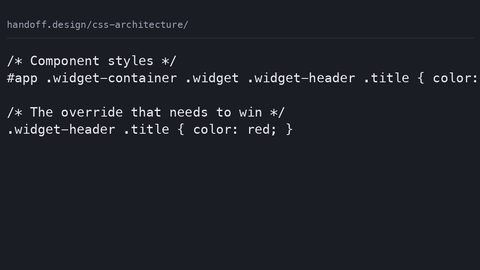
First, the cascade fights you. A utility class that sets display: grid on a component that already has display: grid in its block class triggers a specificity war. The only way to win is a higher-specificity selector or an !important. Both poison the file for the next person.
Second, design tokens scatter across components. The same –color-accent value appears inside ten different block classes. Changing the token means editing ten files instead of one.
Third, you cannot change a component’s layout context without rewriting its CSS. The card in the sidebar needs different padding, but the padding is in the same class as the border radius. You copy the whole class and maintain two versions.
CUBE’s answer: the grouping layer owns layout, the utility layer owns atomic visual properties, and the block layer owns only component identity. The cascade has fewer conflicts because the selectors have narrower responsibilities. Design tokens stay centralised because utilities reference them, not the other way around. Layout context changes by swapping a utility, not by rewriting a block.
Composition Layer: The Layout Primitive
The composition layer is where CUBE maps onto native CSS Grid and Flexbox. A grouping class is a layout primitive. It names a pattern, not a component. .layout-stack, .layout-grid, .layout-cluster: these are not tied to a card or a header. They are reusable blocks of layout machinery.
Grid vs Flexbox: One Axis or Two
Grid is the two-axis tool for page-level and section-level arrangement. Flexbox is the one-axis tool for distribution within a line. The distinction is not macro versus micro, subgrid makes grid the correct choice for many component-internal alignments. It is one-axis versus two-axis. A grouping class sets display, grid-template-columns, gap, align-items, justify-content, and nothing else. No colour. No border. No font. That separation lets you put the same grouping around a card, a form, or a list of links without writing a new class.
Design Tokens In The Composition Layer
The design tokens, the custom properties for space and size, live in the grouping layer as variables. The gap is var(–space-m) rather than a hard-coded pixel value. When the design system changes the space scale, the grouping classes update once. Every component inherits the new rhythm.
Utility Layer: Atomic CSS and the Cascade’s Friend
The utility layer is atomic CSS: one property, one class. .p-4 is padding. .text-base is font size. .bg-surface is background. The cascade behaves well here because the selectors are flat and the specificity is uniformly low.
The Compression Argument
A common objection is that utility classes bloat the HTML. Gzip and brotli compression exploit repetition. The verbose source compresses well because repeated class names are exactly the redundancy that a dictionary-based compressor loves.
Tokens and Performance
The utility layer is where design tokens get consumed. Every utility references a custom property, never a hard-coded value. That keeps the tokens centralised: define the token once in the design system, and the utility is the access point. If the border radius changes from 0.5rem to 0.75rem, change the token value, not the utility class. On performance: utilities are almost always compositor-only when they touch transform and opacity. Layout-triggering properties like padding and margin cost a layout pass. That cost is identical whether the property lives in a utility or in a block class. The utility layer does not add cost. It makes the cost visible.
Block Layer: The Component’s Own Name
The block layer is the component’s identity. It is the smallest piece of CSS that makes the card a card and not a stack of divs. In practice, that means the block class handles the things that are not layout and not atomic: the title margin reset, the component-specific font weight, the interactive state intrinsic to the component.
Where BEM Still Earns Its Keep
The block layer is where a naming convention like BEM’s Block Element Modifier still works, but the scope is narrower. The block class does not own the layout; the grouping layer does. The block class does not own the colour; the utility layer does. The block class owns the few rules that would be wrong to hoist into a utility because they are meaningless without the component. The card-title class in the example above is a block class. It sets margin: 0, a reset, and nothing else. That is the discipline. If a rule does not need the component’s name to be correct, it does not belong in the block layer. If it does, it does. The cascade stays calm because the block layer rarely fights. It is too small to have specificity conflicts.
Exception Layer: Where @layer Proves Its Value
The exception layer is where CUBE handles the one-off: the featured card, the urgent alert, the dark-mode variant. The natural instinct is to reach for a modifier class, .card–featured. That is fine as long as the modifier only changes visual treatment, not layout. But CUBE gives you a better tool: the cascade layer.
How @layer Ends The Arms Race
The @layer at-rule is the native CSS mechanism for explicit priority control. Declare @layer composition, utility, block, exception; and the exception layer wins over the block layer regardless of specificity. That is the point. A specificity rule inside a higher-priority layer beats a more specific selector in a lower-priority layer. The exception class can be a flat, low-specificity selector because the layer order does the work.
Without layers, a featured card that needs a different background gets a selector like .card–featured .card__title or worse, a double-class chain. With layers, .featured in the exception layer overrides .card-title in the block layer because the layer order is explicit. The cascade is not a mystery anymore. It is a declared sequence of priority buckets.
The Unlayered Styles Warning
Unlayered styles always win over layered ones. Put everything in a layer, including third-party stylesheets, or the framework will beat you.
Design System CSS Methodology: Where CUBE Sits
CUBE is one of several design system CSS methodology options. ITCSS (Inverted Triangle CSS) organises by specificity and reach; it is a good companion. BEM is a naming convention, not a full architecture. CUBE’s contribution is the explicit separation of concerns: grouping, utility, block, exception. That separation maps onto the native features of CSS: Grid and Flexbox for grouping, atomic classes for utility, a component class for block, and @layer for exception.
When To Choose CUBE
Choose CUBE when the team needs a low-specificity, high-reuse system that does not fight the cascade. The trade-off is that CUBE demands discipline in the block layer. It is easy to let a component class grow until it owns layout again. The methodology does not prevent that; it names it as the failure mode. The design tokens live in the custom properties layer, the layout primitives live in the grouping layer, and the components live in the block layer. When a stakeholder asks why a change is a one-line token edit instead of a ten-file hunt, the answer is the separation, not the tooling.
Common Failures and the Names They Go By
Three failures kill a CUBE implementation. Each has a symptom you can recognise.
Over-Abstraction
A developer writes a .card class that includes layout, then a .card-grid class that includes the same layout, and the grouping layer is empty. The symptom: changing the gap requires editing every component. The fix: extract the pattern into a grouping class and let the component use it.
Specificity Creep From The Exception Layer
A developer writes .card–featured .card__title instead of trusting the layer order. The symptom: a selector that is three classes long and a colleague who cannot override it. The fix: move the exception into its own @layer and keep the selector flat.
Scoped Styles That Duplicate Utilities
A component uses a CSS-in-JS library or a scoped attribute selector to set the same padding and color that utilities already provide. The symptom: the same token value appears in two places, and the design system drifts. The fix: use the utility layer for atomic properties and the block layer only for the component’s intrinsic rules. If you see those three failures, the methodology is not failing. The implementation is.
Getting Started: A Path for the Working Developer
To adopt CUBE on a live codebase, start small. Pick one component, not the whole design system. Write a grouping class for its layout, extract the visual properties into utilities, and leave a block class for the component’s intrinsic rules. Put the exception in its own @layer.
Measure What You Gain
Then measure. How many lines of CSS did the component lose? How many selectors have specificity higher than one class? If the component is simpler, do another one. If the cascade still fights, the grouping and utility layers are likely not distinct enough. A grouping class should never set a colour. A utility class should never set a grid. The methodology is a constraint, and the constraint is what makes the cascade predictable.
Performance and Browser Support
The cost of a CSS file is parse time and layout time. CUBE does not add either. It reorganises the same declarations into lower-specificity, higher-reuse selectors, which compress better and cache better. The fallback for a browser that does not support @layer is straightforward: layer declarations are ignored, and the unlayered block styles win. That is the same behaviour you had before, so the degradation is graceful. Check caniuse for current @layer support before relying on it in production.
FAQ: CUBE CSS Methodology
Does CUBE CSS replace BEM?
No. CUBE is a complementary methodology. BEM’s Block Element Modifier naming convention still works for the block layer; the grouping and utility layers take over what BEM’s modifier classes handled. Use BEM for the component’s own classes and CUBE for the architecture around them.
What is the difference between Composition and Utility in CUBE?
Composition is layout only: display, grid-template-columns, gap, alignment. Utility is atomic visual treatment: padding, margin, colour, font-size. A grouping class owns the layout machinery; a utility class owns a single visual property. The distinction is what keeps the cascade from fighting.
How does @layer help the Exception layer?
@layer gives the Exception layer explicit priority over the Block layer regardless of specificity. Declare @layer composition, utility, block, exception; and the exception wins. That removes the need for higher-specificity selectors and ends the arms race.
Is CUBE CSS a browser feature?
No. It is a methodology, not a language feature. It relies on native CSS features: Grid, Flexbox, custom properties, @layer. The methodology itself is a convention, so it has no baseline status and no engine support table.
What is the most common mistake in CUBE?
Over-abstracting Block-level components before grouping patterns emerge. Developers write a .card class that includes layout, then find the layout repeated in the next component, and the grouping layer stays empty. The fix: extract the pattern into a grouping class early, even if it feels premature.
A Final Warning: The Cascade Is Not Your Enemy
The honest caveat at the end of this article: CUBE does not make the cascade disappear. The cascade is the CSS specification’s mechanism, stable since CSS2, and it will always decide which declaration wins. CUBE is a way to arrange your declarations so that the cascade has fewer conflicts to resolve. The methodology cannot save you from a developer who writes a block class that owns layout and a utility class that owns colour and then wonders why the specificity is tangled. The separation is a discipline, and the discipline is the product. When you adopt CUBE, you are adopting a constraint. The constraint is what the cascade rewards with predictability.
The One Sentence That Holds It Together
The failure mode is the same one that kills every CSS architecture: someone who treats the methodology as a checklist instead of a habit. Remember this: the grouping layer is for layout, the utility layer is for atomic visual properties, the block layer is for component identity, and the exception layer is for deliberate overrides. That is the whole methodology. It fits in one sentence.
More in this guide
CSS Architecture: How to Organise Stylesheets So the Next Change Is SafeThe ITCSS Inverted Triangle CSS Method for Layering StylesheetsWhat CSS-in-JS Libraries Generate and How the Output Performs.