Understanding the content-visibility Property and Its Effect on Rendering Performance
content-visibility defers layout and paint for off-screen content, improving LCP and INP, but requires contain-intrinsic-size to prevent layout shift and breaks find-in-page and accessibility tree exposure.
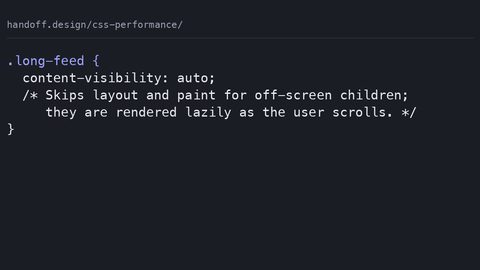
You are here because content-visibility: auto did not make your page faster, or because it made the page jump, or because a screen-reader user hit a wall of missing content. Here is the answer in one sentence: content-visibility: auto tells the rendering engine to skip layout, paint, and composite work for subtrees that are off-screen, and it only improves LCP and INP if you pair it with contain-intrinsic-size and test the accessibility tree. This is a rendering-pipeline instruction, not a visibility toggle. The CSS performance question is really about which stages of the pipeline you are allowed to defer, and what you must pay back when the element scrolls into view.
The rendering pipeline has five stages: style, layout, paint, composite, and layer construction. When you write content-visibility: auto on an element, the engine skips layout, paint, and composite for that element’s entire subtree, provided the subtree is outside the viewport and not intersecting with any find-in-page or accessibility traversal. Style still runs on the parent, and size containment applies to the element itself. That is the distinction that matters: style is never skipped for the element carrying the declaration. Only layout, paint, and composite are skipped for what sits below it. The renderer keeps a placeholder box with the element’s intrinsic size. That is why contain-intrinsic-size exists. Without that placeholder, the element collapses to zero height when off-screen. The moment it scrolls into view, the layout shifts. That shift is a CLS contribution you created yourself.
The LCP Improvement and Its Real Cost
The LCP improvement is real but narrow. LCP measures when the largest contentful paint finishes. If the LCP element is above the fold and you put content-visibility: auto on a sibling below the fold, the engine still renders the LCP element normally. The win comes from deferring the below-fold subtree, which frees the main thread during the initial render. On a long page with heavy images or complex cards, the main thread finishes style and layout faster, and the LCP timestamp moves earlier. That is the mechanism. Measure it with the Performance panel before you ship. You cannot predict the exact LCP improvement from a spec sentence; run the trace.
Getting the Placeholder Right
/* The pattern that helps LCP */
.long-list {
  content-visibility: auto;
  contain-intrinsic-size: auto 500px;
}
The contain-intrinsic-size value is not a guess. It is the average rendered height of the list item or card, in the units the layout uses. For a variable-height card, use the auto keyword with a fallback: auto 500px tells the engine to remember the last rendered size as it scrolls. The first off-screen render uses 500px, then subsequent renders use the actual size. That prevents the cascade of layout shifts that a naive content-visibility: auto produces.
Where the Power Actually Lives: CSS Containment
content-visibility is one member of a family called CSS containment. The contain property takes values for layout, paint, style, and size. Each one draws a boundary around an element’s effects. Layout containment makes the element a formatting context and isolates its layout from the outside. Paint containment clips the subtree to its own box. Style containment scopes counters and quotes. Size containment makes the element’s size independent of its contents. content-visibility: auto is a shorthand that applies layout containment, style containment, and paint containment, plus size containment only when the element is off-screen.
/* Manual containment, the old way */
.off-screen-section {
  contain: layout paint style;
  min-height: 400px;
}
The old technique used contain: strict or contain: layout paint with a manual height or min-height placeholder. That worked but required you to know every possible height in advance. content-visibility: auto removes the manual height only if you add contain-intrinsic-size. The auto keyword on that property is what introduces the memory of actual sizes. The performance difference between contain: layout paint and content-visibility: auto is exactly the size containment that activates off-screen. That is the CSS containment performance story: size containment is the expensive part, and content-visibility makes it conditional.
Off-Screen Rendering Deferral: What Actually Gets Skipped
The off-screen rendering deferral mechanism is precise. When the element with content-visibility: auto sits outside the viewport, the engine skips layout, paint, and composite for the subtree. It does not skip style for the subtree if the subtree has a style-dependent query, and it does not skip the element’s own style. Find-in-page is the exception: if the user searches for a string that matches text inside the off-screen subtree, the engine must render that subtree to answer the query. The deferral is revoked for that pass. The accessibility tree gets the same treatment. If assistive technology navigates into the subtree, the engine renders it. Those revocations are why you cannot treat content-visibility: auto as a pure performance win. It is a contract with the renderer: you accept deferred work in exchange for skipped work, and the renderer decides when to break the contract.
/* The deferral only applies off-screen */
article {
  content-visibility: auto;
  contain-intrinsic-size: auto 600px;
}
Composite is the third stage skipped. Composite is where the engine merges layers into the final frame. Skipping it for an off-screen subtree means the layer tree has fewer elements to merge, which reduces memory pressure on mobile. Paint is the second stage skipped. Layout is the first. Verify all three in the Performance panel: scroll the element into view and watch the rendering timeline for a spike in layout and paint. If there is no spike, the deferral did not work. The usual cause is the element sitting inside a container that already has paint containment or a transform that forces it to render.
The Accessibility Failure Mode: What Breaks and How to Test
The accessibility failure mode is the least documented and the most damaging. When content-visibility: auto defers a subtree, that subtree is not immediately present in the accessibility tree. Screen readers that rely on the accessibility tree for navigation may not see the content until the user scrolls to it or until the engine decides to render it. The failure is not theoretical. Pages that apply content-visibility: auto to large article bodies have shipped with sections that screen-reader users could not reach by virtual cursor navigation. The fix is not to abandon the property. The fix is to test with a real screen reader and a keyboard-only navigation script.
<!-- Test this pattern with NVDA or VoiceOver -->
<div class="long-article" style="content-visibility: auto;">
  <p>This paragraph must be reachable by virtual cursor.</p>
</div>
The WCAG 2.2 success criterion that applies is 2.4.6 Headings and Labels, because a heading inside a deferred subtree may not be exposed. The deeper criterion is 1.3.1 Info and Relationships, because the semantic structure must be present in the accessibility tree. Chromium has improved the revocation behaviour, but Gecko and WebKit have their own implementations, and they are not identical. Test in all three engines, not just Chrome. If the screen reader cannot reach the content without scrolling, the deferral is failing the accessibility contract. Remove content-visibility: auto from that element or set it to visible.
If It Is Not Supported: The Fallback Is Already There
If the engine does not support content-visibility, the element renders normally with no size containment and no deferral. That is the degradation path, and it is acceptable. The content is fully visible, the layout is correct, and the only loss is the performance optimisation. You do not need a polyfill. You do not need to add a manual height. The unsupported engine ignores the property and proceeds through the full rendering pipeline. This is the honest version: content-visibility is an enhancement, not a dependency. The @supports guard is optional because the fallback is the default rendering, but it is useful if you want to conditionally add a different optimisation for non-supporting engines.
@supports (content-visibility: auto) {
  .card-list {
    content-visibility: auto;
    contain-intrinsic-size: auto 300px;
  }
}
Support Across Engines
Chromium shipped content-visibility in version 85. Gecko shipped it in Firefox 125 in April 2024. WebKit shipped it in Safari 18.0 in September 2024 for both iOS and macOS. The real interop gap is users on device-locked older engines: an old iPhone that cannot update its iOS Safari, or an Android WebView in an app that never ships an update. No published study measures that group precisely, and every estimate depends on the site’s own analytics. For those users, the page renders normally, which is the correct outcome. Do not build a JavaScript fallback that tries to simulate the deferral; it will be slower than the engine’s native path.
Common Mistakes and the Failure Cases That Teach the Real Rule
Two mistakes account for nearly every broken content-visibility deployment. The first is applying the property without contain-intrinsic-size, which causes off-screen elements to collapse to zero height. When the user scrolls, the layout shifts, and the CLS score jumps. The second is applying it to above-the-fold content. That does not defer anything because the element is already in view, and the property adds containment overhead without any benefit. The rule: only apply it to elements reliably below the viewport on initial load, and always pair it with contain-intrinsic-size.
/* Wrong: collapses off-screen, shifts layout */
.wrong {
  content-visibility: auto;
}

/* Right: reserves space and remembers sizes */
.right {
  content-visibility: auto;
  contain-intrinsic-size: auto 400px;
}
The Third Failure Mode
A third failure mode is subtler. If the element contains a <canvas> or an element with its own layer, the deferral may be partially revoked because the engine needs the layer for compositing. The same happens with position: fixed descendants, which are always rendered. The practical test: open the Performance panel, scroll the element out of view, and confirm that layout and paint do not run for that subtree. If they run, the engine has a reason, and you need to find it. The reason is usually a style that forces render, like a filter or a will-change: transform on a descendant.
Measuring INP Improvement Without Misreading the Timeline
INP measures the longest interaction delay. content-visibility helps it by reducing the main-thread work that competes with event handlers. When a user clicks a button that triggers a scroll or a re-render, the engine may have to do layout and paint for off-screen subtrees if they were not deferred. With content-visibility: auto, those subtrees are already skipped, so the interaction handler finishes faster. The measurable improvement appears in the Long Animation Frames (LoAF) table in the Performance panel: the count of long tasks drops, and the INP histogram shifts earlier.
Run the Comparison
// Measure with the PerformanceObserver, in the browser console
const observer = new PerformanceObserver((list) => {
  for (const entry of list.getEntries()) {
    if (entry.entryType === 'long-animation-frame') {
      console.log('Long frame:', entry.duration, entry.startTime);
    }
  }
});
observer.observe({ type: 'long-animation-frame', buffered: true });
The key is to measure the same interaction with and without the property. Disable content-visibility in DevTools by removing the declaration, reload, run the same scroll-and-click interaction, and compare the LoAF durations. A reduction of 50 to 100 milliseconds in the longest task is typical for pages with large off-screen DOM subtrees. If you see no change, the property is not deferring anything. Look for the forcing conditions described above. The honest caveat: INP is a field metric, and the lab measurement only approximates real-user conditions. The engine is the final renderer, and its decisions about deferral revocation are not fully documented.
FAQ: The Four Questions That Come Up in Code Review
Does content-visibility: auto work with lazy-loaded images?
Yes, but they are independent optimisations. Lazy loading defers the network request; content-visibility defers the rendering. If the image is off-screen and its container has content-visibility: auto, the image does not render until the container scrolls into view. The contain-intrinsic-size on the container reserves the space, so the image load does not cause layout shift. Use both: loading=”lazy” on the image and content-visibility: auto on the wrapper.
What is the difference between auto and hidden?
The hidden value applies size containment and skips rendering even when the element is on-screen. The content is not visible, not focusable, and not searchable via find-in-page. The auto value only skips rendering when off-screen. Use hidden for large off-screen sections you want to defer unconditionally, but know that hidden removes the content from the accessibility tree entirely until you change the value.
Why does my page still shift with content-visibility: auto?
The contain-intrinsic-size value is wrong or missing. If the actual rendered height is larger than the placeholder, the layout shifts when the element scrolls into view. Use the auto keyword so the engine remembers the last rendered size. If the element contains an image without an aspect-ratio attribute, the height is unknown until the image loads, and the placeholder cannot match it.
Can I use content-visibility: auto on the body element?
No, and it will not work. The body element is always in the viewport, so the deferral never activates. Applying content-visibility to the root or body also breaks the viewport-percentage sizing for children. Use it on section elements or list containers inside the body, and only on those that start below the fold.
The Table: Comparing content-visibility, contain, and visibility
| Property | Layout skip | Paint skip | Composite skip | Size placeholder | Accessibility tree |
|---|---|---|---|---|---|
| content-visibility: auto | Off-screen only | Off-screen only | Off-screen only | Required via contain-intrinsic-size | Deferred off-screen, rendered on demand |
| content-visibility: hidden | Always | Always | Always | Required | Removed entirely |
| contain: layout paint | No | No | No | Not applicable | Always present |
| visibility: hidden | No | Yes | Yes | Not applicable | Removed (with display:none for full removal) |
The table shows the axis that matters: what work is deferred and what the accessibility tree sees. content-visibility: auto is the only value that gives you conditional deferral with conditional accessibility. The hidden value is stronger but more dangerous because it removes content from the accessibility tree with no revocation mechanism. The contain property without content-visibility is a pure isolation tool, not a render-skipping tool. visibility: hidden skips paint but keeps layout, so the element occupies space and causes CLS if you toggle it.
The Honest Caveat: The Engine Is the Final Renderer
Every statement here describes what the specification says should happen and what the major engines do in their current implementations. The specification is CSS Containment Module Level 2, and the engines have shipped it. But the renderer is a complex machine, and the revocation conditions for the deferral are not fully enumerated in any public document. Shadow DOM boundaries, nested content-visibility declarations, and elements with their own stacking contexts can change the behaviour. The only way to know what your page does is to test it in Chromium, Gecko, and WebKit with the Performance panel and a screen reader.The accessibility revocation behaviour differs between engines, and shipping content-visibility: auto without a screen-reader test is a WCAG 2.2 failure waiting to happen. That is the thing the performance guides do not tell you, because they measure the trace and not the tree.
More in this guide
CSS Performance and Core Web Vitals What Declarations Cost in Layout Paint CompositeHow CSS Affects Core Web Vitals: LCP, CLS, and INPMeasuring the Performance Cost of Complex CSS Selectors in the Rendering Pipeline.