The ITCSS Inverted Triangle CSS Method for Layering Stylesheets
ITCSS layers stylesheets from generic to specific so specificity is predictable. See a conflict resolved by layering versus selector hacks, and how @layer maps on.
The Moment the Cascade Breaks
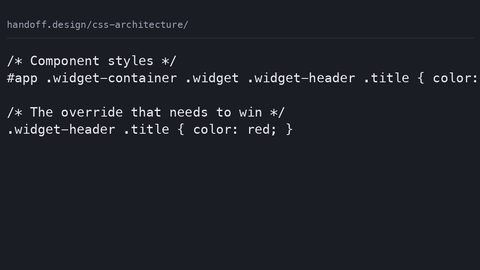
You are four hours into a redesign, and the button is the wrong shade of blue. You inspect it. The rule that should win is overridden by a selector two files up that nobody remembers writing. You add a class to the parent. That breaks the card. You add an ID to the button. That breaks the modal. You rename the class to .btn--primary-special-final. Somewhere, a developer three years from now will hate you. This is the specificity arms race. It is not a CSS bug. It is a consequence of stylesheets with no imposed order. The ITCSS inverted triangle CSS method ends that war by making the cascade predictable from the file structure alone.
ITCSS: The Inverted Triangle CSS Method for Layering Stylesheets
ITCSS stands for Inverted Triangle CSS, a methodology for organising stylesheets so that specificity increases as you move down the file, while reach decreases. The triangle is wide at the top, where rules are broad and low in specificity, and narrow at the bottom, where rules are specific and targeted. Harry Roberts defined the method in his 2014 publication "Managing CSS Projects with ITCSS." It is not a CSS specification feature; it is a discipline. The browser does not enforce it. You enforce it by the order in which you load files and the rules you allow in each layer.
Earlier layers contain selectors with low specificity that set defaults. Later layers contain selectors with high specificity that override those defaults. Since each layer loads after the previous one, source order alone would win the cascade even if specificity were equal. The triangle makes specificity and source order work in the same direction. You never need a specificity hack to override something.
The Seven Layers: From Wide to Narrow
The ITCSS layer structure defines seven layers, each with a clear job.
Settings, Tools And Generic
The first is Settings: variables, custom properties, font definitions, colour palettes. This layer produces no CSS output on its own; it only feeds values into later layers. The second is Tools: mixins, functions, extendable silent classes. In a pre-processor workflow, this layer also produces no CSS output. The third is Generic: reset, normalize, box-sizing rules, print styles. This is where you flatten browser defaults. The fourth is Elements: unclassed HTML element styling for h1, a, p, ul, and so on.
Objects, Components And Utilities
Below Elements come the layers that most projects actually write daily. Objects are layout patterns, grid systems, media objects, container classes, with no cosmetics attached. Components are UI pieces with cosmetics: buttons, cards, navs, modals. Utilities sit at the bottom, single-purpose helper classes where !important is allowed because they are designed to win. The specificity gradient ITCSS describes runs from the near-zero specificity of a reset to the (1,0,0) or higher specificity of a utility override.
ITCSS Layer Structure In Practice
The seven layers in order are Settings, Tools, Generic, Elements, Objects, Components, Utilities. Each layer is a separate file or a set of files, and the load order is fixed. Later files override earlier ones by source order: a component rule always beats an element rule, and a utility always beats a component. This is the inverse of the old pattern where everything was a class and the last writer to touch the file won, regardless of what the cascade intended.
The layer order is not a suggestion. Place a utility class above components in the file, and it will lose to a component rule with equal or higher specificity. The whole point of the triangle collapses. The most frequent mistake in adopting ITCSS is treating the layers as strict file-separation rules rather than a specificity-order principle. That leads to over-fragmentation and files that contain one rule each.
A Practical Override Example
You have a card component that sets padding to 1rem. You want a dense card variant with padding of 0.5rem. In ITCSS, the component layer holds the base card. The utility layer holds .u-pad-sm { padding: 0.5rem !important; }. Utilities load last, so the utility wins without you ever touching the component rule.
/* layer: components */
.card { padding: 1rem; background: white; }

/* layer: utilities */
.u-pad-sm { padding: 0.5rem !important; }
In a project without ITCSS, you would write a more specific selector like .card--dense .card__body, or add an ID, or use !important on a rule outside a utility layer. Each escalation makes the next override harder. ITCSS stops the escalation by giving the utility layer the final say by design.
The Specificity Gradient ITCSS Enforces
The specificity gradient ITCSS enforces is the opposite of what most developers do instinctively. In a typical stylesheet, specificity rises and falls with selector complexity, producing a jagged line. A rule with (0,1,0) might come after a rule with (0,3,0) and lose, forcing the later rule to be even more specific. ITCSS flattens that jaggedness into a smooth gradient: every rule in a lower layer has higher or equal specificity than every rule in a higher layer, because it comes later in source order.
The gradient also controls reach. A rule like body { font-family: sans-serif; } has broad reach and low specificity. A rule like .btn--primary { background: blue; } has narrow reach and medium specificity. A rule like .u-mt-4 { margin-top: 1rem; } has the narrowest reach and the highest specificity. This mapping means you know exactly where a new style goes: if it is a default, it goes up; if it is an override, it goes down.
The Specificity War, And How ITCSS Ends It
Two developers both style the same heading. One writes h2.title, the other writes header.main h2.title. The second wins because (0,2,0) beats (0,1,0). The first then adds a class to the parent, making it header.main .section h2.title with (0,3,0). This is the arms race. ITCSS protects against it by making the layer order the only thing that matters, not the selector length.
/* specificity war, bad */
h2.title { color: red; }
header.main h2.title { color: blue; } /* wins */
header.main .section h2.title { color: green; } /* wins again */

/* ITCSS, good */
/* elements layer */
h2 { color: red; }
/* components layer */
.title--section { color: blue; } /* wins by source order */
/* utilities layer */
.u-text-green { color: green !important; } /* wins by design */
In the ITCSS example, the component and utility rules never fight over the same element. The utility exists only when a component must be overridden in a one-off context, and !important is the agreed-upon escape hatch.
ITCSS And BEM: Complementary, Not Opposed
ITCSS vs BEM methodology is a false opposition. BEM, Block, Element, Modifier, is a naming convention. ITCSS is a layering strategy. They solve different problems and are often used together. Harry Roberts himself recommends BEM-style names for classes within the components layer: a clear naming convention makes the layer boundaries easier to see. What ITCSS adds on top of BEM is an answer to the question "where does this class go?" BEM tells you how to name the class; ITCSS tells you which file to put it in.
Tension arises when BEM is used without layers. In a pure BEM project, you might have .block__element--modifier selectors that are all equally specific, and the cascade is decided by source order alone. That works until you need a global override. At that point you either change the modifier or write a new class with a longer name. ITCSS gives you a third option: drop a utility class into the last layer and let it win by convention.
Where CUBE CSS Fits
A related methodology called CUBE CSS stands for Composition, Utility, Block, Exception. Andy Bell created CUBE CSS partly as a reaction to the rigidity of ITCSS and BEM. Where ITCSS separates objects from components and utilities, CUBE CSS collapses composition and utility into a smaller set of primitives. The two approaches are not mutually exclusive; you can use ITCSS as the layer skeleton and CUBE-style utility classes inside it. The choice is about how much structure you need for a given project size.
/* BEM within an ITCSS component layer */
/* block */
.card { padding: 1rem; }
/* element */
.card__title { font-size: 1.25rem; }
/* modifier */
.card--featured { border-color: gold; }

/* utility layer, still ITCSS */
.u-mt-0 { margin-top: 0 !important; }
On a large design system, BEM gives you the vocabulary to describe components, and ITCSS gives you the hierarchy to manage them. On a small site, BEM alone might be enough. ITCSS introduces file-splitting overhead you do not need.
CSS Architecture Layers, From Token To Override
The CSS architecture layers in ITCSS are not the only way to organise stylesheets, but they are the most explicit about the cascade. The seven layers form a complete pipeline from design token to final override. A design token is a named value like --color-primary or --space-md, stored in the Settings layer as custom properties. The Tools layer uses those tokens inside mixins or functions. The Generic layer resets the browser's default box model. The Elements layer styles bare HTML tags. The Objects layer builds layout primitives. The Components layer assembles those primitives into UI pieces. The Utilities layer provides last-resort tweaks.
This pipeline has a direct benefit: dead CSS becomes easier to find. Each layer has a single responsibility. You can audit a component layer and see which classes are never used in the markup. Utility classes that appear in only one place can be inlined or removed. Tree shaking of unused CSS remains a tooling problem; browsers do not do it automatically. A clear layer structure makes the manual audit tractable.
Native @layer: The Browser Enforces It
Native @layer in CSS now provides the same priority-bucket mechanism with browser enforcement. Declare @layer settings, tools, generic, elements, objects, components, utilities; then write rules inside those layers. The cascade orders layers by their declaration order, not by specificity. A rule in a later layer beats a rule in an earlier layer regardless of specificity. This is a direct implementation of ITCSS's principle, without you managing file load order manually.
@layer settings, tools, generic, elements, objects, components, utilities;

@layer components {
  .card { padding: 1rem; }
}

@layer utilities {
  .u-pad-sm { padding: 0.5rem !important; }
}
The difference: @layer is a CSS specification feature, so the browser enforces the order. ITCSS relies on your discipline to keep the files in the right sequence. Both achieve the same specificity gradient. The most frequent mistake with @layer is placing layer declarations after @import rules that inject styles into unlayered or differently-layered positions. That breaks the ordering you intended.
What ITCSS Protects Against
ITCSS protects against three specific failures.
Not Knowing Where To Put A New Style
The first is the inability to know where to put a new style. In an unstructured stylesheet, a new rule could go after the rule it overrides, or in a new file, or at the end of a long cascade. With ITCSS, the answer is determined by what the rule does: if it sets a default, it goes in the elements or objects layer; if it styles a component, it goes in components; if it is a one-off tweak, it goes in utilities.
Fear Of Breaking Something Elsewhere
The second failure is the fear that adding a class will break something elsewhere. The layer order is fixed. Adding a class to a component layer can only override elements or objects, never other components that come later. Adding a utility can override anything, but only when you explicitly add !important. That is a visible signal to other developers.
The Specificity Arms Race
The third is the specificity arms race, where each developer writes a longer selector than the last to win the cascade. ITCSS makes that unnecessary: the layer order is the arbiter. You never need to match or beat a selector's specificity. You only need to put your rule in a layer that loads later.
The failure case is what happens when the normal route is closed. You are on a legacy project with ITCSS already in place, but the utility layer has been polluted with component-specific rules over time. The triangle no longer holds. The fix: re-audit. Move misplaced rules to their correct layers. If you cannot because of time, add a new layer at the bottom, a "legacy" bucket, and migrate rules into it as you touch them. This is not elegant, but it stops the bleeding.
The Practical Setup For A New Project
For a new project, the setup is mechanical. First, create seven directories or use a pre-processor that supports partials. Second, define your design tokens in settings as custom properties. Third, write your reset in generic and your element defaults in elements. Fourth, build objects for layout and components for UI. Finally, keep utilities small and audit them quarterly.
Use a pre-processor like Sass if you need mixins and functions; the Tools layer depends on them. Without a pre-processor, the Tools layer is empty. That is fine. ITCSS does not require it. The Generic layer can use a modern reset like Andy Bell's or the classic normalize.css. The choice is yours as long as the box-sizing rule is there.
@layer Or Build Tool?
Decide early whether to use @layer or a build tool to enforce order. Target modern browsers, and @layer is the better choice: it moves enforcement from your file-loading to the browser's cascade. Need to support older browsers? Fall back to concatenating files in the correct order. The naming of the layers is the same in both cases, so switching later is a mechanical task.
/* settings.css */
:root {
  --color-primary: #0066cc;
  --space-md: 1rem;
}

/* generic.css */
*, *::before, *::after { box-sizing: border-box; }

/* elements.css */
h1 { font-size: 2rem; }

/* objects.css */
.container { max-width: 60rem; margin-inline: auto; }

/* components.css */
.card { padding: var(--space-md); }

/* utilities.css */
.u-text-center { text-align: center !important; }
This is the complete ITCSS layer structure in five files. The Tools layer is empty and the Settings layer only holds tokens. The result: a stylesheet where the cascade is predictable by reading the file order alone.
Common Mistakes And How To Avoid Them
The most frequent mistake is placing utility classes above components in the triangle. That defeats the specificity management purpose. A utility rule appearing before a component rule, with the component rule carrying equal or higher specificity, means the utility loses. Enforce the layer order in your build process: concatenate files in the correct sequence, or use @layer.
The second most frequent mistake is treating ITCSS layers as strict file-separation rules rather than a specificity-order principle. Some developers create a separate file for every layer and refuse to put two related rules in the same file, even when they belong to the same component. This leads to over-fragmentation where a single feature's styles split across five files. ITCSS is a principle, not a law about file counts. One component can use a utility inside it, as long as the utility is defined in the utility layer and imported later.
Another failure: using !important outside the utility layer. Needing !important on a component rule signals that the layer ordering is wrong. Move the rule to utilities. Better still, fix the component so it does not need the override. Reserve !important for the rare one-off that is genuinely outside the design system.
FAQ: ITCSS And Modern CSS
Is ITCSS still relevant in 2025? Yes, but the tooling has changed. Native @layer implements the same priority ordering, so you get browser enforcement instead of manual file ordering. The methodology remains valuable because it trains you to think in specificity gradients.
Does ITCSS work with Tailwind or Bootstrap? Tailwind is effectively a utility layer, so you can wrap it in @layer utilities. Bootstrap places components and utilities in an unlayered position, so you need to wrap it in a layer and declare that layer after your own components.
What is the difference between ITCSS and CUBE CSS? CUBE CSS collapses the object and component distinction and emphasises composition. ITCSS is more granular, which helps large teams. CUBE is lighter for small sites or prototypes.
Can I use ITCSS with CSS custom properties? Yes, and you should. Design tokens belong in the settings layer as custom properties. They cascade through the layers, and the tools layer can reference them in calc() or var().
Who This Methodology Suits
ITCSS suits the design-system author who needs precise control over specification behaviour and can defend the layer structure to stakeholders. It suits the technical writer who needs to document where styles live. It suits the developer on a team of five or more, where the specificity arms race is a real threat. It does not suit the solo developer building a small static site, where the overhead of seven layers outweighs the benefit. It does not suit someone debugging a React state bug or comparing CSS-in-JS libraries; those are JavaScript questions. It does not suit a beginner learning CSS from zero. That person should start with web.dev or MDN and return here once they have written enough CSS to feel the pain ITCSS solves.
More in this guide
CSS Architecture: How to Organise Stylesheets So the Next Change Is SafeHow to Refactor Legacy CSS Incrementally on a Live Production SiteAn Introduction to CUBE CSS: Composition, Utility, Block, Exception.