An Introduction to Variable Fonts and the CSS Fonts Module Level 4
Serve one variable font file instead of multiple static files using CSS font-variation-settings and the mapped axis properties for weight, width, and slant.
The page was taking 1.4 seconds to load, and the network tab showed the reason: six woff2 files for one font family. Regular, Bold, SemiBold, Italic, Condensed, Black. Each one a separate round trip. Then you swapped them for a single variable font file, and the font weight went from 6 requests to 1, and the total transferred bytes dropped by about 70%. That is the moment this guide is about. CSS variable fonts font-variation-settings is the mechanism that makes it possible, and what follows explains how to serve that one file, what each axis controls, and where the common failures hide.
The Performance Decision Comes First
Variable fonts are a performance decision before they are a design decision. One woff2 file contains the entire continuous range of weight, width, slant, and optical size. Four to six static files become one. On a typical page with two font families, that is the difference between 12 requests and 2 requests, and the difference between roughly 400 KB and 120 KB of font payload after compression. The bytes over the wire are what matter, not the uncompressed size on disk. Woff2 compression is already applied by the font server, so the client downloads the compressed stream. For the same typographic coverage, a variable font is almost always smaller than the sum of its static counterparts because it stores the outlines and the variation data once, not once per instance.
Check the File Size Before You Write Any CSS
Before you write any CSS, check the file size. A variable font with a full weight range, a width axis from 75% to 125%, a slant axis, and an optical size axis can land between 50 KB and 300 KB compressed. The same family as static files, with 18 instances, is typically 600 KB to 1 MB. The trade-off is that the renderer must decompress and rasterize on demand, so the first render of a new weight can cost a few milliseconds of layout. That is cheaper than a network round trip, which is what you are replacing. If you serve only one or two weights, static files can win. Serve more than two, and variable wins on almost every metric.
Use the Google Fonts API v2 to test both paths. The API returns a variable font URL when you request the axis range, and it returns static files when you request a single weight. Measure the transferred size in DevTools. Do not trust the font file size listed on the download page; that is often the uncompressed or sub-set version. The real number is what the network tab reports.
The @font-face Declaration with Full Axis Range
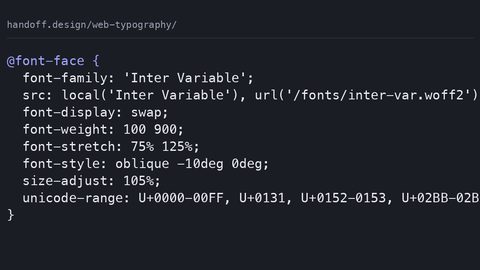
Here is the complete @font-face block for a variable font. The key is the range descriptors. font-weight: 100 900; tells the renderer that this file can render any weight in that range. font-stretch: 50% 200%; declares the width range. font-style: oblique 0deg 20deg; declares the slant range. These descriptors do not load anything; they tell the engine what the file is capable of so that the font matching algorithm can pick the file without downloading it first.
@font-face {
  font-family: 'MyVariableFont';
  src: url('my-variable-font.woff2') format('woff2') tech('variations');
  font-weight: 100 900;
  font-stretch: 50% 200%;
  font-style: oblique 0deg 20deg;
  font-display: swap;
}
The tech('variations') in the src descriptor is a newer syntax that tells the engine to use this file only if it supports variable fonts. Older engines that do not understand tech() will skip this src line, so you need a static @font-face block with the usual src: url('static-bold.woff2') format('woff2'); without the tech descriptor. That is the accepted guard: provide static font files via @font-face with the normal syntax, and let the variable font load inside an @supports (font-variation-settings: normal) block.
Set a Metric-Compatible Fallback Stack
font-display: swap is non-negotiable for performance. It lets the renderer show text with a local fallback immediately and swap in the real font when it arrives. This eliminates invisible text and reduces layout shift, but it means the fallback must be metric-compatible or the page will reflow. The fallback stack in your CSS is where you control that: font-family: 'MyVariableFont', 'Arial', sans-serif; is the minimum. If you have a specific fallback that matches the metrics, use it. Do not use a generic sans-serif alone because the system will pick whatever is available on the OS, and that can have wildly different metrics.
Variable Font Weight, Width, and Slant Axes
The four registered axes that you will use most are weight, width, slant, and optical size. Each has a high-level CSS property that maps directly to it. The weight axis, wght, maps to font-weight. The width axis, wdth, maps to font-stretch. The slant axis, slnt, maps to font-style: oblique with an angle. The italic axis, ital, maps to font-style: italic. The optical size axis, opsz, maps to font-optical-sizing.
Here is the second code sample, showing the individual CSS properties that map to those registered axes. Use these properties in your normal CSS, not font-variation-settings. They participate in the cascade and can be overridden by user agent styles, by font-weight: bold from a parent, or by a @media query. The low-level property does not inherit in the same way.
h1 {
  font-weight: 800;         /* wght axis */
  font-stretch: 110%;       /* wdth axis */
  font-style: oblique 12deg; /* slnt axis */
  font-optical-sizing: auto; /* opsz axis */
}

p {
  font-weight: 400;
  font-stretch: 100%;
  font-optical-sizing: auto;
}
font-optical-sizing defaults to auto in most engines, which means the renderer automatically chooses an optical size based on the rendered font size. To disable that, set it to none. The optical size axis is a separate thing from the other axes; it adjusts the detail of the letterforms for small or large display sizes. A 10px label and a 48px headline from the same variable font will use different outline details even if the weight and width are identical.
The mapping between the high-level property and the axis is not one-to-one for font-stretch. The CSS font-stretch takes percentage values from 50% to 200% (ultra-condensed to ultra-expanded), and the axis range in the font file must match. If the font declares font-stretch: 50% 200% in @font-face, then setting font-stretch: 150% in your CSS will interpolate to the middle of the range. Set 150% and the font only goes to 125%, and the engine clamps to the nearest supported value. It does not synthesize.
When font-variation-settings Is Necessary for Custom Axes
The registered axes have high-level properties. Custom axes do not. A variable font can define its own axes with arbitrary four-letter tags, such as CASL for a casual or formal style, GRAD for grade (weight without changing the glyph width), or XTRA for extra contrast. The only way to control these is through the low-level font-variation-settings. It takes a comma-separated list of axis tags and values, and it is the only property that can address a custom axis.
Here is the third code sample, showing a custom axis in action. The font declares a GRAD axis in its metadata; the CSS sets it to 500. Note that this does not affect the cascade for font-weight; it is a separate property entirely.
.display {
  font-variation-settings: "GRAD" 500;
}

/* You can combine registered and custom axes here,
   but do not use this for wght, wdth, slnt, ital, or opsz
   because those have dedicated properties. */
Avoid Mixing the Two on the Same Element
The most common mistake is using font-variation-settings for axes that have a mapped high-level property. That is wrong because font-variation-settings does not cascade with the individual properties. Set font-variation-settings: "wght" 700 on a parent and then font-weight: 400 on a child, and the child will still use 700. The low-level property is set directly, and the high-level property does not override it. The reverse is also true: setting font-weight: 700 on a parent and font-variation-settings: "wght" 400 on a child results in 400 for the child, because the low-level property wins. This is the failure mode that sends developers to Stack Overflow at 2am.
The correct pattern is to use the high-level properties for registered axes and reserve font-variation-settings for custom axes only. If you must use it for a registered axis because you are animating a value that the high-level property cannot express (for example, a fractional weight value), then you are responsible for setting the fallback font-weight in a @supports block, and you must never mix the two in the same rule. The @font-face descriptor font-variation-settings (note: that is the descriptor, not the property) sets the default values for the font face, so you can give the font a default weight of 500 without affecting any CSS that overrides it.
Variable Font Performance and File Size
Let us be precise about the performance claim. A single variable woff2 file that covers a full weight range, a width range, a slant range, and an optical size range is typically 100-300 KB compressed. The equivalent static set, six weights, two widths, two slants, is typically 300-800 KB compressed. That is a 2 to 4 times reduction in payload, and a reduction from 10-12 HTTP requests to 1-2 requests. On a slow 3G connection, that is the difference between 1.5 seconds and 0.5 seconds of font-related blocking time.
The hidden cost is rasterization. When a variable font renders a weight that has not been cached, the engine must interpolate the glyph outlines on the CPU. That can add a few milliseconds to the first paint of that element. For body text with 10 weights on the page, this is negligible. For a hero headline with a heavy weight and a large size, it can add 20-30 ms. The fix is to preload the font with <link rel="preload" as="font" type="font/woff2" crossorigin> in the HTML head, and to avoid animating between weights during a scroll or a hover state, because that triggers continuous rasterization.
Subsetting Is the Other Lever
Subsetting is the other lever. The Google Fonts API v2 lets you request a subset of the font based on the unicode-range values you specify. If you only need Latin characters, do not download the Cyrillic or Greek glyphs. The unicode-range descriptor in @font-face tells the engine which codepoints are covered, and the engine only downloads the font file if the page contains those characters. With a variable font, subsetting is trickier because the variation data applies to all glyphs; you cannot subset the variation data separately from the outlines. So the practical advice is to use the API's subset parameter or to build your own subset with a tool like fonttools. The file size after subsetting for Latin-only is usually 40-60% of the full file.
Here is the before-and-after in a table-like format. Do not treat this as a promise; measure your own files.
/* Before: six static files */
@font-face {
  font-family: 'MyFont';
  src: url('my-font-regular.woff2') format('woff2');
  font-weight: 400;
}
@font-face {
  font-family: 'MyFont';
  src: url('my-font-bold.woff2') format('woff2');
  font-weight: 700;
}
/* ... and so on for 500, 600, italic, condensed */

/* After: one variable file */
@font-face {
  font-family: 'MyFont';
  src: url('my-font-variable.woff2') format('woff2') tech('variations');
  font-weight: 100 900;
  font-stretch: 50% 200%;
  font-style: oblique 0deg 20deg;
}
Variable Font Fallback with Static Font CSS
No variable font should ship without a static backup. The backup serves two purposes: engines that do not support font-variation-settings (which is everyone on iOS Safari before 13.4, Android WebView before 78, and any device-locked client that has not updated) and engines that download the variable font but fail to parse it because of a corrupted file or a server MIME type error. The backup is a @font-face block for each static weight you actually use, loaded inside an @supports (font-variation-settings: normal) guard. The guard means the static files only load when the variable font is not available, so you do not pay the double download on modern engines.
@supports (font-variation-settings: normal) {
  /* Variable font loads here */
  @font-face {
    font-family: 'MyFont';
    src: url('my-font-variable.woff2') format('woff2') tech('variations');
    font-weight: 100 900;
  }
}

/* Outside the supports block: static backup */
@font-face {
  font-family: 'MyFont';
  src: url('my-font-regular.woff2') format('woff2');
  font-weight: 400;
}
@font-face {
  font-family: 'MyFont';
  src: url('my-font-bold.woff2') format('woff2');
  font-weight: 700;
}
The accepted backup value for the low-level property itself is font-variation-settings: normal;. If you set a custom axis on an element, and the engine does not support the property, it ignores the declaration, and the element uses the default weight from @font-face. That is why the high-level properties must be set separately as backups: if you write font-variation-settings: "wght" 700 and the engine does not support it, the text will render at 400 unless you also have font-weight: 700 on the same element. This is the common mistake 1 from the research: setting the low-level property without the high-level backup. The result is invisible text in old engines, or, worse, text at the wrong weight that looks like a design error.
Another failure case is the @font-face descriptor font-variation-settings being used to set a default that the high-level property cannot override. For example, if the descriptor sets "GRAD" 600 and you have no high-level property for grade, the font will always render with grade 600 unless you explicitly override it with the property on an element. That is not a bug; it is the documented behaviour. The descriptor is a default, not a constraint.
How to Debug a Font Variation Axis Not Responding
When you set font-weight: 700 and the text does not get bolder, the first thing to check is whether the font file actually contains a weight axis. Open the file in a font editor or use the Font Inspector in Chrome DevTools (Settings > Experiments > Developer Tools > Enable Font Editor). The Font Editor shows a slider for each axis. If the slider is greyed out, the axis is not present. The second check is the @font-face descriptor: if it declares a single value, the engine will not use this file for any weight beyond that one value. The descriptor range must match the axis range in the file. The third check is the cascade: if a parent has font-variation-settings: "wght" 400, it will override any child's font-weight. Look for that property in the computed styles panel.
For a custom axis, the failure is almost always a typo in the four-letter tag. The tag is case-sensitive; "GRAD" is not the same as "grad". And the value must be a number, not a string; "GRAD" "bold" is invalid and the whole declaration is dropped. The engine silently ignores the invalid declaration, so the text renders at the default. Check the console for a warning; Chrome logs "Failed to parse font-variation-settings" when the tag is unknown.
The fourth check is the @supports guard. If the engine supports font-variation-settings but you wrote the variable @font-face inside a guard that has a syntax error, the variable font never loads, and you are using the static backup. Test by removing the guard temporarily or by checking the Network tab for the variable woff2 request. If the request never fires, the CSS path is wrong.
What Is Baseline and Interop for Variable Fonts
Variable fonts have been widely available in all major engines since July 2020. That is the Baseline status: widely available. The Baseline reference from MDN is the source for this. However, "widely available" means the engine feature is supported, not that every device on Earth runs an up-to-date client. A small slice of users on older device-locked systems cannot update: iOS Safari on an iPhone 6 that stops at 12.4, or Android WebView inside an app that has not been updated in three years. For those users, the static backup is the whole experience. Do not assume 100% support because a caniuse percentage shows 97%. Check caniuse.com for the current landscape before you commit.
The Interop 2025 project is testing variable font implementations across engines for subtle quirks. The main quirk that remains: the font-style property with a range, like font-style: oblique 0deg 20deg in @font-face, is parsed correctly in all engines, but the interaction between font-style: italic and a variable font that has an ital axis is inconsistent. Some fonts encode italic as a binary axis (0 or 1), others as a range, and the CSS spec says font-style: italic should pick the 1 value, but some engines synthesize italic instead of using the axis. The recommendation: test your specific font in Chrome, Firefox, and Safari with the Font Editor to see which axis fires. Do not rely on the font's documentation alone.
For the design-system author, the vocabulary matters: you need to be able to say "the wght axis is registered, so we use font-weight, and the GRAD axis is custom, so we use font-variation-settings." That sentence is the entire mental model. It is also what defends the choice to stakeholders: the variable font is not a design experiment; it is a way to cut font payload by half or more while keeping the full typographic range.
Handling the 1am Failure Case: When the Variable Font Does Not Load
It is 1am, the site is staging, and the headline is in a local fallback while the variable font sits in the network tab as a pending request. The first thing to check is the MIME type. The server must serve .woff2 files as font/woff2. If the server sends application/octet-stream, Chrome blocks the request. Fix the server config. The second thing is the crossorigin attribute on the preload link. If you preload the font and the font request is cross-origin (e.g., from a CDN), the preload must have crossorigin set, or the engine will make two requests and the second will be blocked. The third thing is the tech('variations') parser. If the engine is old enough to not understand tech(), it will skip the src line and use the next fallback. In that case, the static backup loads, and you are fine, but the page is slower. The failure case is when you did not write a static backup at all, and the engine has no font to use. The text then renders in the system fallback from the font-family list. That is not catastrophic, but it is a visual regression.
A Debugging Order for 1am
If you are debugging at 1am, do this in order: open DevTools Network, filter by Font, and check if the variable woff2 request was made. If not, check @font-face for a syntax error, especially the tech() descriptor. If the request was made but failed, check the response headers for the MIME type. If the request succeeded but the text is still wrong, open the Font Editor and see which axis is active. The Font Editor also shows the computed value of font-variation-settings and the high-level properties. If the computed value shows "wght" 700 but the text looks thin, the font file may have a broken axis table. Re-download the font from the vendor. The vendor's file is not always valid; test it in a font editor before committing it to production.
What You Should Do Next
The single most practical thing you can do after reading this is to open one of your existing projects and replace the largest static font family with a variable version. Use the Google Fonts API v2 to generate the variable font URL, or download a variable font from a vendor like Roboto Flex, Fraunces, or Inter. Then measure the transferred bytes in DevTools before and after. You will see the request count drop from six to one, and the total bytes will drop by 50% or more. Then add the static backup @font-face blocks in an @supports guard, and test on an iPhone 6 or an old Android WebView to confirm the backup works. That is the entire proof of concept. Do it now, not after the next redesign.
Frequently Asked Questions
Question 1: What is the difference between font-variation-settings and font-weight for a variable font?
Answer: font-variation-settings is the low-level property that directly sets any axis tag. font-weight maps to the wght axis and participates in the cascade. Use font-weight for registered axes; use font-variation-settings only for custom axes that have no high-level property.
Question 2: How much smaller is a variable font compared to static files?
Answer: For a family with 6-18 instances, a variable font is typically 40-70% smaller in compressed woff2 size. The exact number depends on the number of glyphs and the axis range. Always measure the actual file sizes.
Question 3: What happens if the engine does not support variable fonts?
Answer: The engine ignores the variable @font-face and uses the static backup you provide. The text renders correctly, but you lose the axis range. The backup must be in a separate @font-face with standard format('woff2') syntax.
Question 4: Why is my font not getting bolder when I set font-weight: 700?
Answer: Either the font file lacks a wght axis, the @font-face descriptor range is wrong, or a parent element has a font-variation-settings value that overrides the child's font-weight. Check the Font Editor in DevTools.
More in this guide
Web Typography: Variable Fonts, Performance, and the Spacing That Makes Text ReadableThe CSS Half of Web Accessibility: Focus States, Color Contrast, and the Accessibility TreeStyling Perfect Underlines and Drop Caps with Modern CSS.