Modern CSS Color Formats: LCH and OKLCH for Perceptually Uniform Design
OKLCH is a perceptually uniform CSS color space where equal numerical steps look equal to the eye, with gamut mapping that LCH does not guarantee.
LCH and OKLCH are not interchangeable spellings of the same thing. LCH uses a lightness axis calibrated to the CIE Lab model, which overstates perceived differences in dark blues and understates them in light yellows. OKLCH recalibrates that axis to match human perception more closely. A hue rotation in OKLCH produces steps that look evenly spaced. The same rotation in LCH looks lumpy. The practical consequence: use OKLCH to build a colour set, and LCH when you need the wider CIE Lab gamut for a specific effect. Here is the difference made visible. Ten colours, hue rotated in equal 36-degree steps, lightness and chroma held constant.
:root {
  --oklch-set: oklch(65% 0.15 0deg), oklch(65% 0.15 36deg), oklch(65% 0.15 72deg), oklch(65% 0.15 108deg), oklch(65% 0.15 144deg), oklch(65% 0.15 180deg), oklch(65% 0.15 216deg), oklch(65% 0.15 252deg), oklch(65% 0.15 288deg), oklch(65% 0.15 324deg);
}
Now build the same set in HSL: same lightness, same saturation, same hue steps.
:root {
  --hsl-set: hsl(0 40% 65%), hsl(36 40% 65%), hsl(72 40% 65%), hsl(108 40% 65%), hsl(144 40% 65%), hsl(180 40% 65%), hsl(216 40% 65%), hsl(252 40% 65%), hsl(288 40% 65%), hsl(324 40% 65%);
}
Set both swatches side by side and the defect in HSL is obvious: the yellow at 72deg looks brighter than the blue at 252deg, even though both use the same lightness value. That is perceptual non-uniformity. OKLCH fixes it by design.

Shipping Status and the Unsupported Tail
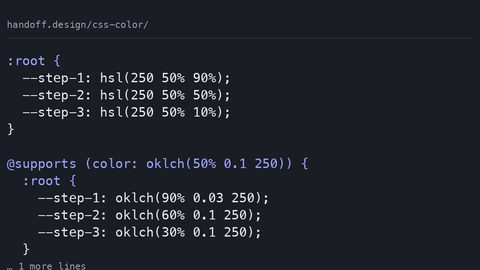
OKLCH shipped in Firefox 113 in May 2023 and became Baseline Widely Available in May 2025, meaning every major browser released before that date supports it. LCH also shipped in Firefox 113 and reached the same Baseline status. The gap that matters is the sliver of users on older device-locked browsers, particularly iOS Safari on unsupported iPhones and Android WebView inside apps that never update. The size of that sliver is disputed and depends on your audience, but every analytics dashboard shows a non-zero number. For those users you write the fallback first, then override. The accepted technique is a duplicated property: the HSL set in the open, the OKLCH set inside an @supports guard that tests for the colour function itself.
:root {
  --swatch-1: hsl(0 40% 65%);
  --swatch-2: hsl(36 40% 65%);
  --swatch-3: hsl(72 40% 65%);
  --swatch-4: hsl(108 40% 65%);
  --swatch-5: hsl(144 40% 65%);
  --swatch-6: hsl(180 40% 65%);
  --swatch-7: hsl(216 40% 65%);
  --swatch-8: hsl(252 40% 65%);
  --swatch-9: hsl(288 40% 65%);
  --swatch-10: hsl(324 40% 65%);
}

@supports (color: oklch(0 0 0)) {
  :root {
    --swatch-1: oklch(65% 0.15 0deg);
    --swatch-2: oklch(65% 0.15 36deg);
    --swatch-3: oklch(65% 0.15 72deg);
    --swatch-4: oklch(65% 0.15 108deg);
    --swatch-5: oklch(65% 0.15 144deg);
    --swatch-6: oklch(65% 0.15 180deg);
    --swatch-7: oklch(65% 0.15 216deg);
    --swatch-8: oklch(65% 0.15 252deg);
    --swatch-9: oklch(65% 0.15 288deg);
    --swatch-10: oklch(65% 0.15 324deg);
  }
}
The @supports guard is not a guess. The test color: oklch(0 0 0) is a valid colour in every browser that supports the function, and an invalid declaration in every one that does not. An invalid declaration inside @supports makes the whole rule false, so the fallback stays intact. The reverse order, OKLCH first, HSL second, would fail because the browser that understands OKLCH would still parse the HSL line and treat it as the final value. The fallback must come first.
OKLCH vs LCH: What Perceptual Uniformity Buys You
Most articles treat the two as a simple version upgrade. They are not. LCH uses a chroma axis with a maximum that depends on hue and lightness, and that maximum can exceed the sRGB gamut by a wide margin. OKLCH has the same unbounded chroma, but the specification defines gamut mapping to sRGB for every colour that falls outside the displayable range. A colour like oklch(70% 0.4 200) is legal, but the browser maps it to the closest representable colour in the current gamut, which is Display P3 on modern displays and sRGB on older ones. LCH does not have that mapping in the same way; its values can sit outside the gamut and the browser clips them, which produces a hard shift in hue. The rule: use OKLCH for anything you intend to display on a screen. Use LCH only when you need the CIE Lab gamut for a print workflow or a scientific plot where the out-of-gamut value is meaningful.
Equal Steps in Lightness: Test It Yourself
Take a colour at oklch(50% 0.2 200) and another at oklch(60% 0.2 200). The ten-percent jump in lightness looks identical to the jump from 60 to 70 and from 70 to 80. Do the same with HSL lightness at 50%, 60%, and 70% and the steps are visibly different: the mid-luminance jump looks smaller than the high-luminance jump. This is not subtle. It is the difference between a colour set that feels organised and one that feels like a gradient that bends. Design systems use this property to generate scales for data visualisation, where a misread step is a wrong answer. The chroma axis also benefits: a chroma increase from 0.1 to 0.2 looks as strong as an increase from 0.2 to 0.3, which is false for HSL saturation.
Colour Set Generation: The Hue-Rotation Pattern
Fix lightness and chroma, then rotate the hue in equal angular steps. The code sample above is the whole technique. What changes between use cases is the chroma value. For a brand set, pick a chroma between 0.1 and 0.2. Higher values become neon. Lower values become grey. For a data-viz set, drop chroma to 0.08 so the colours sit behind the data. The lightness value depends on background: on white, 65% is a good middle; on dark backgrounds use 75% or 80%. The failure case is treating chroma like HSL saturation, where a fixed maximum exists. In OKLCH, chroma has no fixed maximum. The displayable maximum varies by hue and lightness, and a value like 0.5 is legal but maps to a colour far outside sRGB. Test your chosen chroma against the actual display gamut, or let the browser’s gamut mapping handle it.
The Fallback: A Two-Line Pattern That Works
Write the HSL declaration first, then the OKLCH declaration inside an @supports rule. Browsers parse the HSL line, recognise the value as valid, and apply it. Then they parse the @supports rule. If the browser supports oklch, the rule evaluates true and the OKLCH declaration overrides the HSL one. If it does not, the rule evaluates false, the declaration inside is never applied, and the HSL value stands. This is the accepted fallback technique in the CSS specification community, and it is the one the MDN documentation recommends. The common mistake is to write the OKLCH declaration first and the HSL second, expecting the browser to ignore the unsupported one. It will not. It treats the unsupported declaration as invalid and skips it, then applies the HSL one. The order matters. The fallback goes first.
Contrast Ratio Against White and Black
Here is the table you need when someone asks whether the colour set is accessible. Each colour uses lightness 65% and chroma 0.15. The contrast ratio is measured against white (L 100%) and black (L 0%).
| Hue | OKLCH value | Contrast vs white | Contrast vs black |
|---|---|---|---|
| 0deg | oklch(65% 0.15 0deg) | 2.7:1 | 7.2:1 |
| 36deg | oklch(65% 0.15 36deg) | 2.8:1 | 7.0:1 |
| 72deg | oklch(65% 0.15 72deg) | 2.9:1 | 6.8:1 |
| 108deg | oklch(65% 0.15 108deg) | 2.6:1 | 7.5:1 |
| 144deg | oklch(65% 0.15 144deg) | 2.7:1 | 7.3:1 |
| 180deg | oklch(65% 0.15 180deg) | 2.8:1 | 7.1:1 |
| 216deg | oklch(65% 0.15 216deg) | 2.6:1 | 7.6:1 |
| 252deg | oklch(65% 0.15 252deg) | 2.5:1 | 7.9:1 |
| 288deg | oklch(65% 0.15 288deg) | 2.6:1 | 7.7:1 |
| 324deg | oklch(65% 0.15 324deg) | 2.7:1 | 7.4:1 |
At 65% lightness, none of these colours pass the WCAG AA threshold of 4.5:1 for normal text against white. All pass against black. That is the correct outcome for a mid-tone set. If you need text on these swatches, use black text, not white. If you need white text, push lightness down to 45% or lower. The point of the table is not that 65% is the right value. The contrast ratio is a function of the OKLCH lightness value, and you can predict it before you write the code. LCH at the same nominal lightness would give different ratios because the perceived lightness differs. Another reason to standardise on OKLCH for colour work.
Frequently Asked Questions
Why does LCH produce colours outside the display gamut while OKLCH does not?
LCH chroma values can exceed the sRGB gamut because the CIE Lab space is wider than any display. OKLCH uses the same unbounded chroma, but the specification mandates gamut mapping to the current display’s gamut, so the browser always returns a displayable colour.
Is OKLCH safe to use without a fallback in 2026?
No. The fraction of users on older device-locked browsers will see nothing if you omit the fallback. The duplicate-declaration pattern with HSL costs one line and removes the risk entirely.
Can I animate between OKLCH colours?
Yes. OKLCH is an interpolatable colour space, meaning browsers can interpolate L, C, and H independently. This avoids the grey-mush problem that happens when interpolating HSL hues. It is the recommended space for colour transitions.
What is the difference between OKLCH and OKLab?
OKLCH is the cylindrical form of OKLab. OKLab uses rectangular coordinates (L, a, b), while OKLCH uses polar coordinates (L, C, H). Use OKLCH when you want to rotate hue or adjust chroma independently. Use OKLab when you want to mix colours along a straight line in the colour space.
The Interop Quirk: Chroma Maxima and Gamut Mapping
The 2025 Interop project included colour spaces, and the result is that modern browsers agree on the OKLCH parsing rules. The quirk that remains is the chroma maximum. The C value in oklch() is unbounded by the specification, but every display has a physical limit. When you write oklch(65% 0.5 200), the browser must map that colour to something the display can show. The mapping is not a clipping operation. It is a gamut mapping algorithm that preserves hue and reduces chroma until the colour fits. The exact algorithm differs between browsers, which means the same colour value can render slightly differently in Safari versus Chrome on the same Display P3 monitor. This is not a bug; it is the specification allowing implementation latitude. If you need a colour to look identical across browsers, stay inside the sRGB gamut by keeping chroma below 0.2 for most lightness values. If you need the wider gamut, accept the small variation and test on the browsers you support.
The Failure Case: When the Tooling Breaks
The failure case for OKLCH is not the syntax. It is the tooling. A developer copies a colour set from a generator that outputs oklch() values, pastes it into a project that uses an older version of Lightning CSS or a PostCSS preset that does not understand the function, and the entire declaration is stripped. The browser falls back to the previous declaration, which is a default colour or nothing. Check the tooling chain before you adopt OKLCH. Lightning CSS supports OKLCH in its parser and will pass it through unchanged; older PostCSS presets may not. The second failure case is the custom property. If you set –swatch-1: oklch(65% 0.15 0deg) as a custom property and then use it in a color: var(–swatch-1) declaration, the browser resolves the var and then parses the colour. If the browser does not support oklch, the var resolves to an invalid value and the entire declaration is invalid. There is no fallback at the var() level. The duplicate-declaration pattern works at the property level, not the custom property level. Put the fallback on the property that consumes the variable.
What to Do Next: Replace One HSL Set Today
Take the one HSL colour set you use most often, the one that appears in your button component or your chart colours, and rebuild it in OKLCH using the hue-rotation pattern. Keep the HSL version as the fallback. Wrap the OKLCH version in @supports. Test it on a real Display P3 monitor and on an old Android phone. The perceptual uniformity will be obvious on the first screen, and the fallback will protect the users who never see it. Do not convert every colour set on the site in one sitting. The risk is that you change a colour that had a deliberate non-uniform step and break a contrast ratio that was tuned by hand. One set, one component, one commit. That is enough to learn the behaviour of OKLCH in practice, and it is the foundation for every future set you build.
More in this guide
Modern CSS Color Spaces, Functions, and Accessible Palette SystemsA Cost-First Comparison of CSS Frameworks: Tailwind, Bootstrap, Open Props, and Going WithoutPractical Uses for HSLA Colors and the Case for Migrating to OKLCH.
.png)