Triggering CSS Animations From JavaScript Without Fighting the Cascade
Trigger CSS animations from JavaScript only when CSS cannot detect the state itself: class toggles, scroll-driven timelines, and WAAPI calls that read custom properties.
You click a button and a card slides in. The motion works, but the JavaScript that made it happen is a scroll listener with a requestAnimationFrame loop and a transform string you built by hand. That is the old way. The minimum JavaScript required to trigger CSS-driven motion is one line: toggle a class, flip a data-state attribute, or call startViewTransition. Everything else, the timing, the easing, the fill state, belongs in the cascade, where the engine can run it on the compositor thread without touching the main thread. This guide gives you three complete, runnable patterns that replace the jQuery .animate() stack, the all-JS scroll observer, and the React motion library. It tells you exactly when the CSS-only answer already exists so you can stop writing JavaScript that fights the cascade. The goal throughout: trigger motion with the absolute minimum of script. One method call, one attribute change, one declarative timeline.
The ClassList Toggle That Replaces the jQuery Animate Stack
A classList.toggle is the cheapest trigger the DOM offers. It changes one attribute, the engine recomputes the cascade, and any transition or keyframe sequence whose selector now matches starts or reverses. This is the pattern every jQuery .animate() call should have been: you define the start state in one rule, the end state in a second rule that only applies when the class is present, and the transition in a third. The JavaScript never names a property, never sets a value, never reads a style. It flips a switch.
<button id="trigger">Toggle card</button>
<div id="card" class="card">Content</div>
.card {
  opacity: 0.4;
  transform: translateY(0);
  transition: opacity 200ms ease, transform 200ms ease;
}
.card.is-open {
  opacity: 1;
  transform: translateY(-8px);
}
const card = document.getElementById('card');
document.getElementById('trigger').addEventListener('click', () => {
  card.classList.toggle('is-open');
});
That is the entire script. The transition fires on the first toggle because the initial value lives in the stylesheet before the class arrives. The failure case that catches most people is the opposite: they set the start value in JavaScript, so the first toggle has nothing to interpolate from, and the transition appears to not fire. Keep every value in CSS. The animation-fill-mode becomes irrelevant because the end state is a normal class rule. This pattern also respects prefers-reduced-motion if you wrap the transition in a media query, something a JavaScript-driven motion must check manually.
The data-state Attribute for Component Logic
A class is a blunt instrument. It has no meaning beyond the selector that uses it, and two components both using is-active can collide. The data-state attribute gives you a namespace: [data-state=”open”] is unambiguous. It carries the component’s condition in the DOM in a way a class does not. Flipping it is still one line, setAttribute or a property assignment, but the cascade now has a value it can match against. You can use it with style queries to change unrelated parts of the component without touching their classes.
<div id="panel" data-state="closed">
  <button data-action="toggle">Toggle</button>
  <div class="body">Hidden content</div>
</div>
.panel .body {
  max-height: 0;
  overflow: hidden;
  transition: max-height 300ms ease;
}
.panel[data-state="open"] .body {
  max-height: 200px;
}
const panel = document.getElementById('panel');
panel.querySelector('[data-action="toggle"]').addEventListener('click', () => {
  panel.dataset.state = panel.dataset.state === 'open' ? 'closed' : 'open';
});
Why Choose data-state Over a Class
The reason to prefer data-state here is not performance. They are identical on that axis. It is maintainability. Anyone reading the DOM sees the condition without hunting for the class name. You can also use the attribute as the hook for a style query: inside a container, a @container style query can react to the data-state value and animate a sibling. That is the declarative replacement for a hand-rolled state machine in JavaScript.
The max-height Weakness
The transition on max-height is the one place this pattern shows its weakness. Animating to auto still does not interpolate. Pick a fixed pixel value and accept that the motion is approximate when the content is shorter than that ceiling.
Scroll-Driven Motion Replacing the IntersectionObserver Trigger
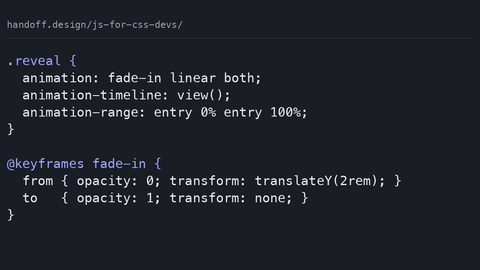
The all-JS scroll observer, the one that listens to scroll, reads getBoundingClientRect, and toggles a class when an element enters the viewport, is dead. Scroll-driven animations give you the same effect with a view() timeline and zero JavaScript. The progress is bound to the element’s position in the scrollport. The engine runs it off the main thread, so there is no layout thrashing from reading scroll offsets in a handler.
.scroll-card {
  animation: reveal linear;
  animation-timeline: view();
  animation-range: entry 0% entry 100%;
}
@keyframes reveal {
  from { opacity: 0; transform: translateY(40px); }
  to { opacity: 1; transform: translateY(0); }
}
<div class="scroll-card">This fades in as it enters the viewport.</div>
That is the whole implementation. No IntersectionObserver. No classList.add on scroll. No will-change hint needed, the engine promotes the motion to the compositor thread when the properties are transform and opacity. The keyframes are the same ones you would write for a class-triggered sequence, but the timeline is the scroll position instead of the document clock. This is the correct replacement for the IntersectionObserver CSS trigger pattern that most sites still ship: the observer fires a class, the class starts a sequence, and the sequence then runs in lockstep with nothing. It plays out. With view() you get the exact behaviour the observer was approximating, minus the JavaScript.
Support and the Honest Fallback
Support is the constraint. Scroll-driven animations are in all modern engines since the 2023-2024 cycle, but the syntax is strict. You need the animation-timeline property alongside animation-range. An @supports block is the honest way to guard it. When the engine does not support it, fall back to a class-triggered sequence with an IntersectionObserver as the trigger. Keep the keyframes shared so the visual result is identical. Do not write two different sequences for the two paths. Write one and let the timeline property decide which trigger wins.
The WAAPI Call That Reads a Custom Property
Sometimes the trigger is not a user action but a value. A progress bar needs to start at 10% because the data says so. A sequence needs to begin halfway through its keyframes because the element was already half revealed. That is where the Web Animations API earns its one call. Element.animate() takes keyframes, an options object, and an offset that you can compute from a CSS custom property. Read the property with getComputedStyle, convert it to a number, and pass it as the start offset. The sequence itself stays declarative; the keyframes are the same ones CSS would use. The start position is data-driven.
:root {
  --start-offset: 0.5;
}
.bar {
  width: 100px;
  height: 10px;
  background: gray;
}
.bar-fill {
  height: 100%;
  background: green;
}
const fill = document.querySelector('.bar-fill');
const start = parseFloat(getComputedStyle(document.documentElement).getPropertyValue('--start-offset'));
fill.animate(
  [{ transform: 'scaleX(0)' }, { transform: 'scaleX(1)' }],
  {
    duration: 1000,
    easing: 'cubic-bezier(0.2, 0.8, 0.2, 1)',
    offset: [start, 1],
    fill: 'both'
  }
);
The offset array lets you skip the first part of the sequence. The element appears already partially progressed. This is the WAAPI versus CSS decision in miniature: if the start value is a constant, keep it in CSS with a class. If it is data, use WAAPI because CSS has no way to read a number and start mid-sequence. The cost is that you lose the declarative cascade. The motion is now in JavaScript and cannot be overridden by a later stylesheet rule without extra code. Use it when the alternative is a library that ships its own timing engine and keyframe parser. That is what a React motion library does: it reimplements the engine’s machinery in JavaScript and hands you back a state object to manage. Element.animate() is the engine’s own version of that, and it is fast because it runs on the compositor thread when the properties are compositor-safe.
Silent Failure and the NaN Guard
The failure case is subtle. getComputedStyle on a custom property returns the computed value. If the property is set on :root and you read it from a child, inheritance brings it down, and that works. If you set it inline on the element itself, it also works. What fails silently is a typo in the custom property name. That yields an empty string. parseFloat(‘’) is NaN, the offset array then has NaN in it, and the motion does not start. Guard with Number.isFinite() and fall back to 0. Also note the keyframes parameter type: the array of keyframe objects preserves order and lets you set offset per frame. The property-indexed object form does not reliably do that.
The View Transitions API for Morphing Between States
The View Transitions API is the declarative replacement for a whole class of JavaScript state-change sequences. The ones that used to fade out an old element, swap the DOM, and fade in a new one. The trigger is a single call: document.startViewTransition(() => updateTheDOM()). The engine snapshots the before state, runs your DOM update, snapshots the after state, and morphs between them with a cross-fade by default. Override the sequence with your own keyframes using the ::view-transition pseudo-elements.
function navigateTo(nextState) {
  document.startViewTransition(() => {
    document.getElementById('app').innerHTML = nextState;
  });
}
::view-transition-old(root) {
  animation: fade-out 200ms ease;
}
::view-transition-new(root) {
  animation: fade-in 200ms ease;
}
@keyframes fade-out {
  to { opacity: 0; }
}
@keyframes fade-in {
  from { opacity: 0; }
}
The JavaScript here is the minimum required: one function call that wraps a DOM mutation. The definition lives entirely in CSS. The engine handles the snapshot, the compositing, and the cleanup. This replaces the React library pattern where you manage enter and exit states as component lifecycle callbacks. The View Transitions API moves that bookkeeping into the engine. It respects prefers-reduced-motion if you gate the keyframes in a media query. You can opt individual elements out with view-transition-name: none.
Async DOM and the Flash Fix
It falls apart when the before and after states are not stable. If the DOM update happens asynchronously, fetching data first, the snapshot is taken before the new content arrives. The morph looks like a flash. Await the data before calling startViewTransition. The after-state snapshot then captures what the user will actually see. Flickering is the symptom of that mistake. Support is broad in modern engines, but older Safari versions may ignore the call entirely. Feature-detect with ‘startViewTransition’ in document and fall back to a direct DOM swap without motion.
Letting the CSS Timeline Do the Work Instead of a Scroll Listener
There is a category of motion that never needed JavaScript at all: scroll-linked effects like a parallax background, a progress bar at the top of the page, or a header that shrinks as you scroll. The old implementation was a scroll event listener, a read of scrollY, and a style.setProperty call on every frame. That thrashed the layout because the read forced a synchronous style recalc. Scroll-driven animations replace all of that with a scroll() or view() timeline. The engine advances the sequence based on the scroll position without touching the main thread.
.progress-bar {
  position: fixed;
  top: 0;
  left: 0;
  height: 4px;
  background: blue;
  transform-origin: left;
  animation: grow linear;
  animation-timeline: scroll(root);
}
@keyframes grow {
  from { transform: scaleX(0); }
  to { transform: scaleX(1); }
}
This is the scroll-driven replacement in its purest form. One rule. No listener. No reading of scroll offset. No manual write-back to a style property. The sequence runs on the compositor thread because transform is the only animated property. The performance win is not marginal. A scroll listener that writes to a style property on every frame forces a style recalc and a paint. On a long page, that is frame drops. The scroll() timeline with root as the scroller is the direct substitute. When you need an element’s position in the viewport rather than the page scroll, a card that fades in as it crosses the center, use view() instead. Same mechanism, scoped to the element’s visibility range.
Support Gate and the Legacy Path
The honest caveat is support. Scroll-driven animations are not universally available in every version a user might bring. The @supports block below is the gate. When it fails, the fallback is the IntersectionObserver trigger with a class toggle. Write that fallback knowing it is the legacy path, not the target.
@supports (animation-timeline: view()) {
  .card {
    animation: reveal linear;
    animation-timeline: view();
  }
}
The CSS-Only Solutions That Already Exist
Before you write a single line of JavaScript, check whether the effect you want is now a pure CSS feature. Three cases that used to be JavaScript-only are now declarative. Scroll-linked effects, parallax, progress bars, reveal-on-scroll, are scroll-driven animations with a view() or scroll() timeline, as above. Morphing between two DOM states, a page transition, a list reorder, a theme switch, is the View Transitions API. The only JavaScript is the startViewTransition call that wraps the DOM change. Simple state changes, a hover, a focus, a class toggle, are CSS transitions or keyframe sequences triggered by a class or data-state attribute. Each of those three now lives entirely in the cascade.
The reason this matters is the cascade itself: it is a constraint solver. When you put a sequence in CSS, you give the engine a set of rules and let it compute the visual result, respecting specificity, inheritance, and the animation-fill-mode that determines whether the end state persists. When you put the sequence in JavaScript, you bypass the solver and hand the engine imperative instructions that fight the cascade. A transform you set here gets overridden by a rule there. You end up reading computed styles to debug a conflict that should not exist. The minimum JavaScript principle is not an aesthetic preference. It is the difference between a sequence that runs on the compositor thread and one that janks on the main thread.
A concrete example of the wrong tool: a site that uses a React library to fade in a list when a user clicks a tab. The library sets inline styles, manages enter and exit states, and re-renders on every frame. The same effect is a data-state attribute on the tab container and a CSS transition on opacity. The library’s only advantage is sequencing, fade out the old list, then fade in the new one. You can sequence with transition-delay or a keyframe sequence with a delay. The View Transitions API handles the swap natively. The library is not bad because it is slow. It is bad because it is unnecessary. Each unnecessary line of JavaScript is a place where a bug can hide.
When the JavaScript Is Legitimately Required
There are three situations where the minimum JavaScript is not zero. Pretending otherwise is dishonest. First, any sequence that depends on a layout-computed value. The width of a container, the height of a collapsed element. These need JavaScript to read that value. CSS cannot animate to auto and has no way to query a measurement mid-sequence. Read getComputedStyle or offsetWidth, set the target value with style.setProperty, and let the transition run. Second, any sequence that must start from a data-driven offset. A progress bar that begins at 37% because the server said so. That needs WAAPI to set the offset array. Third, any sequence that must react to JavaScript state. A form validation message that slides in when a field is invalid. That needs a class or data-state toggle, which is JavaScript but is a single line.
In those cases, keep the JavaScript to the trigger and leave the motion in CSS. Do not build the sequence in JavaScript. No requestAnimationFrame. No manual easing. No frame-by-frame transform writes. Use Element.animate() and the Web Animations API for the data-driven start. Toggle the data-state attribute and use a CSS transition for the state response. The Web Animations API is the fallback pattern when an engine does not support scroll-driven animations. Detect the absence of animation-timeline with @supports. If it fails, write an IntersectionObserver that adds a class. The class starts the same keyframes. That is the exception that proves the rule. Even the fallback keeps the motion in CSS.
The One Sentence That Makes This Page Yours
This guide is for the technical writer and the educator who needs accurate, sourced statements about when CSS-driven motion can be triggered without fighting the cascade. It suits you if you are building a component library and want the smallest possible JavaScript surface. It suits you if you are teaching others that the cascade is a constraint solver rather than a procedural language. It does not suit someone debugging a React state bug, because that is a JavaScript problem with a JavaScript answer, not a CSS one. It does not suit a designer looking for visual inspiration, because the destination here is mechanics, not aesthetics. It does not suit anyone who needs a polyfill for every engine back to 2019, because the scroll-driven and View Transitions features have a support floor that you must check with @supports and accept the fallback for.
Distinctive Claim
The one sentence that cannot appear on a competitor’s page is this: the IntersectionObserver trigger for scroll animations is obsolete the moment you write an animation-timeline: view() rule, and keeping the observer is not a performance optimisation but a failure to delete code. That opinion, that the observer should be deleted, not kept as a fallback by default, is the specific, actionable stance this guide takes. It is what separates it from a generic roundup of animation techniques.
More in this guide
JavaScript for CSS Developers: The Smallest JS a Stylesheet NeedsResponsive Design in the Era of Container Queries, clamp(), and Fluid LayoutBuilding a Simple Tabs Component Where JavaScript Serves the CSS.