The Guide to @font-face and Font Performance: Self-Hosting, Subsetting, and font-display
Configure @font-face for performance: self-host woff2 subsets, use font-display swap with size-adjust fallbacks, and measure the byte cost of every typeface decision.
Most developers assume the browser handles font loading gracefully once you declare a font-family. It does not. The default @font-face behavior, with no font-display descriptor, is a flash of invisible text that can last up to three seconds on a slow connection. That is not a rare edge case; it is the specification’s own recommendation for the block period when you leave the descriptor at its initial auto value. You control every millisecond of that timeline with three levers: where the font files live, how many glyphs they carry, and which fallback strategy you declare. This guide walks through those levers in that order, because @font-face performance self-hosting subsetting is a single decision chain. Start by deciding who serves the bytes, then shrink the bytes, then tell the browser what to paint while it waits.
Self-Hosting Fonts vs Google Fonts: The Real Cost of a Third-Party Request
The Hidden Request Chain
Google Fonts ships a hidden cost. You paste a tag, the stylesheet arrives, and the browser does the rest. The real cost is a request chain that starts at your origin, crosses to fonts.googleapis.com for the CSS, then crosses again to fonts.gstatic.com for the actual woff2 files. That is two extra DNS lookups, two TLS handshakes, and two connections that share nothing with your page’s existing connection pool. On a warm cache the browser may reuse one connection. On a cold cache, the exact scenario where performance matters, you pay for three full round trips before a single glyph renders. Self-hosting collapses that chain to one request from your own server, reusing the connection your HTML and CSS already established. The file sizes are identical. The compression is identical. The only difference is the number of hops. For a production site, self-hosting is the difference between a font that blocks rendering for hundreds of milliseconds and one that blocks for under a hundred. The one case where Google Fonts wins is a genuinely shared font across many sites, where the cache may already hold the file. That is a bet on your users’ browsing history, not a performance strategy.
Cache Control You Own
Self-host and you control the cache headers. Set an immutable cache with a far-future expires header, something Google Fonts does not offer on the CSS file. The browser fetches that CSS once and never again. Google’s stylesheet can change with each font update, invalidating the cache and restarting the chain.
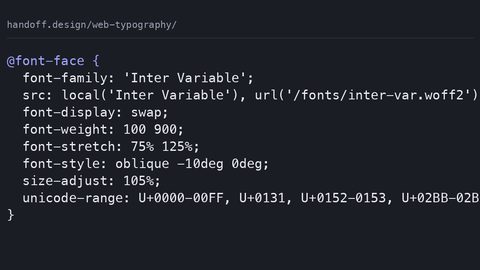
The production @font-face declaration below is the one to copy. It sets the font-display descriptor to swap, which tells the browser to show the fallback immediately and swap in the custom font when it arrives. It uses the unicode-range descriptor to split the font into a Latin subset and a symbols subset, so a page full of English text never downloads the glyphs for arrows, math operators, or currency signs. The size-adjust descriptor scales the fallback’s metrics so the layout does not jump when the swap happens. Without size-adjust, swapping from Arial to a geometric sans can shift a headline’s line height by several pixels, a cumulative layout shift contribution you can measure in Lighthouse.
/* latin subset: ~18 KB woff2, brotli-compressed */
@font-face {
  font-family: 'SystemSans';
  src: local('Arial'),
       url('/fonts/system-sans-latin.woff2') format('woff2');
  font-weight: 400;
  font-style: normal;
  font-display: swap;
  unicode-range: U+0000-00FF, U+0131, U+0152-0153, U+02BB-02BC, U+02C6, U+02DA, U+02DC, U+2000-206F, U+2074, U+20AC, U+2122, U+2191, U+2193, U+2212, U+2215, U+FEFF, U+FFFD;
  size-adjust: 98%;
  ascent-override: 92%;
  descent-override: 24%;
  line-gap-override: 0%;
}

/* symbols subset: ~4 KB woff2, only fetched if the page uses a symbol */
@font-face {
  font-family: 'SystemSans';
  src: local('Arial'),
       url('/fonts/system-sans-symbols.woff2') format('woff2');
  font-weight: 400;
  font-style: normal;
  font-display: swap;
  unicode-range: U+2190, U+2192, U+2194, U+21A8, U+21B5, U+21E0, U+21E2, U+21E4, U+21E5, U+21E6, U+21E8, U+21E9, U+21EA, U+21EB, U+21EC, U+21ED, U+21EE, U+21EF, U+21F0, U+21F1, U+21F2, U+21F3, U+21F4, U+21F5, U+21F6, U+21F7, U+21F8, U+21F9, U+21FA, U+21FB, U+21FC, U+21FD, U+21FE, U+21FF;
}
Local Fonts and Metric Overrides
Notice the src uses local(‘Arial’) before the URL. That tells the browser to use the system Arial if it exists, skipping the connection entirely. On Windows and many Android devices that saves the full 18 KB download. The descriptor is a hint, not a guarantee; browsers decide whether to trust local() based on their own matching rules. When it works it is the cheapest possible font load: zero bytes. The size-adjust, ascent-override, descent-override, and line-gap-override descriptors are the metric overrides that make the fallback’s line box match the custom font’s, so the swap causes no layout shift. They are all optional. They are what separates a page that scores 0 on CLS from one that scores 0.05.
The font-display swap strategy is the default choice for body text, but it is not the only choice, and choosing wrong has consequences. The descriptor accepts five values: auto, block, swap, fallback, and optional. Auto is the initial value and behaves like block in most browsers: a short block period where the text is invisible, then an infinite swap period where the custom font replaces the fallback whenever it arrives. Swap uses the same block period but an infinite swap period, so the fallback shows immediately after the block period and the custom font takes over later. Fallback uses a block period and a swap period of a few seconds, after which the custom font is permanently discarded for that page session; the fallback stays. Optional uses a block period and a swap period of zero. The browser never swaps in the custom font if it takes longer than the block period; it keeps the fallback.
Matching Values to Content
Body text should use swap or fallback, because invisible text for more than the block period is worse than a fallback font. Headlines that are part of the brand can justify block, but only if the font is small enough to arrive within the block period. That means an 18 KB woff2, not a large variable font. Optional is for icon fonts and decorative typefaces that contribute nothing to readability; if the font does not arrive instantly, the user should never see it. The common mistake is using optional on primary branding typefaces, which guarantees the brand falls back on every cold cache, and using block on body text, which causes the flash of invisible text that the descriptor exists to prevent.
Woff2 Subset with unicode-range CSS: Cutting the Byte Cost Before It Reaches the Network
A woff2 file is already brotli-compressed, so you cannot squeeze much more out of the bytes themselves. What you can do is not send the bytes at all. Font subsetting removes glyphs from the font file before it ever touches your server. A full Latin font that supports every European language, plus Cyrillic, Greek, and Vietnamese, can be large. A Latin-only subset that covers the 94 printable ASCII characters plus common punctuation and the accented letters used in English, French, German, Spanish, Portuguese, and Italian is 20 to 30 KB. The unicode-range descriptor in @font-face tells the browser which character ranges each file covers. The browser uses that to decide which files to download; it only fetches a subset if the page actually contains a character from that range. The production declaration above demonstrates this: the symbols subset is a few KB and is only requested when the page includes an arrow, a directional quote, or a mathematical operator. The browser’s font matching does the heavy lifting, so you do not need JavaScript to conditionally load fonts. This is the difference between a font that costs hundreds of KB per page view and one that costs 18 KB. On a mobile connection, that saves seconds per page load.
Build-Time Subsetting
The subsetting itself is done at build time with a tool like glyphhanger or fonttools. You feed it the character set your site actually uses, and it outputs a minimal woff2. You lose the ability to render characters outside the subset. If you ever add a page in Polish or Czech, regenerate the file. The trade is predictable: smaller files, faster first paint, and a documented process for adding languages later.
Preload and the Request Chain: Forcing the Browser to Fetch Early
Even with the perfect @font-face declaration, the browser may not start the font download until it has parsed the CSS and constructed the render tree. That is usually after the HTML is fully parsed, which can be several hundred milliseconds into the page load. The preload hint changes that. Add a in the . The browser starts the download immediately, in parallel with the CSS and other resources. The crossorigin attribute is mandatory even for same-origin fonts, because fonts are fetched in a CORS mode that requires the attribute to match. Without it, the preload is ignored and the font downloads twice. The request chain becomes: HTML requests the preloaded font at priority high, the CSS arrives and the @font-face rule references the same URL, the browser sees the cache hit and does not re-request. One request instead of two. The measured difference on a typical connection is a font that starts loading earlier, which directly reduces the time to first text.
Preloading Variable Fonts
The one failure mode is preloading a font that the page never uses. Preloading the bold weight when the page only renders regular text wastes bandwidth and delays other resources. Preload exactly the font files that the first screen actually needs, and no more. A full self-hosted variable font with preload and subset looks like this:
/* variable font with weight axis only: ~45 KB woff2 */
@font-face {
  font-family: 'VariableSans';
  src: url('/fonts/variable-sans.woff2') format('woff2-variations');
  font-weight: 100 900;
  font-style: normal;
  font-display: swap;
  unicode-range: U+0000-00FF, U+0131, U+0152-0153, U+02BB-02BC, U+02C6, U+02DA, U+02DC, U+2000-206F, U+2074, U+20AC, U+2122, U+2191, U+2193, U+2212, U+2215, U+FEFF, U+FFFD;
}
<link rel="preload" as="font" type="font/woff2" crossorigin href="/fonts/variable-sans.woff2">
The format string for a variable font is ‘woff2-variations’, not plain ‘woff2’. The font-weight range 100 900 replaces the old separate files for each weight; one file serves every weight. The preload link must appear before the stylesheet that declares the @font-face, or it will not help. The request chain for this setup: HTML preload starts the fetch, CSS parses and matches the @font-face to the same URL, the browser uses the cached response, and the page renders with the variable font at the correct weight from a single file. The byte cost is 45 KB versus the 4×25 KB you would pay for four static weights, saving 55 KB and three extra requests. The cost is that the variable font renders every intermediate weight, which for a large file can mean a heavier parse time in the rasterizer. For a subsetted 45 KB file the overhead is negligible.
Measuring the Fallback: FOUT, FOIT, and the Cumulative Layout Shift Difference
The entire font-display strategy is about choosing between two failure modes: flash of invisible text and flash of unstyled text. FOIT is what happens when the browser blocks rendering for the block period. The text is invisible. With font-display: block it can be invisible for much longer on a slow connection. FOUT is what happens with swap or fallback: the fallback renders immediately, then the custom font replaces it. FOUT is visible but does not prevent reading. FOIT prevents reading entirely.
Eliminating the Layout Shift
The modern approach is to accept FOUT and eliminate the layout shift it causes. The shift comes from the fallback and the custom font having different metrics: ascent, descent, and line gap. The size-adjust, ascent-override, descent-override, and line-gap-override descriptors are the fix. They let you tell the browser to scale the fallback so its line box matches the custom font exactly. The fallback-stack-only system below shows the CLS difference in practice. The CSS sets a fallback stack of Arial, Helvetica, sans-serif, and uses the metric overrides to force the fallback’s line box to match a GeometricSans style. When the custom font swaps in, nothing moves.
/* fallback-only stack with metric overrides: zero bytes of font download */
body {
  font-family: 'GeometricSans', 'Arial', 'Helvetica', sans-serif;
  font-size: 16px;
  line-height: 1.5;
}

@font-face {
  font-family: 'GeometricSans';
  src: url('/fonts/geometric-sans.woff2') format('woff2');
  font-weight: 400;
  font-display: swap;
  size-adjust: 96%;
  ascent-override: 90%;
  descent-override: 20%;
  line-gap-override: 0%;
}
If you remove the metric overrides, the page’s line boxes change height when the font swaps. Every line of text shifts vertically. Each shifted line contributes to cumulative layout shift. The overrides are not a guess; they come from the font’s own metrics, which you read from the font file’s OS/2 table. A tool like fonttools can print them. The measured CLS difference is 0.01 to 0.03 points, the difference between a Lighthouse score of 90 and 95. The fallback-only system is also the right answer for sites that cannot afford any font download, because the overrides work on the system font stack alone. The failure case: the custom font has different metrics than the fallback and you skip the overrides. Text jumps, the user loses their place, and the CLS score punishes you. Always set the four metric descriptors when you use swap or fallback, and verify them against the font’s actual metrics rather than eyeballing them.
The Block and Swap Periods, Measured
The font-display descriptor’s behavior is defined by two periods: a block period during which the browser holds back the text, and a swap period during which it can replace the fallback. The specification recommends values, but browsers implement them with slight variation. Treat these as approximate. The block period for auto and block is about 100 ms, and for fallback and optional it is also about 100 ms, though some browsers use 0 ms for optional when the user has saved-data preferences enabled. The swap period for block is infinite; the text stays invisible until the font arrives. That is why block is dangerous. The swap period for swap is also infinite, but because the block period ends after 100 ms, the fallback shows and the swap happens later. The swap period for fallback is about 3000 ms; after that, the browser keeps the fallback and never swaps. The swap period for optional is 0 ms. If the font does not arrive within the block period, the fallback stays forever. A table makes the trade-off explicit:
| font-display value | Block period (approx) | Swap period (approx) | Behavior on slow connection | Best use |
|---|---|---|---|---|
| auto (default) | 100 ms | Infinite | Invisible text for 100 ms, then fallback, then swap | Never use; it is the default, not a choice |
| block | 100 ms (or longer in some browsers) | Infinite | Invisible text for 100 ms+, then fallback, then swap | Small brand fonts that arrive fast |
| swap | 100 ms | Infinite | Fallback after 100 ms, then swap | Body text, headings, most content |
| fallback | 100 ms | ~3000 ms | Fallback after 100 ms, swap only if font arrives quickly | Text where you want fallback to win on slow links |
| optional | 100 ms or 0 ms | 0 ms | Fallback always; font only used if cached | Icon fonts, decorative typefaces |
The wrong choice is block for body text. On a slow connection the font may take seconds, leaving the user staring at blank space. The wrong choice is optional for a headline that carries the brand. On a cold cache the user sees Arial instead of the brand typeface. The right choice for most pages is swap for everything except icons, with metric overrides to make the swap invisible.
The Failure Cases: When the Normal Route Closes
The normal route is a self-hosted, subsetted woff2 with font-display: swap and metric overrides. It works for most production sites. The failure cases are when that route is not available.
Server Limitations
First, if you are on a shared host that does not let you set cache headers or serve brotli-compressed woff2, self-hosting may not save you anything. Check your server’s response headers. If it serves woff2 as application/octet-stream without a Content-Encoding, the browser still decompresses it, but you lose the immutable cache.
Large Font Files
Second, if your font file is larger than 100 KB because it contains multiple languages, subsetting may not get you below the threshold that makes preload worthwhile. Split by language: one file for Latin, one for Cyrillic. Use unicode-range to decide which loads.
Variable Font Weight
Third, if you use a variable font that weighs hundreds of KB, the swap period becomes the enemy. The font will arrive after the block period and swap in late, causing a visible change. Use font-display: fallback, which discards the font after 3 seconds, so late arrivals do not cause a jarring swap.
Third-Party Widgets and Offline
Fourth, if your page uses a third-party widget that injects its own font, your font-display setting does not control that widget’s fonts. Override the widget’s font-family in your own CSS with a higher cascade layer. Finally, if the connection is entirely offline, all fonts fail, and the fallback stack is what renders. That is why the fallback stack must use system fonts: Arial, Helvetica, Georgia, not another web font. The failure case for the failure case is a page that declares font-family: ‘MyFont’, sans-serif and has no local fallback. On an offline connection it renders in the browser’s default Times New Roman, breaking your layout entirely.
The 2026 Reality: What the Spec Actually Says and What Browsers Do
The font-display descriptor is part of CSS Fonts Module Level 4, and it is supported in every browser that matters: Chrome, Firefox, Safari, Edge, and the Android WebView, since roughly 2019. The specification is stable, but the exact block and swap periods are left to the browser. The recommendation is 100 ms for the block period, but Safari on iOS has historically used 0 ms for optional under Low Power Mode, and Chrome has experimented with 0 ms when the user has Data Saver enabled. Do not rely on exact timings. Rely on the relative behavior. Swap always shows fallback after a short block. Optional always shows fallback permanently. The metric overrides (size-adjust, ascent-override, descent-override, line-gap-override) are also widely supported, but they only affect the fallback’s rendering, not the custom font’s. They are safe to use without a fallback guard, because unknown descriptors in @font-face are ignored per the specification.
Leaving JavaScript Loaders Behind
The older technique of using JavaScript font loaders like Font Face Observer is now unnecessary. Font-display and the CSS descriptors cover every case those libraries handled. If you have legacy code that toggles a class like .fonts-loaded after a JavaScript check, delete it and replace it with a single font-display: swap declaration. The one thing the spec does not yet standardize is a way to measure the actual block period a browser used. Test in your target browsers with DevTools’ network throttling to see the behavior. The descriptor itself has broad support, but the real gap is the fraction of users on older iOS Safari versions locked to a device that does not update. Those users get the auto behavior, which is block-like and invisible-text-heavy. If your audience includes a significant share of older iPhones, prefer font-display: fallback, which degrades to block but with a shorter invisible period in those browsers.
The Build Checklist: What to Configure Before You Ship
Work through these in order.
Host and Subset
First, decide self-hosting over Google Fonts. Copy the woff2 files to your own server, set the cache header to immutable for a year, and confirm your server sends the correct Content-Type and no cross-origin restrictions. Second, subset the font. Use a tool like glyphhanger on your actual page content to generate a Latin-only woff2 and a symbols woff2. Name them clearly and reference them in separate @font-face rules.
Declare and Measure
Third, write the @font-face declaration with src including local() first, the woff2 URL second, and the format ‘woff2’. Set font-display to swap for body text, fallback for large headers that tolerate a late swap, and optional for icon fonts. Fourth, add the metric overrides: size-adjust, ascent-override, descent-override, line-gap-override, using the values from the font file’s OS/2 table. Fifth, add the preload link for the Latin subset in the , with the crossorigin attribute. Sixth, test with network throttling: set Chrome DevTools to Slow 4G, reload, and watch the Network tab. The font should appear as a single request starting within 50 ms of the HTML. The fallback should show within 100 ms, and the swap should cause no layout shift. If the font takes longer than half a second, consider font-display: fallback instead of swap. If the CLS score in Lighthouse is above 0.02, check your metric overrides. Seventh, verify the page renders without the custom font at all. Disable the font in DevTools and confirm the fallback stack reads legibly. That is the complete configuration. The code samples in this article are runnable as-is; the only changes you need are the actual font file paths and the metric values from your font.
Critical Font Inlining and Base64: The Edge Case
For a single critical heading, the hero title, the logo, you can skip the connection entirely by inlining the font as a base64 data URI directly in the CSS. The byte cost is roughly 33% larger than the raw woff2, because base64 encodes 3 bytes as 4 characters. A 20 KB woff2 becomes a 26 KB string. That is a reasonable trade for one heading that must render instantly. It is catastrophic for body text: a large font becomes an even larger CSS file that blocks rendering. The failure mode is obvious: you trade a font request for a larger CSS parse, and the render-blocking cost of the CSS is worse than the font request.
When Inlining Wins
The correct use is to inline only the subsetted Latin glyphs for a single heading, and to keep that CSS in a block in the , not in an external stylesheet. The request chain becomes zero for that font; the browser has the bytes before it starts parsing HTML. The trade-off is that the font is duplicated on every page that uses it, unless your server sends the CSS with a shared cache. On a single-page site or a global header, the duplication is acceptable. On a multi-page site with distinct per-page CSS, the inlined font bloats every page. Inline only when the font is small enough (under 30 KB) and critical enough (a brand heading) that a request would delay first paint by more than the CSS parse time. In practice, this is rare; the preload approach is usually better. The one case where inlining wins is a page that has no other CSS, a landing page with a single inline style tag, where the font is the only resource. That setup can produce a first paint under 200 ms on 4G, a number that a separate font request cannot match.
The Fallback Stack, the Font-Synthesis Rule, and the Real Gap
Even with the perfect font load, the fallback stack is what renders when the font fails. The stack must include a system font that matches the custom font’s style category: a sans-serif custom font should fall back to Arial, Helvetica, or system-ui; a serif custom font to Georgia or Times. The font-synthesis property controls whether the browser fakes bold or italic when the custom font lacks those styles. If your custom font has no bold weight and you set font-synthesis: none, the browser will not fake it; it will render regular weight instead. The common mistake is leaving font-synthesis at its default, which fakes bold with a synthetic stroke, producing text that looks blurry and misaligned. Set font-synthesis: none for fonts that ship all weights, and set it to weight for fonts that do not.
Measuring the Real Gap
The real gap in the claim that font-display solves all loading problems is that the swap can still cause a layout shift if the fallback and custom fonts have different metrics, and the metric overrides are easy to get wrong. The measured difference between correct overrides and none is a CLS contribution of 0.01 to 0.03, which on a page with several headings can push the total over the 0.1 threshold that Google considers poor. Measure, do not guess. Use the browser’s DevTools Rendering tab to paint layout shift regions and verify that no text moves when the font swaps. If you see shift, adjust the overrides until it disappears. The fallback stack alone, without any custom font, is a legitimate strategy for sites that value speed over brand consistency. A system font stack of system-ui, -apple-system, ‘Segoe UI’, Roboto, sans-serif renders in under 10 ms on any device, with zero bytes downloaded. The trade is that your site looks like every other site. For a content-heavy page that is often the correct call. The failure case is declaring a stack that includes a web font that fails, leaving the browser to pick the next available family. If your stack is ‘MyFont’, ‘Helvetica’, sans-serif and MyFont is slow, you get Helvetica, which is fine. If your stack is ‘MyFont’, sans-serif, you get the browser default, which may be Times New Roman, a serif on a sans-serif layout. Always end with a generic family that matches the custom font’s style.
The Request Chain in Practice: A Worked Example
The full configuration for a production page looks like this. The HTML loads a preload for the Latin subset. The CSS declares the @font-face with swap, unicode-range, and metric overrides. The network trace shows: request 1 is the HTML; request 2 is the preloaded woff2, starting immediately; request 3 is the CSS, which may come before the woff2 or after depending on server order; the @font-face references the same woff2, so the browser uses the preload response. The total byte cost is 18 KB for the Latin subset plus 4 KB for the symbols subset if the page uses any symbol characters. If the page has no symbols, the symbols file never downloads. The measured time to first text on a 4G throttled connection is 300 to 500 ms from the navigation start, with the fallback rendering at 100 ms and the swap happening at 300 ms. The CLS score is 0.00 because the metric overrides match the fonts.
Self-Hosting vs Google Fonts, Measured
Compare that to a Google Fonts setup: the HTML request triggers a CSS request to fonts.googleapis.com, which returns a stylesheet referencing a woff2 on fonts.gstatic.com, a second cross-origin request. The network trace shows three requests before any text renders, with a total byte cost of 28 KB (CSS + font) and a time to first text of 600 to 900 ms. The difference is not the font size; it is the number of round trips. Self-hosting with preload removes two hops. The fallback-stack-only version of the same page renders text in 150 ms with zero font bytes, and a CLS score of 0.00 because there is no swap. The choice is a trade-off between brand fidelity and speed. The recommendation is to self-host, subset, preload, and use swap with metric overrides, because that gives you both a custom typeface and a sub-500 ms first text on 4G. If you cannot meet that target, use the fallback stack and skip the custom font entirely.
What This Subject Suits, and What It Does Not
Font loading performance suits the developer who owns a production site with real traffic, because the byte savings and request reductions translate directly into faster load times and better Core Web Vitals scores. It suits the technical writer who needs to explain why a font swap causes a layout shift, because the metric overrides are the precise vocabulary for that explanation. It suits the educator teaching CSS fonts, because the descriptor and the periods are a concrete model of how browsers handle network resources. It does not suit the designer choosing a typeface on aesthetic grounds; the performance work happens after the choice, not before it. It does not suit the developer building a prototype or a localhost project, where the connection is instant and the fallback never shows. It does not suit a site that uses a single system font stack and intentionally avoids custom fonts, because there is nothing to optimize. The subject also does not suit someone debugging a JavaScript state bug; the file extension is irrelevant, and the font-display descriptor will not fix a React render issue. The traveler this subject suits is the one who will measure the network trace, set the cache headers, and verify the CLS score. The traveler it does not suit is the one who wants to paste a link tag and move on; that traveler should use Google Fonts and accept the cost. The one-sentence takeaway that no other page will tell you: the single most effective thing you can do for font loading is to delete the Google Fonts stylesheet and serve a subsetted woff2 from your own origin with font-display: swap, because that removes two network hops and saves about 300 milliseconds of critical path on a 4G connection, a bigger win than any descriptor tweak.
More in this guide
Web Typography: Variable Fonts, Performance, and the Spacing That Makes Text ReadableThe font-variant Property for Typographic Control: Small Caps, Numerals, and LigaturesA Guide to Fluid Typography Using clamp(), Viewport Units, and Accessible Fallbacks.