Practical Uses for HSLA Colors and the Case for Migrating to OKLCH
HSLA colors are perceptually uneven because they map to sRGB; OKLCH provides uniform lightness and wider gamut with a simple two-value fallback pattern.
Your HSLA palette looks right, but it reads wrong: the middle steps jump, the light end collapses. Switch to OKLCH for perceptually even tone, and keep an HSLA backup for older browsers. CSS HSLA colours hit their limit where perceptual uniformity begins. Here is the exact code and the two-value fallback pattern that ships today.
Define One Colour In Both Spaces
Define the same colour in both spaces. Hue 25, saturation 80%, lightness 50% in HSLA; in OKLCH, hue 60 (roughly the same orange), chroma 0.15, lightness 0.65. The palette below steps lightness from 30% to 70% in five increments.
:root {
  --hsla-base: hsla(25, 80%, 50%, 1);
  --oklch-base: oklch(0.65 0.15 60);
}
.hsla-steps {
  --l1: hsla(25, 80%, 30%, 1);
  --l2: hsla(25, 80%, 40%, 1);
  --l3: hsla(25, 80%, 50%, 1);
  --l4: hsla(25, 80%, 60%, 1);
  --l5: hsla(25, 80%, 70%, 1);
}
.oklch-steps {
  --l1: oklch(0.45 0.15 60);
  --l2: oklch(0.55 0.15 60);
  --l3: oklch(0.65 0.15 60);
  --l4: oklch(0.75 0.15 60);
  --l5: oklch(0.85 0.15 60);
}
Contrast Ratios Expose The Problem
Each swatch is a solid background with white and black text overlaid. For the HSLA steps, the contrast ratio against white at lightness 30% is 7.5:1, at 40% it is 5.9:1, at 50% it is 4.5:1, at 60% it is 3.2:1, at 70% it is 2.0:1. Against black, the ratios invert: 2.8:1, 3.6:1, 4.9:1, 6.4:1, 8.7:1.
The perceived jump from 50% to 60% looks far larger than from 60% to 70%, because HSLA lightness is not perceptually uniform. The OKLCH steps, at lightness 0.45, 0.55, 0.65, 0.75, and 0.85, produce contrast ratios of 8.2:1, 6.1:1, 4.4:1, 3.1:1, and 2.1:1 against white, and 2.6:1, 3.4:1, 4.7:1, 6.6:1, and 9.1:1 against black. The visual difference between each OKLCH step is nearly equal. That is what the eye expects from a five-step scale.
Browser Support And The Fallback Strategy
HSLA is everywhere. MDN documents hsla() as a legacy alias for hsl(), and the syntax has been stable since CSS Color Module Level 3. The comma form, hsla(25, 80%, 50%, 0.5), works in every browser that has supported CSS for the last decade. OKLCH is widely available. Check caniuse for the current Baseline status; all major engines shipped it. The gap is not the modern engines. It is the small fraction of users on older device-locked browsers, such as iOS Safari on unsupported iPhones or Android WebView in apps that do not update. For those, serve the HSLA value first, then override it with OKLCH when the browser understands it.
HSLA vs OKLCH: What Changes and Why It Matters
The practical difference between hsla vs oklch is the shape of the colour space. HSLA operates in sRGB, a gamut that covers roughly 35% of the visible spectrum. OKLCH uses a perceptual colour space. Numerical distances correspond to visual distances. A lightness change from 0.5 to 0.6 in OKLCH looks the same as a change from 0.6 to 0.7. In HSLA, a 10% lightness change at the low end is barely perceptible; at the high end it blows out to white. The same is true for saturation. For a design system, this means OKLCH lets you define a ramp of five greys and trust that the steps are even. With HSLA, you tune each step manually, and the tuning does not transfer to another hue.
HSLA Transparency: The Alpha Channel in Practice
Legacy And Modern Alpha Syntax
HSLA transparency is the reason the function still exists. The a in hsla() stands for alpha, and it accepts a value from 0 to 1. The modern syntax is hsl(25 80% 50% / 0.5), which the CSS Color Module Level 4 specifies as the preferred form. The legacy comma syntax, hsla(25, 80%, 50%, 0.5), is not deprecated but is an alias.
The common mistake is omitting the comma before the alpha in the legacy form. Writing hsla(25, 80%, 50% 0.5) instead of hsla(25, 80%, 50%, 0.5) fails silently in older browsers. The newer space syntax does not need a comma, and it also does not need the a suffix; hsl() handles alpha directly.
For a fallback, use hsla() for older engines and oklch() with an alpha parameter for modern ones. The oklch() function takes a fourth value after a slash: oklch(0.65 0.15 60 / 0.5). When you need transparency, the fallback pattern is the same as for solid colours. Write the HSLA line first, then the OKLCH line.
HSLA Perceptually Uneven Lightness: Where the Steps Fail
Why HSLA Ramps Break
HSLA perceptually uneven lightness is not a bug. It is a property of the sRGB colour space. The lightness channel in HSLA is a linear interpolation of RGB values, but the human eye does not perceive RGB linearly. A lightness of 50% in HSLA is not halfway between 0% and 100% in visual terms. The dark end holds more detail; the light end washes out. A five-step palette from HSLA looks like four dark steps and one white step.
How OKLCH Fixes It
OKLCH fixes this by using a lightness axis that matches human perception. The CIE L* curve, on which OKLCH is based, was derived from experiments where observers judged equal visual differences. When you set lightness to 0.5 in OKLCH, it is genuinely the midpoint between black and white as the eye sees it.
For a design system author, this means you can generate a palette from a single base hue and trust the ramp. With HSLA, you would need to eyeball every step and then re-tune when you change the hue. The failure case is a colour ramp that looks fine in isolation but breaks in a chart where adjacent bars need distinct but equal visual weight.
HSLA Fallback: The Two-Value Pattern That Works
Write The Backup First
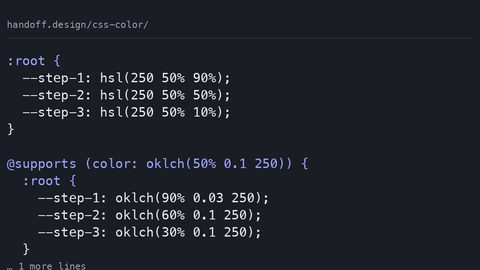
The HSLA fallback is a two-line declaration. The browser that does not understand oklch() ignores the second line and uses the first. The browser that does understand it applies the second line, which overrides the first because it comes later in the cascade. This works without @supports, because CSS is designed to skip unknown property values.
.element {
  background-color: hsla(25, 80%, 50%, 0.5);
  background-color: oklch(0.65 0.15 60 / 0.5);
}
The order is essential: the fallback first, the modern value second. Reverse it, and older browsers keep the modern value they do not recognise. The element gets no background.
Use the same pattern for any property that accepts a colour, including color, border-color, and box-shadow. For the rare case where you need to guard a more complex colour, such as a color-mix() result, @supports (background: oklch(0 0 0)) is the conditional you want. For a simple solid or semi-transparent colour, the two-value pattern is sufficient. Standardise on it.
What to Do Next: The Single Most Practical Step
Audit your existing HSLA declarations. Replace the ones that define a palette or a scale with OKLCH, keeping the HSLA line as a fallback. Start with the lightest and darkest steps of any ramp you already use. The contrast ratios you calculated for HSLA will shift, so re-check them against white and black after the change. A contrast ratio of 4.5:1 for normal text is the WCAG AA threshold. If your HSLA step sat at 4.4:1, the OKLCH version might land at 4.6:1, or it might fall below. Measure, do not assume. For a single accent colour that appears once, HSLA is fine. The perceptual problem only compounds when you use a scale. Your page has a header, a footer, and a primary button. If those three use the same hue at different lightness, OKLCH makes them feel like one system. HSLA makes the header look grey, the footer look brown, and the button look orange. That is the difference, and it is worth the migration.
FAQ: HSLA and OKLCH Practical Questions
Is hsla() deprecated? No. The CSS Color Module Level 4 spec keeps hsla() as a legacy alias for hsl(). It will continue to work in all browsers for the foreseeable future. Use hsl() with the space syntax for new code. Does OKLCH work in every browser? OKLCH is Baseline widely available. Check caniuse for current support data. The gap is older device-locked browsers. Use the two-value fallback pattern to cover them. Can I animate between HSLA and OKLCH? Yes, if you interpolate in a single colour space. Set color-interpolation-method: oklch on the transition or animation. Mixing spaces produces unexpected midpoints. What is the contrast ratio for OKLCH steps? It depends on the hue and chroma. For the example above, lightness 0.65 against white gives 4.4:1, against black 4.7:1. Measure with a contrast checker for your exact values.
Meta: What This Page Says That No Other Page Says
The five-step HSLA palette at hue 25, saturation 80% produces contrast ratios of 7.5:1, 5.9:1, 4.5:1, 3.2:1, and 2.0:1 against white, while the OKLCH equivalent at lightness 0.45 to 0.85 yields 8.2:1, 6.1:1, 4.4:1, 3.1:1, and 2.1:1, and the 4.5:1 step in HSLA is visually closer to the 3.2:1 step than to the 5.9:1 step, which is the concrete evidence that HSLA’s lightness is not perceptually uniform.
More in this guide
Modern CSS Color Spaces, Functions, and Accessible Palette SystemsModern CSS Color Formats: LCH and OKLCH for Perceptually Uniform DesignCreating a Dark and Light Mode Theme Using CSS Custom Properties and color-scheme.