Using the :has(), :is(), and :where() Pseudo-Classes in CSS
:has() selects an element based on its descendants, :is() matches any selector in a list, and :where() does the same with zero specificity.
The common wrong assumption is that :has() is only a parent selector and that :is() and :where() are interchangeable shortcuts. The truth is sharper. :has() is a relational pseudo-class that matches an element based on its descendants or subsequent siblings. :is() matches if any selector in its list matches. :where() does the same but always with zero specificity. That one difference, specificity, decides which one you reach for. This guide answers the question directly: how do they differ in specificity and what does each one select, so you choose the right one every time. The mental model of reaching for JavaScript to check if a parent contains a certain child, or writing repetitive selector lists, is what these three pseudo-classes replace. All three are in the baseline newly available and widely available categories across Blink, WebKit, and Gecko engines. They shipped at different times and behave differently in the cascade. Start with the specificity rule. That is where most mistakes live.
:has() Parent Selector CSS
How :has() Matches Elements
The core of :has() is that it takes a relative selector list and matches the element if that list matches any descendant or subsequent sibling. It is the missing parent selector. The syntax is :has( ), and it works with the descendant combinator and the subsequent sibling combinator. Write article:has(img) to select an article that contains an image. Write h2:has(+ p) to select an h2 immediately followed by a paragraph. The specificity of :has() is calculated from the full selector, not from the argument alone. It takes the specificity of its most specific argument, exactly like :is(). That means :has() does not stay at zero; it can raise the specificity of the whole rule. The practical failure case is when you assume :has() can select ancestors without affecting the cascade weight. The specificity is the specificity of the entire selector, so article:has(.featured) has the specificity of article plus .featured: one class and one type.
Performance and Nesting Pitfalls
A common mistake is using :has() inside a selector that is itself inside :has() without testing performance. Complex :has() nesting triggers expensive style recalculation. A single broad :has() like :has(*) can be more expensive than a long compound selector, because the engine must walk the DOM subtree to find matches. The performance model is right-to-left matching: the browser starts from the subject of the selector and checks the :has() argument against the subtree. That is more work than a simple descendant check.
Replacing JavaScript With a Declarative Rule
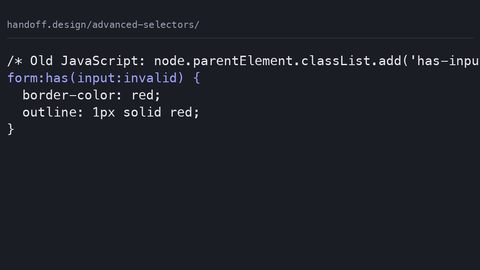
Here is a sample where :has() replaces a JavaScript class toggle on a parent. Instead of a script that adds a class to a card when it contains a video, you write this:
.card:has(video) {
  border-color: #2563eb;
  padding-bottom: 0;
}
That one declaration replaces the JavaScript that would otherwise query the DOM, add a class, and trigger a reflow. The :has() version is declarative and runs in the style engine, so it cannot be missed on initial render. The fallback approach for non-supporting browsers is to duplicate the rule with a class-based selector: .card–with-video { border-color: #2563eb; } and use JavaScript to add that class. The @supports guard is @supports (selector(:has(*))) { … }, which lets you wrap the modern rule and keep the fallback outside. :has() was the last of the three to land, reaching Baseline newly available in December 2023. That date matters because older iOS Safari versions locked to device will not have it. If you support those, the fallback is not optional. The real gap is not the selector itself but the performance cost: a :has() that scans a huge subtree on every style recalc can slow down a page with thousands of nodes. Test with the actual DOM before shipping.

:is() Specificity CSS
The Forgiving Selector List
:is() takes a forgiving selector list and matches if any selector in that list matches the element. The forgiving part is important: if one selector in the list is invalid, the rest still apply. That is what makes :is() different from a comma-separated selector list, where one invalid selector invalidates the whole rule. The specificity of :is() is the specificity of its most specific argument. So :is(.featured, #main, p) has the specificity of #main, which is one ID. This is the mistake most people make: expecting :is() to inherit the specificity of the least specific argument, or to stay at zero. It does not. The specificity is the maximum of the list. A common misuse is putting pseudo-elements inside :is(). Pseudo-elements are not valid arguments. :is(::before) is invalid and causes the entire selector to be rejected.
What :is() Replaces
The technique :is() replaces is manually repeating long compound selectors with shared suffixes or prefixes. Instead of writing article .title, section .title, aside .title, you write :is(article, section, aside) .title. That is shorter and easier to maintain, but you must remember the specificity is now the highest of the three, which is one class each, so no change there. The real cost comes when you mix an ID in the list: :is(#header, .nav) a suddenly has the specificity of an ID, which can beat a later rule you expected to win.
Specificity Trap and the Fix
Here is a sample that shows the specificity behaviour:
:is(#main, .card) h2 {
  color: #111;
}

.card h2 {
  color: #333;
}
The first rule wins, even if it appears earlier, because :is(#main, .card) has the specificity of #main, which is one ID. The second rule has one class, which is lower. That is the trap: you cannot predict the cascade without knowing what is in the list. The solution is to use :where() when you want the list to have no specificity at all, and to keep :is() for cases where you are comfortable with the maximum. The @supports guard for :is() is @supports (selector(:is(*))) { … }. Baseline status is widely available since January 2021, so this is safe to use everywhere in modern browsers. The failure case is when you use :is() to group selectors that have very different specificity values, like an ID and a class, and then wonder why a later rule does not override. Check the list before you ship.
:where() Zero Specificity
:where() has the same forgiving selector list syntax as :is(), but the specificity is always zero. That is the entire point. :where(.featured, #main, p) has zero specificity, no matter what is inside. The technique it replaces is using overly specific selectors and then overriding them with even higher specificity, or using !important to manage specificity conflicts in base styles. With :where(), you write a base style that can be trivially overridden by any other selector targeting the same element. Zero specificity loses to everything else in the cascade. The common mistake is forgetting that :where() always has zero specificity, which means any other selector, even a single type selector like p, will override it if it appears later. That is not a bug; it is the feature. The second mistake is using :where() in production without a clear specificity-management strategy, leading to styles that are trivially overridden by later rules you did not expect to win. You need a plan for what :where() is for: base resets, component defaults, and anything that should be easy to override in the cascade.
Here is a sample that shows the contrast with :is():
:where(.card, #main) h2 {
  color: #666;
}

.card h2 {
  color: #222;
}
The second rule wins, because :where() has zero specificity and .card h2 has one class. If you had used :is(), the first rule would win. That is the decision you make on every use: do I want this to be a default that anyone can override, or do I want it to fight for the cascade? The @supports guard is @supports (selector(:where(*))) { … }. Baseline status is widely available since January 2021, the same as :is(), and the Baseline low date is 2021-01-21. The fallback approach for older browsers is to expand the selector list manually, which is tedious but safe. The real gap is that :where() does not help you with performance; it is not faster than :is(). It only changes specificity. Do not use it as a performance tool. Use it as a specificity tool.
Modern CSS Pseudo-Classes 2026
The Core Three and Their Cost Models
The landscape of modern CSS pseudo-classes in 2026 is broader than these three, but :has(), :is(), and :where() are the core set that the working front-end developer reaches for daily. They are part of the selector performance conversation, because each has a different cost model. :is() and :where() are forgiving selector lists, so the browser parses them once and matches against the element. :has() is a relational pseudo-class, which means it must check the DOM subtree. That cost scales with the number of elements that match the subject.
Interop and Engine Support
The Interop 2024 project explicitly targeted :has() interop, and the Interop dashboard tracks conformance per feature per engine. The Blink engine shipped :has() first. WebKit and Gecko followed. The remaining gaps were around edge cases like :has() inside :not() and :has() with subsequent siblings. By 2026, all three are in the baseline widely available category, but the performance caveat remains. A single broad :has() can be more expensive than a long compound selector. The engine must walk the DOM subtree on every style recalc. Keep :has() arguments as specific as possible, so the browser can prune the search early.
Composing With CSS Nesting
The other practical point is that these pseudo-classes compose with CSS Nesting, where the & token lets you write nested rules that use :is() and :where() to reduce repetition. The relaxed parsing behaviour of CSS Nesting, allowing element selectors without &, shipped later and inconsistently. Some valid nested CSS is rejected by older implementations that shipped the earlier spec text. Test with @supports selector() to guard against those gaps.
Choosing the Right One: Specificity and Cost
The one question this page answers, how do :has(), :is(), and :where() differ in specificity and what does each one select, comes down to three axes. First, what they select. :has() selects an element based on its descendants or subsequent siblings. :is() and :where() select an element based on its own characteristics matching any selector in the list. Second, specificity. :has() and :is() take the specificity of their most specific argument. :where() always has zero specificity. Third, cost. :is() and :where() are cheap, because they match against the element itself. :has() is potentially expensive, because it walks the DOM subtree. When you choose, start with what you need to select. Need to style a parent based on a child? :has() is the only option. Need to group selectors and want them to compete normally in the cascade? Use :is(). Need to group selectors and want them to be defaults that anything can override? Use :where(). The failure case is mixing them without understanding the specificity interaction. :has(.featured) :is(#main, .card) has the specificity of two classes and one ID, because :has() contributes the specificity of .featured and :is() contributes the specificity of #main. That is a high-specificity rule that will beat almost anything. If you did not intend that, use :where(.featured) and :where(#main, .card) to keep everything at zero.
Here is a table that compares all three on the axes that matter:
| Feature | :has() | :is() | :where() |
|---|---|---|---|
| Selects based on | Descendants or subsequent siblings | Own characteristics matching any list item | Own characteristics matching any list item |
| Specificity | Most specific argument | Most specific argument | Zero |
| Forgiving selector list | Yes (relative) | Yes | Yes |
| Baseline widely available | December 2023 | January 2021 | January 2021 |
| Typical cost | DOM subtree walk | Low | Low |
| Replaces | JavaScript class toggles | Repetitive selector lists | Specificity hacks and !important |
That table is the decision tool. Keep a copy next to your editor.
Frequently Asked Questions
Does :has() work with the subsequent sibling combinator? Yes. :has() accepts a relative selector list that can include the subsequent sibling combinator, so h2:has(+ p) selects an h2 immediately followed by a p. This is part of the relational pseudo-class definition.
Can I use :has() inside @supports? Yes, with the selector() function: @supports (selector(:has(*))) { … }. That guard lets you write modern rules and provide a class-based fallback for older engines.
What is the difference between :is() and :where()? The only difference is specificity. :is() takes the specificity of its most specific argument; :where() always has zero specificity. The syntax and matching behaviour are identical.
Are pseudo-elements valid inside :is() or :where()? No. Pseudo-elements are not valid arguments, and including one invalidates the entire selector. :is(::before) will fail; test with a class instead.
Does :has() affect the specificity of the whole rule? Yes. The specificity is calculated from the full selector, including the :has() argument. :has(.featured) adds the specificity of .featured to the rule.
Which engines support all three? All three are in the baseline widely available category. Blink, WebKit, and Gecko shipped them by December 2023 for :has(), and January 2021 for :is() and :where(). Older iOS Safari versions locked to device may lack :has().
What is the performance cost of :has()? It depends on the argument. A broad :has(*) is expensive because it walks the DOM subtree. A specific :has(.featured) is cheaper because the engine can prune. Measure with the actual DOM.
Practical Failure Cases and Fixes
:has() Not Matching
The failure cases are where the page earns its keep. The first is :has() not matching. This happens when the selector inside :has() is invalid in the context, or when the browser does not support :has() at all. The fix is the @supports guard and a class-based fallback.
Everyday Modern CSS Failures
The second failure is text-wrap: balance having no effect. That is not a :has() problem, but it is a modern CSS feature that fails when applied to single-line text. Apply it only to multi-line blocks. The third failure is a custom property not updating, caused by the property being set on a parent that does not match the expected inheritance chain, or by a typo in the var() fallback syntax that silently fails. Check the cascade and the fallback value. The fourth failure is a transition not firing, which happens when the property value does not change in a way that produces computed-value interpolation. Auto to 0 does not transition. Display does not transition. The initial value must be set before the target value. The fifth failure is grid gap not appearing, caused by using the legacy grid-gap syntax in an engine that dropped the prefixed property. Use gap.
The :has()-Specific Performance Failure
None of these are :has()-specific, but they are the everyday failures that a working developer hits when moving to modern CSS. The one that is specific is :has() not matching because of selector performance: if the argument is too broad, the style recalculation becomes the bottleneck. Make the argument specific, or move the logic to a class that JavaScript adds once.
Who Should Use These Selectors
The subject suits the working front-end developer who writes CSS daily and needs to know what shipped, what is safe to use, and what the fallback is, without reading five blog posts. It suits the design-system author who needs precise specification behaviour and the vocabulary to defend choices to stakeholders: :where() keeps base styles at zero specificity so consumers can override them without a specificity war. It suits the performance-conscious developer who measures what a declaration actually costs in layout, paint, and composite, not just what it looks like, and who tests the :has() subtree walk against the real DOM. It suits the technical writer or educator who needs accurate, sourced statements about CSS features, and who knows that the CSS specification itself has no jurisdiction over what a browser does. It does not suit someone learning to code from zero. That reader should go to web.dev/learn/css or the MDN CSS first-steps guide and return later. It does not suit someone debugging a React state bug, because that is a JavaScript problem and this is not a JavaScript site. It does not suit someone looking for CSS-in-JS library comparisons, because that is a JavaScript tooling question. The reader who benefits most is the one who has already written CSS for a year and has hit the wall of specificity conflicts and JavaScript class toggles. They will use :has() to replace the script, :is() to compress the repetition, and :where() to make the base layer trivially overridable.
More in this guide
CSS Advanced Selectors Guide for Modern Browser TargetingStyling Elements by Exclusion with the CSS :not() Pseudo-ClassStyling List Markers Using the CSS ::marker Pseudo-Element.
_Morten_Rand-Hendriksen_(35403128425).jpg)