Using a Settings File for Theming with CSS Custom Properties
Build a runtime theme system with CSS custom properties instead of Sass variables, with complete samples showing why build-time values freeze and cascade tokens don't.
Every theming system you have ever built with Sass variables works until a user flips a switch. Then it dies. The fix is a CSS custom properties settings file: keep the tokens in one place, but move them from build-time constants to live values the cascade can change. A preprocessor variable freezes when the compiler runs. A custom property is a live cell in the cascade. It inherits, it overrides, and JavaScript can mutate it. That is what a theme layer needs. The same setup appears twice below: once with Sass variables, once with custom properties. Each example names what the second approach protects against.
Why Sass Variables Fail at the Moment of Theme Switching
The _settings.scss file has been the backbone of design tokens for a decade. You write $brand-primary: #0055aa; at the top, import it everywhere, and the compiler substitutes the literal value into every rule. That mechanism runs at build time. The value is gone the moment the stylesheet ships. When a visitor clicks a dark mode toggle, the client has no record of $brand-primary. Only the hex colour baked into a rule remains. No CSS can swap it without a new stylesheet or a reload.
Compile-Time Constants Versus Live State
The failure is not in the syntax. Sass variables excel at organising values that never change, like a baseline grid unit or a breakpoint threshold. The failure is in treating all tokens as the same kind of thing. A breakpoint is a compile-time constant. A theme colour is a live state. The settings file conflates them. The result is a system where changing the theme means generating a second stylesheet, loading it, and hoping the override layer wins every battle it fights.
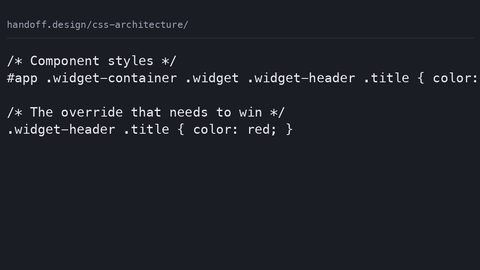
That is the specificity war. Theme overrides written as .theme-dark .button { background: #001122; } climb to beat the base rule. The next component that needs an override climbs higher. Soon every rule carries a chain of classes and the cascade stops meaning anything.
Design Tokens Custom Properties: The Replacement That Runs Live
The custom-property equivalent of _settings.scss is a :root block that declares tokens as CSS custom properties. The difference is inheritance. A custom property is not a constant. Its computed value resolves in the client, and it inherits down the DOM tree. Any element can override it for its own subtree. That single fact turns the settings file from a compile-time dictionary into a live theme layer. The same property can hold different values in different parts of the page. A media query, a class on the root, or a style attribute set from JavaScript can change those values.
:root {
  --brand-primary: #0055aa;
  --surface-base: #ffffff;
  --text-strong: #1a1a1a;
  --spacing-unit: 0.25rem;
}

button {
  background: var(--brand-primary);
  color: var(--surface-base);
  padding: calc(var(--spacing-unit) * 2);
}
This sample runs in any modern engine. The var() function reads the computed value of the custom property at the point where the rule applies. The button’s background is whatever –brand-primary happens to be at that moment, on that element, in that theme. The cascade does the work that Sass used to do at build time, and it does it live.
Sass Variables vs Custom Properties: What Actually Changes
The distinction is not about which one is newer. It is about the stage at which the value is fixed. Sass variable scope is lexical. A variable defined inside a block is local to that block unless you flag it !global. The value substitutes before the CSS file is written. A custom property has no such freeze. Its specified value is parsed. Its computed value resolves during the cascade. It can be reassigned at any point in the inheritance chain. That is the difference between a photograph and a live feed. Theming is a live-feed problem.
The Static @if Pattern and Its Limits
Consider the Sass theming pattern that uses @if and @else to output different blocks based on a $theme variable. That works for two static themes you compile separately. It cannot respond to a user’s preference after the page has loaded. The CSS equivalent is a media query like prefers-color-scheme. The client evaluates that condition live. A class toggle that JavaScript flips in a single line is another. The custom-property approach subsumes both. Set a token at the root based on the condition. Every descendant picks up the new value through inheritance. No specificity battle occurs because the override happens at the property level, not the rule level.
Theme Switching at Runtime: A Working Toggle
Here is the complete pattern that Sass cannot do. A button on the page flips a class on the root element. The entire theme changes without a reload because every token is a custom property and every rule reads it through var().
<!DOCTYPE html>
<html lang="en">
<head>
  <style>
    :root {
      --bg: #ffffff;
      --fg: #1a1a1a;
      --accent: #0055aa;
    }
    :root[data-theme="dark"] {
      --bg: #1a1a1a;
      --fg: #eeeeee;
      --accent: #ffcc00;
    }
    body {
      background: var(--bg);
      color: var(--fg);
      font-family: system-ui, sans-serif;
    }
    button {
      background: var(--accent);
      color: var(--bg);
      border: none;
      padding: 0.5rem 1rem;
    }
  </style>
</head>
<body>
  <button id="toggle">Switch theme</button>
  <script>
    const root = document.documentElement;
    document.getElementById('toggle').addEventListener('click', () => {
      const next = root.getAttribute('data-theme') === 'dark' ? 'light' : 'dark';
      root.setAttribute('data-theme', next);
    });
  </script>
</body>
</html>
That is the whole mechanism. The button sets an attribute. The attribute selector changes the custom properties at the root. Every var() in the page recomputes. No extra stylesheet. No specificity arms race. No JavaScript that touches individual elements. The cascade handles the distribution.
Component-Scoped Tokens: When the Root Is Not Enough
The same inheritance that makes root-level theming work gives you component-scoped tokens for free. Set a custom property on a component’s container. It applies to that component’s entire subtree, and only that subtree. That is the scoping a design system wants to keep one component’s theme from leaking into another. Sass has no equivalent. A variable is global unless you manually namespace it, and even then the value is frozen.
.card {
  --card-surface: #f5f5f5;
  --card-border: #cccccc;
  background: var(--card-surface);
  border: 1px solid var(--card-border);
}

.card--featured {
  --card-surface: #fffbe6;
  --card-border: #e6c200;
}

.card__title {
  color: var(--card-text, var(--text-strong));
}
The Fallback Chain
Notice the fallback pattern in the last rule. The var() function takes a second argument used when the custom property is not defined. That fallback can itself be another var(). You chain a component token down to a global token. This is the specificity-free equivalent of a Sass map lookup. It resolves live, so the same component can be themed differently in different parts of the page by changing the context.
What @property Gives You That a Plain Custom Property Does Not
A plain custom property has a critical limitation. The client treats its value as a string until it is used. It cannot animate or interpolate. The @property rule fixes that. It declares a type, an initial value, and an inheritance behaviour. This turns a custom property into a true registered property the CSS engine understands and can compute. Without @property, –spacing: 2; is text. With @property, it is a length that participates in calc() and transitions.
@property --theme-rotation {
  syntax: '<angle>';
  inherits: true;
  initial-value: 0deg;
}

:root {
  --theme-rotation: 90deg;
}

.element {
  transform: rotate(var(--theme-rotation));
  transition: --theme-rotation 0.5s ease;
}
The registered property gives you a reliable initial value for cases where a token is missing. This is a safety net a plain var() fallback does not fully cover. The fallback only activates when the property is not defined, not when it is defined but invalid. The practical consequence: @property makes custom properties behave like typed design tokens, not untyped strings. The platform is moving in that direction for exactly the theming use case.
Cascade Layers and Theme Precedence Without Specificity Wars
The final piece of the theming architecture is @layer. It gives you explicit priority buckets so a theme override never fights a base rule on specificity. The cascade has always had an order: origin, then layer, then specificity, then source order. Layers let you declare that your theme overrides sit in a higher layer than your base tokens, regardless of how specific the selectors are.
@layer tokens, theme, components;

@layer tokens {
  :root {
    --brand: #0055aa;
  }
}

@layer theme {
  :root[data-theme="dark"] {
    --brand: #ffcc00;
  }
}

@layer components {
  .button {
    background: var(--brand);
  }
}
Because the theme layer comes after the tokens layer, its declarations win for the same custom property. Because the components layer comes last, component-level declarations can further refine tokens for a specific part of the page. This works without a single extra specificity point. The layer order is the priority. The cascade resolves the rest. This architecture replaces the Sass @if / @else pattern for emitting theme blocks, and it does it live, with the client handling the conditional evaluation.
Style Queries and the Limits of Live Theming
One more tool extends custom property theming beyond simple root toggles: style queries. A style query lets a container respond to the computed value of a custom property on itself. This is component-variant logic that does not require a class on every element. If a component’s theme token changes, its descendants adapt without knowing which class caused it.
.product-card {
  --card-mode: normal;
}

@container style(--card-mode: featured) {
  .product-card__title {
    font-size: 1.5rem;
  }
}
What Style Queries Cannot Do
That is a powerful pattern, but it has a boundary. Style queries are supported in all major engines as of the mid-2020s. Check caniuse for the current support picture. They are not a replacement for a full logic language. They cannot do arithmetic or branching beyond a value match. The claim that custom properties are a constraint-solving system is true only in a narrow sense: they inherit, they cascade, they combine with calc(), and style queries can branch on them. That is enough for theming and for most component variants. It is far less than a programming language. The mistake is to over-engineer a system that needs a handful of tokens and a toggle into a JavaScript state machine that fights the cascade instead of riding it.
When the Live Theme Is Not Enough: The Failure Case
The pattern described here is robust for most theming needs, but it has a failure mode. Name it before you commit. If a theme requires changing a value that is not a custom property, the custom property cannot reach it. Examples include a property animation or a font-face selection that depends on a variable in a @font-face rule. The @font-face descriptor does not accept var(). Some declarations, like background-image in certain shorthand forms, have parsing quirks that make a var() substitution fail silently.
Older Clients and Progressive Enhancement
The second failure case is older clients. Custom properties work in every engine from 2016 onward. @property and style queries are newer. A page that relies on them degrades poorly without a fallback. The @supports guard can test for style queries. It cannot test for @property registration. Decide whether the progressive enhancement is worth the complexity. For a theming system on a modern front end, the answer is yes. For a site that must support a 2018-era client, ship the Sass variable version as a static fallback and layer the live enhancement on top.
FAQ: Theming with a Settings File
Why use custom properties instead of Sass variables for theming?
Custom properties cascade and inherit. They change live in response to a class, a media query, or JavaScript. Sass variables freeze at build time and cannot change after the stylesheet is generated. Theming is a live behaviour, so it needs the live mechanism.
How do I switch themes without a page reload?
Set a custom property on the root element through a class, an attribute, or a style attribute from JavaScript. Let inheritance distribute the new value to every rule that reads it with var(). The client recomputes the affected values automatically.
Can I use Sass variables for anything in a theming system?
Yes, for values that never change, such as breakpoints, base font sizes, or grid gutters. Separate compile-time constants from live tokens. Put the former in Sass and the latter in custom properties.
What is the fallback for a custom property in an older client?
Provide a static value as the fallback argument in var(), such as var(–brand, #0055aa). Or use a @supports guard to load a different stylesheet. The fallback is not a perfect substitute, but it keeps the page usable.
How does @property change custom property behaviour?
It registers a type, an initial value, and an inheritance rule. The client can then animate the property and treat its value as a number, length, or colour instead of a string. Without @property, custom properties are untyped and cannot interpolate.
What is the role of @layer in theming?
@layer sets explicit cascade priority order. A theme override wins over a base token without increasing specificity. The layer order is the priority. The cascade resolves the rest.
When should I not use this pattern?
When you need to change a value that cannot be a custom property, such as a @font-face descriptor. Or when you must support clients that predate custom properties. In that case, ship a static Sass-generated fallback first.
Who This Pattern Suits and Who Should Skip It
This theming architecture suits a working front-end developer who owns a design system that must support dark mode, user-preference themes, or component-level variants. It suits someone tired of shipping three compiled stylesheets and a specificity hack to make it work. It suits a design-system author who needs to defend the choice of live tokens to stakeholders. It suits a technical writer who needs to explain why a preprocessor variable is not a substitute for a cascade value.
It does not suit someone building a static brochure site with one theme and no user interaction. For that, a Sass variable file is simpler and faster. The live machinery is unnecessary weight. It also does not suit a project that must support a client from before 2016. The core mechanism does not exist there, and the fallback would double the maintenance cost without delivering the live benefit. If you need live theme switching, this is the road. If you do not, the old road still works.
More in this guide
CSS Architecture: How to Organise Stylesheets So the Next Change Is SafeManaging z-index in Large Projects Using Explicit Stacking Context LayersA Guide to Scoped CSS Using @scope, CSS Modules, and Shadow DOM.