A Guide to the IntersectionObserver API for CSS Animation Triggers and Lazy Loading
Use IntersectionObserver to trigger CSS animations and lazy loading when elements enter the viewport, and know when the CSS-only view() timeline replaces the JavaScript approach entirely.
The first scroll of the page is the moment the IntersectionObserver API earns its keep. The hero section is already painted, the fold is full, and the engine has just asked whether the next section’s entrance animation should fire. That single question, is it visible yet?, is the whole job. The answer arrives asynchronously, off the rAF loop, without a single scroll event listener touching the main thread. For a CSS developer who has spent years wiring scroll events to getBoundingClientRect() and watching the layout thrash pile up, this is the quiet upgrade. The IntersectionObserver CSS animation trigger turns visibility into a declarative contract between the DOM and the stylesheet. It is the first tool to reach for when a scroll-triggered animation needs JavaScript state.
The question this article answers is when to use that JavaScript visibility detection versus the newer, CSS-only route. The answer is not a preference. It is a matter of which thread does the work. IntersectionObserver callbacks run on the main thread, exactly where JavaScript lives. Any style change you make in the callback, toggling a class or setting a custom property, will trigger a style recalc, possibly layout, and then paint and composite. The Scroll-Driven Animations specification, by contrast, defines scroll() and view() timeline animations that run off-main-thread on the compositor. The engine can advance them without ever asking the main thread for permission. That is the performance boundary that drives the decision. If the animation can be expressed declaratively and does not need JavaScript state, the compositor path is strictly cheaper. If it needs a conditional, a measurement, or a dynamic value, IntersectionObserver is the bridge that gets you there.
How the IntersectionObserver CSS Animation Trigger Works
Understanding The API Surface
Before writing code, understand the API surface. The mistakes live in the defaults. IntersectionObserver takes a callback function, callback(entries, observer), and an options object with three properties: root, rootMargin, and threshold. The root defaults to the viewport, the implicit root. rootMargin defaults to “0px 0px 0px 0px”, so the observation area is exactly the viewport’s rectangle. The threshold, which can be a single number or an array of numbers from 0 to 1, determines when the callback fires. At threshold 0, the callback fires when any pixel of the target enters or exits. Critically, isIntersecting can be true even at an intersectionRatio of 0, which confuses many developers. At threshold 1, the callback fires only when the entire element is visible. The entry object you receive has two properties that matter: isIntersecting, a boolean, and intersectionRatio, a number from 0 to 1. The callback fires once per frame per observed element when the ratio crosses a threshold. It is not a continuous scroll handler. It is a state-change notifier.
A Class-Toggled Entrance Animation with IntersectionObserver
Building The Classic Entrance Pattern
The classic pattern is to add a class when the element enters the viewport, which triggers a CSS animation that runs once. Here is a complete example that observes a section and applies an animation class when it appears.
<!DOCTYPE html>
<html lang="en">
<head>
<meta charset="UTF-8">
<meta name="viewport" content="width=device-width, initial-scale=1.0">
<style>
  .reveal {
    opacity: 0;
    transform: translateY(20px);
    transition: opacity 0.6s ease, transform 0.6s ease;
  }
  .reveal.is-visible {
    opacity: 1;
    transform: translateY(0);
  }
  section {
    min-height: 80vh;
    display: grid;
    place-items: center;
    font-size: 2rem;
    border-bottom: 1px solid #ccc;
  }
</style>
</head>
<body>
  <section>Scroll down to see the animation trigger</section>
  <section class="reveal" id="target">This section fades in via IntersectionObserver class toggle</section>

<script>
  const target = document.getElementById('target');
  const observer = new IntersectionObserver((entries, observer) => {
    entries.forEach(entry => {
      if (entry.isIntersecting) {
        entry.target.classList.add('is-visible');
        observer.unobserve(entry.target); // fire once, then stop
      }
    });
  }, { threshold: 0.3 }); // fire when 30% visible
  observer.observe(target);
</script>
</body>
</html>
How The Pattern Holds Up
This is the bread-and-butter use case. The callback adds a class, the CSS transition does the rest, and unobserve() prevents the callback from firing again. A common mistake is forgetting that unobserve call, which wastes cycles. The threshold of 0.3 means the animation starts after the section is a third visible, which feels natural for entrance effects. Note the mismatch: the JavaScript sets the class, but the animation is pure CSS. The main thread does the style recalc when the class is added. If the transition targets transform and opacity only, the compositor can handle the actual movement.
IntersectionObserver Lazy Loading CSS Techniques for Images
Swapping The Source On Demand
The second job of the IntersectionObserver API is lazy loading. It is a direct replacement for the scroll-event-with-getBoundingClientRect pattern that used to litter the main thread. Observe an image. When it is about to enter the viewport, swap the data-src attribute into src. The engine then fetches the image on demand. The IntersectionObserver lazy loading CSS pattern keeps the initial page load light because the engine does not download off-screen images. Here is a complete runnable sample.
<!DOCTYPE html>
<html lang="en">
<head>
<meta charset="UTF-8">
<meta name="viewport" content="width=device-width, initial-scale=1.0">
<style>
  .lazy-image {
    width: 100%;
    height: 300px;
    display: block;
    object-fit: cover;
    /* Reserve space to avoid layout shift, a common mistake without it */
  }
  .placeholder {
    background: #eee;
  }
</style>
</head>
<body>
  <div style="height: 200vh;"></div>
  <img class="lazy-image placeholder" data-src="https://via.placeholder.com/800x300" alt="Lazy loaded image">

<script>
  const img = document.querySelector('img.lazy-image');
  const observer = new IntersectionObserver((entries, observer) => {
    entries.forEach(entry => {
      if (entry.isIntersecting) {
        const target = entry.target;
        target.src = target.dataset.src;
        target.classList.remove('placeholder');
        observer.unobserve(target);
      }
    });
  }, { rootMargin: '200px 0px', threshold: 0 });
  observer.observe(img);
</script>
</body>
</html>
Preloading And Layout Stability
The rootMargin of ‘200px 0px’ extends the observation area 200 pixels below the viewport. The image starts loading before it is on screen, which is the right default for perceived performance. A threshold of 0 means the callback fires as soon as one pixel is in the root, which pairs naturally with the rootMargin preload. The failure mode here is forgetting to reserve space with width and height or aspect-ratio. That causes layout shift when the image loads and the page jumps. This is the “percentage height collapsing to zero” failure reversed: here it is the image’s natural height appearing after the fact. Also note that this technique is now partially redundant with the native loading=”lazy” attribute, which uses the same intersection logic internally. The attribute gives you no control over when the swap happens. The IntersectionObserver version lets you add a class, fire a callback, or measure the intersectionRatio for progress.
IntersectionObserver vs Scroll Events Performance
The Real Cost Of Each Approach
To decide, you need a concrete picture of what each costs. The IntersectionObserver API was designed to replace scroll event listeners with getBoundingClientRect() and manual viewport maths. The old way triggered layout thrashing because each getBoundingClientRect call forced a synchronous style flush. Those scroll listeners run on the main thread. Every pixel of scroll fires the handler, even if the handler does nothing useful. That is the main-thread cost the research names. IntersectionObserver callbacks also run on the main thread, but they do not run on every scroll frame. They are scheduled by the engine’s internal intersection logic, which runs asynchronously and only notifies you when the intersection ratio crosses a threshold. The main thread does less work per scroll, but the work it does, the callback, is still JavaScript. The performance win over scroll listeners is real but bounded. You are not fighting layout thrashing, but you are still occupying the main thread.
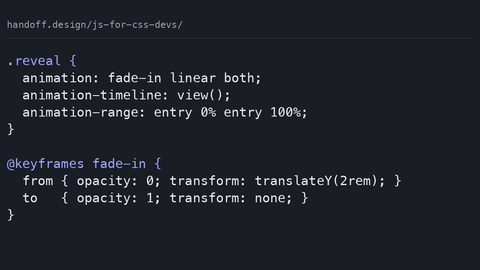
Scroll-driven animations with the scroll() and view() timeline functions are declared in CSS and executed on the compositor, entirely off the main thread. The research is explicit: the Scroll-Driven Animations specification defines that these animations are driven by the compositor. The main thread never sees a scroll event, never runs a callback, and never recalculates layout unless you force it by reading layout properties in a requestAnimationFrame callback. That is the boundary. If your animation is a simple transform or opacity change that progresses with scroll position, the view() timeline is the right tool. It is the CSS-only alternative this article promised. But if your animation needs a conditional based on JavaScript state, a delay that depends on a measurement, or a different animation for each of three thresholds, you cannot express that in a declarative timeline. You need the IntersectionObserver callback to flip a class. The choice is not “better or worse.” It is “which thread is allowed to do the work.”
Here is the comparison side by side, showing the identical effect, a section that fades in when scrolled into view, implemented both ways.
IntersectionObserver vs view() Timeline: The Same Effect, Two Threads
<!-- Version 1: IntersectionObserver (main thread) -->
<!DOCTYPE html>
<html lang="en">
<head>
<meta charset="UTF-8">
<style>
  .fade-in {
    opacity: 0;
    transition: opacity 0.5s ease;
  }
  .fade-in.is-visible {
    opacity: 1;
  }
</style>
</head>
<body>
  <div style="height: 100vh;"></div>
  <section class="fade-in" id="obs-box">Observer version</section>
  <div style="height: 100vh;"></div>
<script>
  const box = document.getElementById('obs-box');
  const observer = new IntersectionObserver((entries, obs) => {
    entries.forEach(e => {
      if (e.isIntersecting) {
        e.target.classList.add('is-visible');
        obs.disconnect();
      }
    });
  }, { threshold: 0.5 });
  observer.observe(box);
</script>
</body>
</html>
<!-- Version 2: view() timeline (compositor, no JavaScript) -->
<!DOCTYPE html>
<html lang="en">
<head>
<meta charset="UTF-8">
<style>
  @supports (animation-timeline: view()) {
    .fade-in-view {
      animation: fade-in 1s linear;
      animation-timeline: view();
      animation-range: entry 0% entry 100%;
    }
  }
  @keyframes fade-in {
    from { opacity: 0; }
    to { opacity: 1; }
  }
</style>
</head>
<body>
  <div style="height: 100vh;"></div>
  <section class="fade-in-view">view() version</section>
  <div style="height: 100vh;"></div>
</body>
</html>
Where The Trade-Off Bites
In the view() version, there is no JavaScript at all. The animation-timeline: view() declaration tells the engine to progress the animation as the element enters the viewport. animation-range: entry 0% entry 100% makes it fade in across the entrance. The compositor handles this without consulting the main thread. It cannot jank, even on a slow device. The trade-off is control. The view() version cannot decide to skip the animation if the user has prefers-reduced-motion set, unless you write a media query. It cannot respond to a button click that should trigger the same animation prematurely. The IntersectionObserver version can do all of that, because the callback can check any JavaScript state before adding the class.
The practical advice is to start with the view() timeline and only reach for IntersectionObserver when you hit the boundary. That boundary is concrete. If your animation needs to read a value from a variable that changes based on user interaction, or if it needs to fire conditionally on something other than scroll position, the declarative timeline fails and the observer is the answer. Conversely, if you catch yourself writing an IntersectionObserver callback that merely adds a class to start a transform animation, you are doing on the main thread what the compositor could do for free.
content-visibility: auto and IntersectionObserver: The Missing Link
The Rendering Deferral Partnership
The research pairs IntersectionObserver with content-visibility: auto as a performance combination, but the truth is more subtle. The content-visibility: auto property tells the engine to skip rendering work, layout, paint, and style, for an element that is off-screen. It does that work when the element approaches the viewport. The engine implements this using the same intersection detection machinery that IntersectionObserver exposes, but it is not the same API. You can use content-visibility: auto without any JavaScript. The engine decides when to start rendering. The connection to IntersectionObserver is that both are about visibility, and you can combine them. Use content-visibility: auto on a section to defer its layout cost. Use IntersectionObserver to add a class that triggers an entrance animation when it becomes visible. The pair works because content-visibility: auto gives the engine permission to skip the expensive layout pass. The IntersectionObserver callback re-enables it by adding a class that forces the engine to compute the now-needed styles.
Avoiding The Flash And The Shift
A common mistake the research flags is setting contain-intrinsic-size alongside content-visibility: auto to reserve space. Without it, the engine may not know the element’s size until it is rendered, causing layout shift. The failure mode is that content-visibility: auto is not a magic bullet. It changes when layout happens, not whether it happens. Apply it to an element that is already visible and you get no benefit plus a possible flash of unstyled content. The right pattern: apply content-visibility: auto to elements below the fold, pair it with contain-intrinsic-size: auto with a value, and let IntersectionObserver handle the animation trigger when the element crosses the threshold.
When Scroll-Driven Animations Replace the Observer
The Compositor-Only Sweet Spot
The Scroll-Driven Animations specification is the direct competitor to this article’s premise. It wins for a specific class of problems. The scroll() timeline progresses the animation based on the scroll position of a scroll container. The view() timeline progresses based on the visibility of the element in the viewport. Both run off-main-thread. They never cause layout thrashing. Both are pure CSS, so they work without any JavaScript. For any animation that is purely cosmetic, a parallax effect, a fade-in, a scale-up as an element enters, the scroll() or view() timeline is the better choice. It removes the main-thread cost entirely.
The Hard Boundary
But the research is clear about the boundary. Scroll-driven animations cannot respond to JavaScript state. They cannot be triggered by a click or a timer. They cannot delay their start based on a computation. They also cannot do anything that requires reading a layout value, like “start when the element is 50% of the viewport height AND the header is hidden.” That would require a measurement the compositor does not have. In those cases, you need the IntersectionObserver callback. It runs on the main thread and can read any value, check any condition, and then flip a class or set a custom property. The decision is not about which is simpler. Both can be a single line. It is about whether the animation depends on anything other than scroll position. If it does not, use the declarative timeline. If it does, use the observer.
This is the practical test: write the animation first as a view() timeline. If it does not do what you need because of a conditional, a state variable, or a delay, replace it with IntersectionObserver. The single most practical thing to do next is to take one animation you currently trigger with a scroll event listener and a getBoundingClientRect call, rewrite it as a view() timeline, and measure the difference in your DevTools performance panel. You will see the main-thread work disappear. Then you will know exactly when the observer is worth the cost.
Common Mistakes and How to Avoid Them
Memory Leaks And Detached Nodes
The IntersectionObserver API has three failures that trip up developers. The research names them precisely. First, forgetting to call observer.disconnect() or unobserve() when the observed element is removed from the DOM causes memory leaks. The observer keeps a reference to the element and the callback can fire on a detached node. The fix is to call unobserve at the top of the callback, as the samples do.
Threshold Surprises And Skipped Frames
Second, using a single threshold of 0 or 1 without considering that isIntersecting can be true at ratio 0. The element is just one pixel in. It can be false at ratio 1 when the element fills the entire viewport, a real edge case for large elements. Set an array of thresholds like [0, 0.25, 0.5, 0.75, 1] if you need precise control. Third, expecting the callback to fire on every scroll pixel. It does not. It fires once per frame per observed element when the intersection ratio changes. A fast scroll can skip a threshold crossing entirely. Do not put logic in the callback that assumes every visible state. Check isIntersecting and intersectionRatio in the callback and treat it as a state change, not a continuous stream.
rootMargin Pitfalls
Another failure is rootMargin misuse. The rootMargin property accepts a string in CSS margin syntax. It expands or contracts the root’s bounding box. A positive value like ‘200px 0px’ makes the observation area larger, good for preloading. A negative value, like ‘-100px 0px’, shrinks it, useful for triggering animations only when the element is well into the viewport. The mistake is using a negative margin without testing. It changes the threshold semantics. A threshold of 0 with a negative rootMargin means the callback fires only when the element is inside the shrunken box. That may be never if the element is short. Always test with real viewport sizes.
Performance Budgets and the Main Thread
Compositor Eligibility Is Everything
The research makes a hard claim that should shape every decision: IntersectionObserver callbacks run on the main thread, and scroll-driven animations run off-main-thread on the compositor. The “main thread” is where JavaScript executes, where style recalculations happen, and where layout is computed. Every time you add a class in an IntersectionObserver callback, you force a style recalc. If that style change affects layout, like changing width or top, you force a reflow. The compositor only composites pre-painted layers. It can move and fade them without ever touching the main thread. That is why a transform and opacity animation can run at 60fps even when the main thread is busy. A view() timeline animation never janks.
This has a concrete implication for your CSS. When you write an IntersectionObserver CSS animation trigger, the animation itself should target only transform and opacity, the compositor-safe properties. The only main-thread cost is the class toggle itself, not the animation’s every frame. If you animate width, height, or top, you move the animation to the main thread. You have lost the performance advantage. The research calls this the “compositor eligibility” categorical: compositor-only, partial, or main-thread. Transform and opacity are the canonical compositor-safe properties. Treat anything else as a red flag. The view() timeline does not save you from this. It only moves the scroll tracking off the main thread. If your keyframes animate a property that requires layout, the main thread still does the work on every frame. The compositor cannot help.
This is why the content-visibility: auto connection matters. It defers layout work, so the main thread is free when the scroll-driven animation runs. The combination of content-visibility: auto for off-screen sections and a compositor-only animation is the performance ideal. It is achievable with no JavaScript at all.
The Browser Support Reality Check
Guard Your Timelines
The research insists on honesty about support. The IntersectionObserver API is a W3C Living Standard and is supported in all modern engines, so you can use it without a polyfill. You cannot assume it exists in a client that is more than a few years old. The Scroll-Driven Animations specification, specifically the scroll() and view() timeline functions, is newer. Support rolled out in Chromium first, with Firefox and Safari following later. Check caniuse for the current status of each engine. Do not quote a specific version. Use an @supports guard around any animation-timeline declaration. The view() timeline sample above includes that guard. It falls back to no animation if the feature is missing, which is the correct progressive enhancement. The failure mode is assuming that because a feature is “shipped” it behaves identically everywhere. The research flags that interop gaps are real. Test in at least two engines before relying on a timeline feature.
IntersectionObserver's Universal Trap
For the IntersectionObserver API, the failure mode is different. It is universally supported. The mistake is not missing support but misuse of the options. The rootMargin and threshold defaults are not what you want for most animations. The research names the common mistake of using threshold 0 without realizing it fires at ratio 0. Read the MDN documentation for the exact semantics. The research directs readers there for authoritative truth. Do not assume your mental model is right. The spec is the source.
Content Visibility, IntersectionObserver, and the Lazy Loading Pivot
Combining The Two Without Collision
The research suggests a combined pattern that deserves its own section. When you use content-visibility: auto on a long page, you tell the engine to skip rendering for off-screen sections. This saves time on initial load. The engine still has to decide when to start rendering. That decision is based on intersections. The IntersectionObserver API can observe those same sections. When they become visible, it can remove the content-visibility: auto or add a class that forces a specific animation. The key is to not double-work. The engine is already using intersection logic for content-visibility. Your observer is redundant for the rendering decision. It is not redundant for the animation trigger. The observer can add a class like .entered that starts a transition, while content-visibility: auto handles the layout deferral.
Fixing The Half-Done Animation Flash
A common failure is applying content-visibility: auto to a section that itself contains an element you want to animate with IntersectionObserver. The observer will still fire. It observes the element’s position in the viewport. But the element’s styles may not be computed yet because the engine is skipping them. This causes a flash. The element appears with the animation already half-done. The fix is to set contain-intrinsic-size on the section so the engine knows its dimensions. Ensure the observer’s callback forces a style recalc by reading a layout property like offsetHeight if you need the latest styles. The research is blunt: without contain-intrinsic-size, you get a layout shift and a broken animation.
The Question of prefers-reduced-motion
Respecting The User's Choice
The one accessibility consideration that changes the code is the prefers-reduced-motion media query. The research is silent on it except as a supporting term, but it must be addressed. When a user has reduced motion enabled, both the IntersectionObserver class toggle and the view() timeline should be suppressed or replaced with a simple fade. The IntersectionObserver approach handles this naturally. In the callback, check matchMedia(‘(prefers-reduced-motion: reduce)’).matches. If true, add the visible class without any animation, or skip the observer entirely and set the element visible by default. The view() timeline has a companion. Wrap the animation in a media query that disables it, like @media (prefers-reduced-motion: no-preference) { .fade-in-view { animation-timeline: view(); } }. The failure mode is not including this check. It costs nothing and is a basic courtesy. The web platform has a dedicated media query. Use it.
When to Choose Which: A Decision Heuristic
Start On The Compositor
The research wants a clear answer, and here it is. Write the animation as a view() timeline first. It runs on the compositor and has zero main-thread cost. If the animation requires any of the following, switch to IntersectionObserver: a conditional based on JavaScript state, a delay that depends on a measurement, a different animation for different section types, or a trigger that is not scroll position (like a timer or a click). The IntersectionObserver API gives you the main-thread callback that can read anything. It costs you main-thread time and the risk of layout thrashing if you are not careful. The view() timeline gives you speed but only for the narrow case of scroll-progress-driven, compositor-safe properties.
Three Concrete Examples
A hero section that fades in on page load is not a scroll animation at all. Use CSS animation with a delay. A section that fades and slides when it enters the viewport is a view() timeline if it is pure transform and opacity. A section that should only appear after the user has scrolled past a certain point AND a form field has been filled in is an IntersectionObserver job. The condition involves state. Do not try to hammer the view() timeline into a state machine. It is not one. The IntersectionObserver callback is the state machine.
The Meta: What This Article Says That Others Do Not
The single most practical thing to do next is to open your DevTools performance panel. Find one scroll-event listener with a getBoundingClientRect call. Replace it with an IntersectionObserver and a view() timeline pair, one for the observer-triggered class and one for the compositor-driven animation. Measure the main-thread time before and after. The gap you see is the whole argument for this article.
More in this guide
JavaScript for CSS Developers: The Smallest JS a Stylesheet NeedsManipulating CSS Classes with JavaScript Using the classList APIDynamic Theming with CSS Custom Properties and JavaScript Theme Switching.