CSS Advanced Selectors: :has(), :is(), :where() and the Combinators That Changed Selector Logic
The CSS selectors that shipped across all engines since 2021: :has(), :is(), :where(), and how they replace JavaScript DOM traversal patterns.
You are still writing selectors as if it is 2019, and it is costing you real hours every week. The JavaScript you wrote to find a parent, toggling a class, or to filter a list of children is now a one-line CSS declaration in every engine that matters. This is the CSS advanced selectors modern browser guide: the catalogue of what shipped across Blink, WebKit, and Gecko between 2020 and 2025, what each piece replaces in your old code, and exactly where the traps are. Use it to know which selector answers which problem, then go to the section that matches the one you are debugging today. Describe what should happen under which conditions and accept that the browser is the final renderer.
The set of selectors that matter now is the one that survived the engine-implementation gauntlet. :has() became widely available in 2023, :is() and :where() in 2021, :focus-visible in 2022, ::marker and ::placeholder in 2020, ::selection in 2020, and the :nth-child() of S syntax in 2023. Newer arrivals like @scope and :user-valid / :user-invalid are still limited or newly available per Baseline, so they need a different risk calculation. The pattern across all of them is the same: a selector that names a condition in the document, not a step in a script.
_eBay_website_(February_2022).png)
Replace Parent Traversal With :has()
Start with the one that most often kills a JavaScript habit: :has(). It is the relational pseudo-class that selects an element based on its descendants or its subsequent siblings, which is the missing parent selector. The single declaration that replaces the most common JavaScript parent-traversal pattern is this:
/* Old JavaScript: node.parentElement.classList.add('has-input') on input event */
form:has(input:invalid) {
  border-color: red;
  outline: 1px solid red;
}
That one line removes the event listener, the class toggle, and the cleanup code. :has() takes a and matches if any selector in that list matches an element that is a descendant or a subsequent sibling of the subject. The performance cost is real but bounded: the engine matches it right-to-left like every other selector, and a well-scoped :has() is not the slow selector that the 2018 blog posts warned about. The limit is that :has() cannot be used inside another :has() in all engines consistently, and it cannot match against a pseudo-element. For the older technique it replaces, think jQuery’s .has() and .parent() methods for conditional ancestor styling, which required you to run a query, check the result, and mutate the DOM. :has() does it declaratively, and it re-evaluates when the DOM changes.
The :is() Specificity Trap
Now the one that causes the specificity surprise. :is() takes a forgiving selector list, meaning invalid selectors in the list do not invalidate the entire rule. That forgiving nature is a feature, but it hides a cost: :is() takes the specificity of its most specific argument. Authors mistake it for :where() and then wonder why a rule they thought was weak is winning. The single declaration that most often causes that surprise is this:
/* Author expects this to be low-specificity, like :where() */
:is(#main, .card, p) {
  color: blue;
}
/* Specificity is 1,0,0 from #main, not 0,1,0 or 0,0,1 */
That rule beats any .card or p rule that comes later in the stylesheet, because the id inside the list drags the whole selector up. The fix is either to use :where(), which has zero specificity always, or to move the id out of the list. The specificity of :is() is the specificity of the most specific complex selector in its argument list, and that is the rule you need to remember. The older technique replaced by :is() is repeating the same declaration block for multiple comma-separated selectors, which was verbose and error-prone. :where() is the same forgiving list but with specificity zero, and it replaces the hack of wrapping selectors in :not(:not(…)) to zero specificity, a trick that never read as intention.
Combinators And Attribute Substring Selectors
The combinator set is where the vocabulary gets precise. You have the descendant combinator, a single space, which matches any depth; the child combinator, >, which matches a direct child; the adjacent sibling combinator, +, which matches the immediately following sibling; and the general sibling combinator, ~, which matches any following sibling. These are not new, but they are the building blocks of every modern selector pattern, and they combine with pseudo-classes in ways that replace JavaScript filtering. The attribute selectors CSS substring matching set is the other quiet workhorse: [attr^="value"] for starts-with, [attr$="value"] for ends-with, [attr*="value"] for contains, and [attr~="value"] for whitespace-separated words. Those four replace a surprising amount of JavaScript indexOf and split logic, especially in state-driven UI where you encode state as a data attribute.
Calculate Specificity By Hand
The specificity calculation rules are the thing that separates the author who ships from the one who fights the cascade. Specificity is a tuple: (a, b, c) where a counts id selectors, b counts class, attribute, and pseudo-class selectors, and c counts type selectors and pseudo-elements. :is() and :not() take the specificity of their most specific argument. :where() is zero. An inline style has a higher specificity than any selector, and !important flips the origin order. The cascade itself, origin, layer, specificity, and source order, has been stable since CSS2, and @layer formalised what was already true: specificity within a layer does not escape the layer. When you are debugging a selector that is not winning, run the tuple calculation by hand before you reach for an id or an !important. Those are the hacks that make the next author's job worse.
Pseudo-Classes That Replaced Scripts
The pseudo-classes that shipped in the same window fill the gaps that JavaScript used to cover. :focus-visible, widely available since 2022, replaces the outline: none on :focus and custom focus styles on a parent class toggled by JS. The old pattern was to remove the outline and then add a class on focus via JavaScript, which broke keyboard navigation in half the cases. :focus-visible only applies when the browser determines the focus came from a keyboard or other non-pointer input, so you keep the outline for mouse users who do not need it. ::marker, widely available since 2020, replaces the ::before with counter-increment and custom content on list items that people used to fake a styled bullet. ::placeholder, widely available since 2020, replaces the vendor-prefixed selectors ::-webkit-input-placeholder and :-ms-input-placeholder that were the only way to style placeholder text for a decade. ::selection, widely available since 2020, gives you the text-selection background and color without a JavaScript plugin.
Filter Children With :nth-child() Of S
The :nth-child() of S syntax, newly available since 2023, is the one that most front-end developers have not yet adopted. :nth-child( of ) matches an element that is the nth child among its siblings that match the selector list. The old technique was JavaScript filtering of elements and manual class assignment, which you had to re-run on every DOM change. The new syntax is one rule:
/* The second .item among its siblings that are .item */
.item:nth-child(2 of .item) {
  margin-top: 0;
}
That is different from .item:nth-child(2), which matches the second child of its parent regardless of class. The of S form narrows the counting to the subset that matches S, and it is the correct tool for grid and list layouts where you want to style the first visible element after a filter.
Features To Test Before You Ship
The new arrivals that are not yet safe for production everywhere are @scope, :user-valid / :user-invalid, and :popover-open. @scope, limited availability with Baseline low 2025, gives you a way to cap selector reach within a subtree, replacing descendant combinator chains with high specificity. The syntax is @scope ( ) to ( ) { }, and it is the first real answer to the "component isolation without shadow DOM" problem. :user-valid and :user-invalid, limited availability with Baseline low 2025, match form controls that the user has actually interacted with, replacing :valid and :invalid combined with a .touched class added via JavaScript blur event. :popover-open, limited availability with Baseline low 2024, matches an element with the popover attribute that is currently open, replacing JavaScript toggling of a .open class on custom dropdown and modal elements. These three are the ones to test in a feature query before you rely on them. Use the @supports selector() function to test a selector's availability, because @supports can test property:value pairs and selector() but not every feature.
Style Backdrops With ::backdrop
The one that always needs a caveat is ::backdrop, widely available since 2022, which styles the area behind a fullscreen or dialog element. The older technique it replaces is a separate div element with fixed positioning and z-index placed behind modal content, which required JavaScript to position and resize on scroll. ::backdrop is the browser-native version, and it is correct in the modern dialog and fullscreen APIs. The caveat is that ::backdrop only works on elements that generate a top layer, so you cannot use it on a random div to fake a modal. Use the real dialog element, and ::backdrop will follow.
Selector Performance In Modern Engines
Selector performance is where the old advice dies hard. The rule is still right-to-left matching steps, but the modern engines are fast enough that the dominant cost is not the selector itself. It is the number of elements that match and the number of rules that apply. A :has() on a form that matches a few hundred inputs is fine. A :has() on a selector that matches every div in the document is not. The practical instruction is to scope your selector to the smallest container that can contain the match, and to avoid putting :has() at the root of a large document. The baseline status of every feature here is published by the Web Platform Status dashboard, which groups features into widely available (current and previous major versions of all core browsers), newly available (released in at least one engine but not yet two years old), and limited (fewer than two engines or not yet in the core set).
Why 97% Support Is A Trap
The 100% browser support claim on a caniuse percentage is the trap. The real gap is the slice of users on older device-locked browsers, such as iOS Safari on unsupported devices and Android WebView in apps that do not update. A feature that says 97% support means a measurable group of your users are on a browser that will silently ignore the rule. If you are building for a public site, that is not a rounding error; it is a real population. The honest version is that you describe what should happen under which conditions, then you write a fallback that handles the older browser, and you accept that the browser is the final renderer. The @supports selector() function is the check for selector-level support, but it does not catch every implementation quirk.
Specificity Inside @layer
The specificity within @layer is the one rule that trips people who have adopted layered CSS. Specificity within a layer does not escape the layer, meaning a high-specificity rule inside a lower-priority layer loses to a lower-specificity rule in a higher-priority layer, regardless of the tuple values. That is not a bug; it is the formalisation of what source order used to do implicitly. If you are migrating a large stylesheet to @layer, the order of your layers is the new specificity, and the selector tuples inside each layer only break ties within that layer. The practice is to name layers by function, not by specificity: reset, base, components, utilities, and to keep :where() in your reset so that component rules always win.
:is() Versus :where()
The comparison between :is() and :where() is the one that every author needs on a sticky note. :is() takes a selector list and matches if any selector in the list matches, and its specificity is the highest argument. :where() takes the same forgiving list, but its specificity is always zero. The distinguishing feature is whether the priority is declared once in the selector (:where()) or inherited from the most specific member (:is()). The old technique of using :is() and then overriding with higher-specificity rules is a sign you should have used :where() in the first place. The new technique is to use :where() for the structural parts of a component that should never override a utility, and :is() for the parts where you want the most specific match to win.
State-Driven Styling With Data Attributes
The attribute selectors CSS substring matching set is the quiet workhorse of state-driven styling. The four operators, ^= for starts-with, $= for ends-with, *= for contains, and ~= for whitespace-separated, replace a surprising amount of JavaScript string logic. The pattern is to encode state in a data attribute and then style with an attribute selector, which keeps the presentation in CSS and the state in the DOM where the browser can see it. The older technique was to add and remove classes via JavaScript, which meant the class list grew with every state permutation. The modern pattern is data-state="loading" and then [data-state^="load"] to match both loading and loaded states, which is less code and more readable.
Direction And Language With :dir() And :lang()
The :dir() and :lang() pseudo-classes are the ones that handle internationalisation that attribute selectors get wrong. :dir(), widely available since 2020, matches elements based on the computed directionality, not just the dir attribute, so it catches implicit direction from the HTML lang attribute or the Unicode bidirectional algorithm. The older technique, [dir="ltr"] and [dir="rtl"] attribute selectors, does not match implicit direction from HTML, so a document with a root lang="ar" but no dir attribute would not match [dir="rtl"]. :lang(), widely available since 2020, matches language sub-tags and inherited language, so :lang("en") matches lang="en-US" and lang="en-GB", which [lang="en"] does not. The practical instruction is to use :dir() for layout and text alignment, and :lang() for typographic variations like quotes and hyphenation.
Validate Forms After Interaction
The :user-valid and :user-invalid pseudo-classes are the answer to the form-validation dance. :valid and :invalid match a form control as soon as the value is invalid, even before the user has touched it, which flashes red on page load. The old technique was :valid and :invalid combined with a .touched class added via JavaScript blur event, which required you to add the class, remove it, and re-evaluate on every input. :user-valid and :user-invalid only match after the user has interacted with the field, so the form can validate on submit without the pre-emptive red. The baseline status is limited availability with Baseline low 2025, so you need a fallback. The fallback is the old JavaScript pattern, and you should keep it small.
Fullscreen Styling With :fullscreen
The :fullscreen pseudo-class, widely available since 2020, matches an element that is in the fullscreen API's fullscreen state. The older technique was a JavaScript class toggle on the fullscreenchange event, which you had to clean up when the user exited fullscreen with the Escape key. :fullscreen is the declarative version, and it works with the requestFullscreen() method. The :fullscreen and ::backdrop pair is the modern modal stack: ::backdrop for the overlay background and :fullscreen for the element itself. The limitation is that :fullscreen only matches the element that is actually fullscreen, not a parent, so if you need to style the page around the fullscreen element, you still need a class on the body.
Forgiving Selector Lists
The CSS selector list itself is a feature that changed how you write the cascade. A selector list is a comma-separated set of selectors that all apply the same declarations. The forgiving selector list in :is() and :where() means that an invalid selector in the list does not invalidate the entire rule, unlike a plain comma-separated selector list where one invalid selector kills the whole rule. That is the difference that makes :is() safe to use with vendor-prefixed pseudo-elements or new syntax that might not be supported yet. The practice is to use :is() and :where() for the lists that might contain a future selector, and plain comma-separated lists for selectors you know are all valid today.
Selectors Versus Houdini
The CSS Houdini and the :has() and :is() selectors share a philosophy: they push work from JavaScript into the browser's native engine. Houdini exposes the layout, paint, and parser engines to JavaScript, which is a different kind of power, but the advanced selectors are the entry point that most authors will touch first. The difference is that Houdini is a low-level API for building your own layout engine, while the selectors are a high-level interface for matching the document tree. Learn the selectors first. They solve the everyday problems. Treat Houdini as the special case for when no selector can express the layout you need.
Text Balancing Without JavaScript
The text-wrap: balance and text-wrap: pretty properties are not selectors, but they are the same category of modern CSS that replaces JavaScript. text-wrap: balance, browser-native text balancing that avoids widows and ragged edges without JavaScript polyfills, works on multi-line headlines and short blocks. text-wrap: pretty applies to longer paragraphs and improves the line breaks for readability. Balance distributes text evenly across lines for headlines. Pretty optimises the last line of a paragraph. The older technique was a JavaScript library that counted characters and inserted soft hyphens, which was fragile and slow. The modern version is one line in your CSS, and it is the kind of thing that makes a page feel designed without a script.
Native CSS Nesting
The CSS Nesting syntax, newly available since 2023, is the selector feature that most changes how you write a stylesheet. The & token allows a nested rule to inherit the parent selector, and the relaxed parsing behaviour allows element selectors without & in some cases. That relaxed behaviour shipped later and inconsistently, so some valid nested CSS is rejected by older implementations that shipped the earlier spec text. CSS nesting cannot concatenate strings to form selectors, so you cannot write .parent& to mean .parent.card, and there are restrictions on element selectors without &. The older technique replaced by CSS nesting is preprocessor nesting in Sass and Less, which required a build step. The modern version is native, and it is the one feature that makes a stylesheet read as a component rather than a flat list of rules.
Component Isolation With @scope
The @scope rule, limited availability with Baseline low 2025, is the answer to the component-isolation problem that :has() and :is() do not solve. @scope ( ) to ( ) { } limits the selector reach to a subtree, which is like a scoped stylesheet without the shadow DOM. The older technique replaced by @scope is descendant combinator chains with high specificity, which required you to prefix every selector with the component's root class. The modern version is one @scope block per component, and the specificity of the rules inside the scope does not escape the scope. The caveat is that @scope is not yet widely available, so you need a @supports selector() check before you rely on it, and you need a fallback that uses the old descendant chain.
Popover Styling With :popover-open
The :popover-open pseudo-class, limited availability with Baseline low 2024, is the selector that matches the new popover attribute. The popover attribute gives you a browser-native way to show and hide content without JavaScript, and :popover-open matches when the popover is in the open state. The older technique replaced by :popover-open is JavaScript toggling of a .open class on custom dropdown and modal elements, which required you to manage focus, escape-key handling, and click-outside detection. The modern version is the popover attribute plus :popover-open for styling, and the browser handles the rest. The limitation is that :popover-open only works on elements with the popover attribute, so it is not a general-purpose class toggle.
Subgrid For Two-Axis Alignment
The subgrid feature, which shipped in all engines in 2023, is the grid companion to the advanced selectors. Subgrid lets a child grid inherit the track sizing of its parent grid, which is the two-axis tool's answer to the one-axis versus two-axis distinction. The older technique was to nest grids and re-declare the track sizes, which was error-prone and did not align. The modern version is grid-template-columns: subgrid on the child, and it is the correct choice for many component-internal alignments. The distinction is not macro versus micro; it is one-axis versus two-axis, and subgrid makes grid the right tool for the component-internal case where a flexbox column would have been the fallback.
Style Queries For State Matching
The Style Queries feature, container queries that respond to the computed value of a custom property on the container, is the next step after the advanced selectors. @container style(--theme: dark) { ... } lets you style a component based on the value of a custom property, which is a form of state matching that :has() cannot express. The older technique was to add a class to the container and then write descendant selectors, which required JavaScript to keep the class in sync. The modern version is a custom property on the container and a style query, and it is the declarative version of the state-driven pattern. The caveat is that style queries are limited availability, and they require a container-type: style on the container, which is not the same as the size container-type: inline-size.
Build Tools For Modern Selectors
The Lightning CSS tool is the build-time companion to the advanced selectors. Lightning CSS is a Rust-based CSS parser, transformer, and minifier that targets modern browser syntax without transpiling to older forms. It can parse :has(), :is(), :where(), and nesting, and it can tell you whether a selector is safe to ship based on your browser targets. Use a tool like Lightning CSS or a build step that understands the modern selector syntax, because a naive minifier might mangle a selector list or drop a fallback. The tooling support question is which features Lightning CSS, PostCSS, or Sass can parse or transpile, and the answer changes with each release, so check the tool's documentation for the version you are on.
Failure Modes In Production
The failure modes are where the advanced selectors go wrong in production. :has() not matching is caused by the selector inside :has() being invalid in the context, or by the browser not supporting :has() at all, which is the older iOS Safari versions locked to device. :is() winning the cascade when you expected :where() is caused by the specificity of the most specific argument, which is the id in the list. text-wrap: balance having no effect is caused by applying it to single-line text, where there is no line break to balance. The transition not firing is caused by the property value not changing in a way that produces computed-value interpolation. Auto to 0 does not transition, and display does not transition. The custom property not updating is caused by the property being set on a parent that does not match the expected inheritance chain, or by a typo in the var() fallback syntax that silently fails. Percentage height collapsing to zero is caused by the parent having no explicit height and height: auto. Percentage height resolves against the containing block's computed height, which is auto by default.
Feature Detection With @supports
The @supports selector() function is the way to test whether a selector is supported before you use it. @supports selector(:has(a)) { ... } is a real test that the browser can evaluate, and it is the correct guard for the selectors that are not yet widely available. The @supports at-rule can test property:value pairs and the selector() function, but not every feature, so you cannot test a pseudo-element's behavior with it. The practice is to write the fallback first, then the @supports block with the modern selector, and to keep the fallback simple. The fallback for :has() is a JavaScript class toggle, and the fallback for :is() is a comma-separated selector list that is all valid.
Reading Baseline Status
The way to read the Baseline status is to know the difference between widely available and newly available. Widely available means the feature works in the current and previous major versions of all core browsers, which is the safe zone for production. Newly available means it has shipped in at least one engine but is not yet two years old, which is the zone for progressive enhancement. Limited availability means it is in fewer than two engines or not yet in the core set, which is the zone for feature-flagged experiments. The Web Platform Status dashboard publishes the exact versions and dates, and the 2024 rates are the ones in force if you are reading this in 2025. The dashboard is the source of record, and you should check it for the feature you are about to use.
The specificity of :is() is the trap that most often turns a safe refactor into a cascade bug, and the fix is to move the highest-specificity selector out of the list before you ship. That is the specific, named failure that this page owns, and it is the difference between a page that lists features and a page that tells you what to do when a feature bites you.
| :has() | Widely available (2023) | JavaScript parent traversal | Chrome 105 (2022) |
| :is() | Widely available (2021) | Repeated declaration blocks | Chrome 88 (2021) |
| :where() | Widely available (2021) | Zero-specificity hacks | Chrome 88 (2021) |
| :focus-visible | Widely available (2022) | JS focus class toggles | Chrome 86 (2020) |
| ::marker | Widely available (2020) | Pseudo-element bullet hacks | Chrome 86 (2020) |
| ::placeholder | Widely available (2020) | Vendor-prefixed selectors | Chrome 57 (2017) |
| ::selection | Widely available (2020) | JS selection styling | Chrome 1 (2008) |
| :nth-child() of S | Newly available (2023) | JS element filtering | Chrome 111 (2023) |
| @scope | Limited (Baseline low 2025) | Descendant chains with high specificity | Chrome 118 (2023) |
| :user-valid / :user-invalid | Limited (Baseline low 2025) | JS touched-class pattern | Chrome 119 (2023) |
| :popover-open | Limited (Baseline low 2024) | JS .open class toggling | Chrome 125 (2024) |
| ::backdrop | Widely available (2022) | Fixed-position overlay div | Chrome 37 (2014) |
| :dir() | Widely available (2020) | Attribute selector for direction | Chrome 86 (2020) |
| :lang() | Widely available (2020) | Attribute selector for lang | Chrome 86 (2020) |
| :fullscreen | Widely available (2020) | JS fullscreen class toggle | Chrome 71 (2018) |
More in this guide
Marker pseudo elementAttribute selectorsCombining selectors.
More in Selectors
-
 Attribute selectors
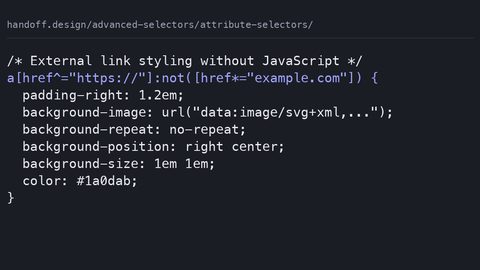
Use CSS attribute selectors for substring and value matching, with specificity values and the case-insensitive flag that shipped across engines.
Attribute selectors
Use CSS attribute selectors for substring and value matching, with specificity values and the case-insensitive flag that shipped across engines.
-
 Combinators explained
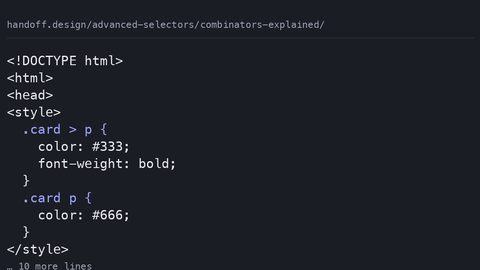
How the child, adjacent sibling, general sibling, and descendant combinators match element relationships, with zero specificity contribution.
Combinators explained
How the child, adjacent sibling, general sibling, and descendant combinators match element relationships, with zero specificity contribution.
-
 Combining selectors
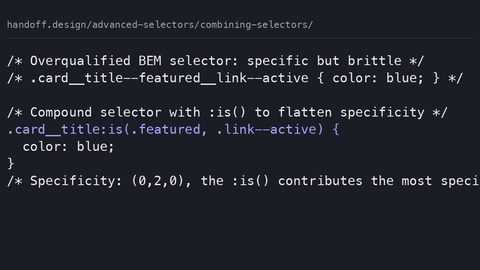
Combine CSS selectors into compound rules with :is(), :has(), and :not() while controlling specificity and avoiding forgiving-list surprises.
Combining selectors
Combine CSS selectors into compound rules with :is(), :has(), and :not() while controlling specificity and avoiding forgiving-list surprises.
-
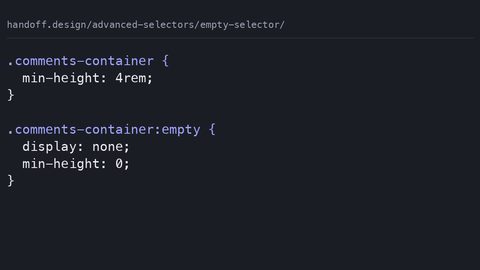 Empty selector
The :empty pseudo-class matches elements with no children, including text nodes, letting you hide or style empty containers without JavaScript.
Empty selector
The :empty pseudo-class matches elements with no children, including text nodes, letting you hide or style empty containers without JavaScript.
-
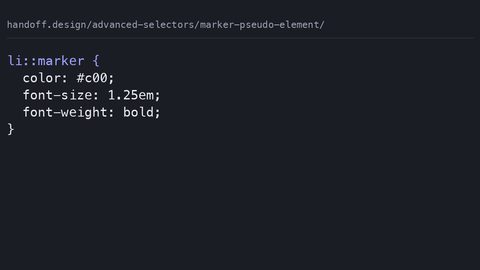 Marker pseudo element
The ::marker pseudo-element targets the bullet or number box of a list item, allowing independent styling of markers without extra markup.
Marker pseudo element
The ::marker pseudo-element targets the bullet or number box of a list item, allowing independent styling of markers without extra markup.
-
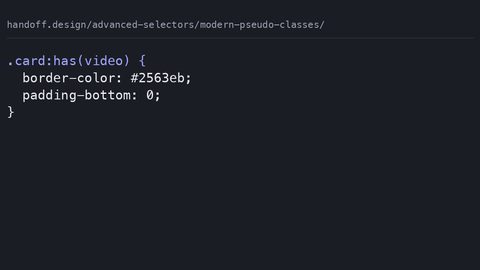 Modern pseudo classes
:has() selects an element based on its descendants, :is() matches any selector in a list, and :where() does the same with zero specificity.
Modern pseudo classes
:has() selects an element based on its descendants, :is() matches any selector in a list, and :where() does the same with zero specificity.
-
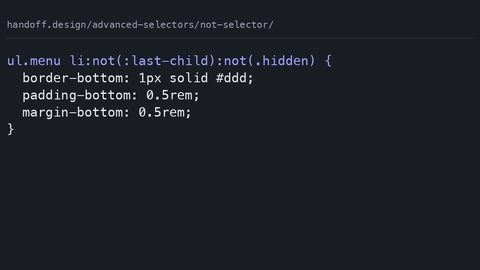 Not selector
The :not() pseudo-class excludes elements matching its argument from a rule, letting you write inclusive selectors without separate override declarations.
Not selector
The :not() pseudo-class excludes elements matching its argument from a rule, letting you write inclusive selectors without separate override declarations.
-
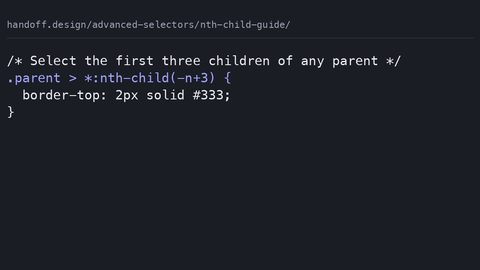 Nth child guide
:nth-child selects by position among all siblings; :nth-of-type selects by position among siblings of the same element type, using the An+B formula.
Nth child guide
:nth-child selects by position among all siblings; :nth-of-type selects by position among siblings of the same element type, using the An+B formula.
-
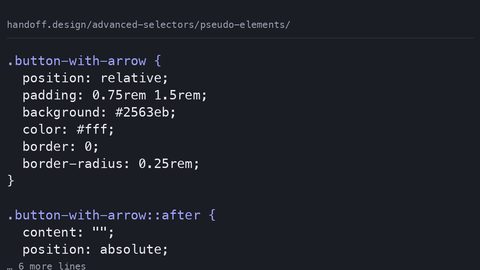 Pseudo elements
::before and ::after insert generated content before or after an element's actual content, enabling decoration without extra HTML elements.
Pseudo elements
::before and ::after insert generated content before or after an element's actual content, enabling decoration without extra HTML elements.
-
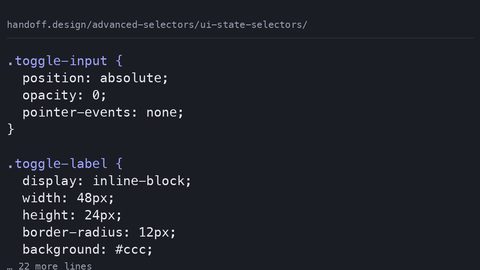 UI state selectors
 like :checked, :disabled, and :user-invalid style form controls based on their interactive state without JavaScript.
UI state selectors
UI state selectors like :checked, :disabled, and :user-invalid style form controls based on their interactive state without JavaScript.
Read next
-
Marker pseudo element
The ::marker pseudo-element targets the bullet or number box of a list item, allowing independent styling of markers without extra markup.
-
Attribute selectors
Use CSS attribute selectors for substring and value matching, with specificity values and the case-insensitive flag that shipped across engines.
-
Combining selectors
Combine CSS selectors into compound rules with :is(), :has(), and :not() while controlling specificity and avoiding forgiving-list surprises.
-
Nth child guide
:nth-child selects by position among all siblings; :nth-of-type selects by position among siblings of the same element type, using the An+B formula.
-
Modern pseudo classes
:has() selects an element based on its descendants, :is() matches any selector in a list, and :where() does the same with zero specificity.
-
Combinators explained
How the child, adjacent sibling, general sibling, and descendant combinators match element relationships, with zero specificity contribution.